Home » The PARIS Forums » PARIS: Main » Scherzo beta 1.21 + new PSCL
| Scherzo beta 1.21 + new PSCL [message #101429] |
Wed, 03 December 2008 17:51  |
 Mike Audet
Messages: 294
Registered: December 2008
|
Senior Member |
|
|
s for the info, and you've pretty much convinced me to go with the built in graphics to start off, I can always add a card later. CheersHi folks,
I've told you that I film band promos in my garage for agents who book the Las Vegas, NV lounges. Below is a few links to my YouTube channel videos. Enjoy!
All audio is recorded "live" as they perform for the video. Mic-snake-Mackie 16vlz4 trim pot only-direct out to MEC. I then tune vocals and mix. PARIS mix is then imported to iZotope Ozone for a quick master and manually aligned to the video clips.
Each video is about 3-4 minutes
PUSH https://youtu.be/-oki9LrGTs0
Vivid [url=https://youtu.be/tmEZuQpe_Tc[/url]
SJ and Ruckus https://youtu.be/YHM1gbjYgVM
VSKings https://www.youtube.com/watch?v=Y9mQq_i7ZQc
All really great. Super smooth. I appreciate the VSKings the most : )
Ted
Can anyone tell me if there is a way to....
Route an internal reverb to the aux I'm using for a headphone mix? Thanks. Hello there Paris family,
I've almost got my Paris system running but for some reason, any audio I import is distorting during playback, even at unity.
When I try to use EQ, I also get heavy distortion.
I'm hoping this is a software problem but have a feeling it could be damage on my EDS cards, what do you think?
I can provide audio samples, if necessary. I should add that I only get the distortion during playback, when I render files, everything seems ok.
Any help would be massively appreciated.
LeighHi Leigh,
I suspect that you are importing audio that has extra data written on it.
Find a copy of stripwave and see if that cleans up your audio for PARIS.
WayneThanks TedOld school would be to route the reverb aux return to an empty channel in the submix and then send that to your headphone mixes individually.
I haven't tried it, but in theory, it should work. http://paris.kerrygalloway.com/index.php?t=getfile&id=11 40
It has been a valuable tool for me.
Cheers,
KimThis is also a very useful free utility. I think it strips the header info as well, from memory. (But can't be sure). It has batch processing too. I think Stripwav costs $25 to gain full batch processing. (Still a bargain).
https://www.voxengo.com/product/r8brain/
KimI think Wayne's solution is the only way.It's funny.
Most times I've conducted sessions, I've kept it really simple. I don't bother with separate headphone mixes. If overdubbing, I just create a stereo mix on my studio monitors, and pump that into the headphone amp for the talent. That way, it's immediate. I know exactly what they are hearing in their cans. Give them more or less reverb? no problem. 95 percent of the time, they hear what they want to hear, and always compliment me on the great headphone mix. A bit low tech, but it's worked for me since I first got Paris. To each their own. My method takes the guesswork out of the equation. Give them what they want quickly, and they're sure to deliver as good a performance as they can. Cheers,
Kim.I just remembered that if you turn the monitor knob above 0 you may get distortion on playback.Hi Everyone,
I thought that before I dove into whatever is next, I would do a bit of cleanup on some of the older stuff. Pretty much everyone here has bought everything, so I'm just going to post the new files here. If you haven't and like what you see, I could always use the support.
Heartbeat - the metronome. I did some tests and found that it was offset from the bars and beats ruler by a value that looked suspiciously like a pre-roll value. It's fixed.
Paris Compressor and Multi Band Compressors. There was some debugging code that was accidentally left in that created files in c:\. It's been removed.
Tight Bottom. This is a single band version of the multi band compressor that I never got around to releasing. It's great for controlling the low end of a boomy acoustic guitar or a bass.
Enjoy!
Thanks Mike.
Haven't been on Paris for a while but the system is still operational.
JeffI am up and running with 2 cards on an Asus p8p67 running windows 10. Haven't tried anything further than getting the software to run, but tomorrow I hope to start working with files, and doing tests to see what I can get for track counts etc.
I anticipate snafus along the way, and certainly as well, memory lapses from my days of using the system on a daily basis starting some 20 years ago.
Frankly, I am a bit stunned to get this thing going again, and am excited! Big thanks to everyone here, especially impressed, heck awestruck with Mike for keeping this system going.What are folks doing for a multi-card set-up? I have a four card rig running on an ancient system and I'd be interested to upgrade.I'm running 4 cards in the Virtua Via chassis. Works great. No PCI slots on the motherboard needed (Just one PCIe).| Benazure wrote on Tue, 08 October 2019 20:29 | I am up and running with 2 cards on an Asus p8p67 running windows 10.
|
Great stuff - Many congratulations!
My PC is also up and running now. I put Windows 7 on it because that's what I had. I'll be interested to see how you go with Win10.With the latest drivers (and Secure boot disabled), PARIS should run equally well under Windows 10 and Windows 7. Microsoft changed something in Windows 10 that broke the way PARIS increased the priority of it's main buffer switch thread. But, I found another way to set it's priority to 31 under Windows 10 as part of the 64 bit ASIO project.
All the best,
Mike| mikeaudet wrote on Fri, 11 October 2019 15:32 | With the latest drivers (and Secure boot disabled), PARIS should run equally well under Windows 10 and Windows 7. Microsoft changed something in Windows 10 that broke the way PARIS increased the priority of it's main buffer switch thread. But, I found another way to set it's priority to 31 under Windows 10 as part of the 64 bit ASIO project.
All the best,
Mike
|
Is that the ASIO driver you're referring to? I will be downloading both your drivers once the PC has been finalised (bios settings, fan setup and cabling still needs to be done).
One issue I could have with Windows 10 is that my Motherboard only has drivers up to Win8 for things like the LAN interface, and I don't know if those drivers would be suitable for Win10.
Windows 10, for my install, just installed Paris, no muss, no fuss...seems to run just fine so far...good luck with your usage!Yep. Still using it. 4 card system on XP. I'm about to embark on a system upgrade.Should work with an expansion chassis...I got an Asus MB with 3 serial PCI slots, but am only using 2 cards at the moment. One thing that interests me is the VST jbridge wrapper for using 32 bit plugs in a 64 bit host...has anybody tried this? Any reports gratefully welcomed!
Good luck with your new build, Rich!I've only tried it briefly. My UAD 1 plugins are 32 bit, and you have to set JBridge to run them in the same process, but they work without any additional wrapping. I wrapped my 64 bit Lexicon PCM reverbs and they worked fine.
JBridge has a good demo here: https://jstuff.wordpress.com/jbridge/
I corresponded a bit with the developer, and he seems like a great guy.
I hope this helps.
Mike Thanks Mike, I've downloaded the demo, but haven't had sucess yet in using it. All best!
I just did a little more experimenting. Removing a plugin during playback causes PARIS to lock up unless "use dirty close" is selected in the jBridge settings. This has to be set for each plugin.
Here's a screen shot of my settings.
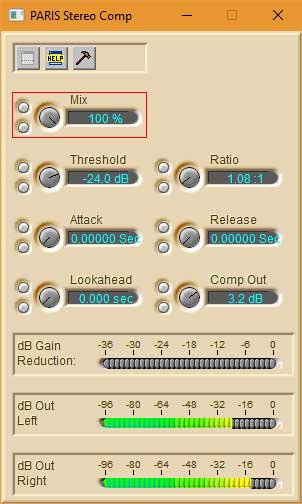
 Has anyone else tried using the PARIS compressor as a soft clipper? Has anyone else tried using the PARIS compressor as a soft clipper?
I just set the attack and release to 0. Then, I set the ratio to a small value and adjust the threshold to set how much of the wave is soft-clipped.
To my ears, between 1.1 and 1.4, it sounds more like even order distortion, and above that the odd distortion picks up fast.
Once you have a distortion that you like, you can use the mix knob to blend to taste.

I'm actually really liking this setting:
 I've looked into using Win 10 and it looks like Microsoft has dropped support for my old but majestic CPU. I've looked into using Win 10 and it looks like Microsoft has dropped support for my old but majestic CPU.
So I will go with Win 8.1 or stay with Win 7, but I just know that I'll regret being unable to go online if I stick with Win 7. Going for Win 8 gives me until 2023.
Anybody using Windows 8.1 and things running well?I have been using windows 8.1 since it came out and with Mikes' new drivers it works GREAT !| Richard Kelley wrote on Fri, 01 November 2019 12:34 | I have been using windows 8.1 since it came out and with Mikes' new drivers it works GREAT !
|
Many thanks for responding, sounds good.
I'm going to go for Windows 8.1 right away before I hook up the additional drives and install applications. It's the best time to do it.
Cheers!This sounds interesting. So you're using it as an effect?
It's not the sort of thing you would use to prevent clipping on the way in? Forgive my ingnorance but when tracking I'd need to avoid clipping the MEC first and foremost, possibly with an outboard compressor on vocals or drums for example?Hi SS.
The MEC inputs are the first port of call. Yes, You would have to use external limiting to avoid clipping. However, I find the whole PARIS architecture quite forgiving. My default template for sessions include 3db gain in the EQ section of each and every channel. This gives me an extra 3db of headroom before any drastic "overs" even reach the EDS's on the way in. (Doing this, on top of the already very forgiving nature of the PARIS mojo pretty much guarantees against any nastiness, even if the red peak "LED's" show). I always have the Channel strip VU's set to show PREfader levels, to avoid confusion.
Kim.Still using Windows 7 64 bit. I refuse to allow my DAW access to the internet. Recipe for disaster, I.M.O.  I was thinking of this as an effect. I had been reading up on the Distressor, and one of the things it does is soft clipping. That got me thinking that we could probably do that already, no $300 plugin required.Hi Mike. I was thinking of this as an effect. I had been reading up on the Distressor, and one of the things it does is soft clipping. That got me thinking that we could probably do that already, no $300 plugin required.Hi Mike.
What is "Tight Bottom"?
Cheers,
Kim W.Sorry Mike.
Duh... Should have read the description.
Cheers.
P.S. Was this a freebie?
Sure!| Kim W. wrote on Tue, 05 November 2019 13:15 | Still using Windows 7 64 bit. I refuse to allow my DAW access to the internet. Recipe for disaster, I.M.O.
|
Yeah I agree about keeping it off the internet, and I will do that for the most part, but I think I will need a few months of access to get the PC fully shaken down. I might want to get Reaper and that Paris file handling gadget so I can put other projects into Paris.
It has been more difficult than I expected to build my own PC (coming from not knowing much about PC building!)I better not ask these questions until I've actually got the system up and running with some tracks playing.
The soft clipper for free sounds pretty good!New song, just tracked and mixed in Paris. I wrote this one for my oldest daughter's funeral, so it's a special song for me, and a sad one. Paris sounds fantastic, and I tracked it on my Yamaha C3, and my old analog Hammond Organ, with a Cajon for the Low end, and brushes on snare.
Looks like you have to "copy" the link, then "paste" it in the YouTube search window. Sorry. I will try to figure out an easier way
https://youtu.be/j3cqh_35oZII couldn't find any VirtuaVia Chassis available, new or used. I did find several MAGMA PE6R4-1 both new and used (new ones are crazy expensive). Any issues with those, or is there a source for the VirtuaVia's that I'm missing?I pulled the trigger on a Magma PE6R4-1. Hope this wasn't a mistake, but if so tell me. It's a fixable mistake.
My overall goal is a stable system that will run 4 cards. No midi or anything else is necessary. I can get other computers to do that.
Assuming the Magma will work, next up is a modern computer and operating system to go with the Magma. I can build a computer if necessary. What's the thought on either a current Mobo and parts, or (preferably) whole system.
Also, operating system. Should I just go with Windows 10, or should I buy a copy of Windows 7 and install fresh? This computer only has to run Paris and any programs necessary to get from Paris files to .wav. It never has to be connected to the internet or do other tasks.
Finally, I'm still using WaveLab lite to go from Paris to .wav. Will that still work, or is there a better option? If so, what?
Sorry for all of the questions.If you're interested in something that I've recorded on my current Paris rig:
https://www.youtube.com/watch?v=6z1OIWQ5oZ8
https://www.youtube.com/watch?v=qAdVeQ7vhFA
Thanks again for any help.
Rich
Hi Rich,
If you scroll up to Kim's post number 108604, there are links to the original manufacturer of the Virtua Via chassis. They sell direct.
I'll check our the recordings!
All the best,
MikeGreetings.
I just checked, and Exsys are still selling the four PCI gear on ebay.
Here is a self contained box (full size for the large EDS's:
https://www.ebay.com.au/itm/Exsys-EX-1031-Expansion-Box-with -4x-PCI-Slot-220W-Power-Supply-38cm-Long/162799525913?hash=i tem25e79ba019:g:DWkAAOSwcu5UMU4Y
DIY backplane for mounting in any ATX case here:
https://www.ebay.com.au/itm/Exsys-EX-1035-Expansion-Board-wi th-4x-PCI-Slots-for-ATX-Casing/163078704461?epid=4009587333& amp; amp; amp;hash=item25f83f8d4d:g:NdcAAOSw1x1UMVlB
....AND you will need (with both of these options) the PCI-E Host card:
https://www.ebay.com.au/itm/Exsys-EX-1095-PCI-Express-Adapte r-Card-for-EX-1010-31-32-41-42/163078704485?hash=item25f83f8 d65:g:OVMAAMXQyFFTkbDI
I'm in Australia, so these are in Australian dollars. Check Ebay U.S. for pricing.
ALSO, if opting for the 4 PCI self contained unit with inbuilt power supply, make sure it is the full size unit capable of 38cm cards. (They make a smaller unit which WON'T suit the EDS cards.
Cheers,
KimHi Mike, I pulled the trigger on a Magma that I found on Ebay. It looks like that should work for a four card rig. I'll play with that first before I look at the VirtaVia stuff. I have enough spare Paris components to setup another rig without taking apart my current rig.
As I said in another post, the next step is the computer and operating system.
Love to hear any thoughts on the music. It's classic, melodic rock if you're into that genre.
Thanks.BeautifulWow. That was beautiful. Well written, well arranged, great piano figure, and a soulful vocal with lyrics that ripped my heart out. I almost never do this but I had my wife listen to this too. We both started to tear up.Thanks man!Thanks Wayne! I need to come see your place some day, I live a couple hours away in Utah, and am in Vegas frequently.Hi die hard paris users,
I just want to share a tip.
I was almost crying one hour ago, and now life is great again, i have to claim it on the rooftop !
So, IF
you plan to use paris on a HP pro computer (and it's probably valid on any computer with an intel mobo)
AND
you have a 64 bits windows OS (7 pro here)
AND
of course, you have Mike's 64 bits driver & installer
AND
you get this good old blue screen while starting paris (i have'nt seen this for years !) with this somehow scary message :
"the system has halted ,NMI Parity Check Memory Parity Error"
 
THEN,
i suggest you try to modify your bios setup according to the link below
https://www.youtube.com/watch?v=3MVdQD0LP60
it's just about disabaling "PCI SER# GENERATION" in "advanced" ==> "BUS OPTION"
F10
Exit
done !!
Ah and also if you got issue while starting paris, just try to set paris.exe options in "windows XP SP1 compatibilty mode".
eeer, don't ask me why.
Works perfect !
The old PC died, and now i'm ready to roll with a HP 8000 pro i5 (120 euros refurbished waranty, dead silent ! i had two paris computers in 13 years, sort of money saver ! ).
And i still love tracking in paris.
cheers !
Yeah John, we can definitely do this. After the new year settles in, visit my website for my business email. Send me a note and then we'll go private for arrangements.
www.audio-audition.com
Have a great holiday and God bless.
Waynea few more things :
- executing paris.exe with XP mode is not that a good idea finally. No option at all, provide it's executed as administrator.
- Mike audet's support is second to none.
- paris is more stable and responsive with a modern computer and mike's paris64 driver.
- paris still sounds good today (i bought some newer stuff, i was ready to ditch this old big blue thing, but, well ... not yet) .. but i assume you already know paris sounds good.
Cheers
damien
Hi Damien.
Very interesting!
I'm on an AMD platform, and I (for some reason) can never start Paris successfully first time after booting computer. (No "blue screen", but the machine just hangs upon launching PARIS). If I leave the machine on for a few minutes prior to launching PARIS it will sometimes work. Otherwise, I do a "ctrl-alt-del" to start task manager, and terminate the process. After doing so, PARIS invariably launches no problem without having to reboot.
I will investigate Your solution when next I fire up my system, and see if this fix could apply to the bios in my AMD quad core machine.
Cheers,
Kim. John - everything is done so well. The recording, the mixing/mastering and the performance.
And then there's the fact that you wrote this for your daughter. I can't imagine.
I am forwarding the link to another musician friend whose daughter was killed tragically in a car accident on Oct 15.
Bless you and yours.
Ted
John,
Thank you for sharing. Beautiful.Merry Christmas everyone. Happy Hanukkah tomorrow.
Blessings to all.
RichSame to you, Sir!Best wishes to all the Paris community, and Happy New Year for 2020, yet another year Paris lives on truly amazing !!!!!Best to everyone!!I'm sorry that I'm so late to the party on this, but happy holidays to all!
I'm building a new PARIS system. After almost 20 years on a now ancient Asus/AMD mobo running a four card, four monitor system I decided I needed to update. Actually I was pushed into it because the Asus system isn't stable anymore. It crashes a lot. I have music I want to record and dealing with this crash-machine was making me not want to start.
Tonight was the successful completion of step 1: The expansion chassis.
I looked at the VirtuaVia that many here recommended, but ended up getting a 13 card Magma on ebay. I got both a PCI and a PCIe host card for it (also from ebay). I had to get the cable from Magma (now called One Stop Systems). Interestingly, their headquarters is located 10 minutes from my house. I'd like to get a quieter power supply.
Anyway, I was able to bring up the Magma on a spare Asus system running XP I have here using the PCI host card. I loaded PARIS on this old system using Mike's fantastic installer. I loaded a spare EDS in the Magma and used a 442 for I/O. With a little fiddling PARIS loaded and correctly recognized the hardware.
I'm calling this a win and relaxing with a lovely Dragon's Milk Stout.
Next step is assembling a new system.
I'll start with Mike's recommendations for a mobo. Anything newer I should look at? I'm thinking Windows 7 32 for an operating system. I've kept all of my PARIS systems very software lean and off the internet so no anti-virus software either. I'd like to upgrade the monitor situation too so I'll probably need a video card.
This next step will take a while, but I'll keep y'all updated.
If anyone has thoughts/advice please post here.Congrats! I need to do something with mine. My old mac G4 is TIRED!!The Magma route was easy once I figured out which one to get.
Here's the Magma info in case you're interested:
You want either the 13 slot P13R or the 7 slot P7R4. With the 13 slot you'll also need a card that goes into the Magma chassis: PCIEIF68. That's the card that the cable attaches to on the Magma end. For the 7 slot Magma the cable connection on the Magma side is part of the chassis.
Other Magma chassis' look similar but might not fit the EDS card. I know for sure that some don't fit. The EDS card uses one of the earlier standards for a PCI card.
The cable you need is either the 1 m long CBL1HF or the 1.5 m long CBL1.5HF.
For the host computer you can get either a PCI or a PCIe card.
- PCI - PCIHIF68 (very similar number to the 13 slot Magma side card)
- PCIe - PEHIFX1
I got both for flexibility.
You can buy new at One Stop Systems for $2500, or go used on ebay for $300-500. I had to buy all the parts separately, and get the cable new.
No drivers were necessary. XP and Windows 10 recognized the hardware.Thanks for the info!Silence the Magma
As I've been researching computer systems and components I've run across the whole idea of ultra quiet and silent PCs. This led me to a sub-project of tackling the noise generated by the Magma.
The Magma has been working great so far, but it is a noisy beast. It's fan noise from the power supply and two 120 mm case fans.
Solution
I won't bore you with the process. Here's what I decided on:
Power Supply - Seasonic Prime Titanium 600 W
This unit is fanless. Zero noise. It's not cheap, but I'm curious how quiet I can get this whole system now. I'm going to use this on the computer too.
Case Fans - Noctua NF-S12A FLX
This is a three wire, 12V fan. It can be run at three speeds.
700 rpm - 38.7 CFM - 7.4 dB(A)
900 rpm - 49.0 CFM - 10.7 dB(A)
1200 rpm - 63.3 CFM - 17.8 dB(A)
The two slower speeds are achieved by using a small cable that comes with the fan that has a resistor on the power line. The lowest speed is essentially inaudible, but it's hard to feel a lot of airflow. You have to put your ear up to the fan grill to hear it and feel any airflow. The middle speed is pretty close to that level of quietness but the airflow definitely improves. The highest speed is audible from a few feet with more noticeable airflow. I went with the middle choice to get more air flow but still basically silent. With the 13 slots I can space out the EDS cards. I also put in PCI slot covers with air vents.
[UPDATE: The EDS cards get pretty warm. I decided on a 5 card system, so I took off the throttling cable and went with the highest speed. Under my desk it's still basically inaudible.]
There also a Noctua ULN variant of this fan. I'd recommend just getting the FLX. They're mechanically the same fan. The motor electronics or windings is where the difference is. The FLX can hit almost the same noise and flow specs as the ULN, and has the top speed option with the highest flow if you need to go there.
Result
The Magma is now basically inaudible. Under a desk, a few feet away, I'd record an acoustic guitar next to it. By comparison the MEC is louder.
System
I'll have more on the system soon. There's a crazy amount of info out there and I have to come up to speed on all of it.Here's the system I'm thinking about. Interested in any thoughts/opinions:
High Level
I'm just going totally modern. No older mobo with PCI slots. I could use a Intel 9th generation CPU, but I went with an 8th generation because the "T" suffix is needed so that the chip runs cool (35 W) and I couldn't find a source for a 9th generation "T". The 8th generation i7 chip I went to is probably more powerful than the 9th gen i5. The mobo has a Z390 chip set, the latest chip set available at this time. It will run 8th or 9th generation CPUs.
I'm also going fanless and zero noise. Passive CPU cooler, lower wattage processor (denoted by the "T" at the end of the number), all solid state drives (which are also insanely fast R/W), fanless power supply, and big case so there's lots of open space. I'm going to first try no case fans.
For video I'm going to use the intel's onboard video (HD360). I believe that drives 2 2k monitors. I went with 32 GB of RAM because I believe it helps the onboard video processor, but I don't know if this is overkill. If I want more pixels I'd need a graphics card.
Details
$175 Mobo: Asus Prime Z390-A
$205 CPU: Intel Core i5-9400 (Update)
$ 89 CPU Cooler: NoFan CR-80EH Fanless CPU Cooler
$125 Memory: Cosair Vengeance LPX 32 GB DDR4-2666 (low profile to stay below the CPU cooler)
$ 80 Main Drive: Samsung 860 Evo 500 GB SS SATA (`500 MB/s)
$170 Audio Drive: Samsung 970 Evo 1 TB M.2-2280 NVME SS (~3500 MB/s)
$ 20 DVD-RW Drive
$160 Case: Corsair 750D ATX Full Tower Case - Airflow
$250 Power Supply: Seasonic 600W Fanless Ti
$130 Operating System: Windows 10 Home 64 bit
Checkout pcpartpicker.com and click the System Builder menu pick. Very useful for putting together a system.
3/8/2020 - Changed the CPU from Intel Core i7-8700T to i5-9400 due to availability, added DVD drive. Prices update to actual prices paid.How much would something like this cost, if I were to have my local (very good) computer service shop custom build it for me?BTW,
I'm still looking at NIXSYS (I have no financial or other vested interest in this company)who will custom build a PCI slot computer to your specs, any OS. No more worries about external chassis issues. Hi RonA,
I added prices to my shopping list. Overall there's about $1500 in parts. You can get everything on Amazon except the CPU, which I found other places.
On the CPU, I'd recommend getting the one with the part number ending in "T". That denotes low power, about 35W. That low power is an enabler for the NoFan CPU to successful. NoFan says that it works up to 80W I think, but I read some stuff online where a user said they needed a case fan to keep the temperature reasonable under load. My thinking is why risk it. PARIS shouldn't be asking much of the CPU.
The CPU cooler means low profile RAM might be needed. The higher profile RAM has some extra heat sinking I believe. Again, my thought is why hassle with a potential interference. I'm not going to overclock this system so I don't need the extra heat sinking.
Also checkout pcpartpicker.com and click the System Builder menu pick. Very useful for putting together a system.CPU Update
I'm starting to buy the parts and found the CPU difficult to find. The pricing I got was from a vendor that had super low ratings. I had not checked that previously.
Overall the "T" series processors, which have a 35W total dissipated power (TDP), are the best match to make the whole passive cooling thing work well. The non-suffixed processors (like i7-8700) have a TDP of 65W can also work with the passive CPU cooling. Both are on back order right now. The over-clocker series, with a K suffix, are easiest to get but have a TDP of 95W. These will NOT work with a passive CPU cooler.
I changed the processor to an 8th gen i7-8700T. Still it's back ordered until Feb 26, 2020. 2/26 Update - STILL back ordered. Apparently there's a worldwide Intel chip shortage . More updates as I get them. Stay tuned.Can someone please give me a step by step walk thru of creating Submixes with 1 eds card. I have struggled with this and can't seem to figure it out. Thanks in advance
AlDo you have the Paris manual? It should be there. It's been a while since I've done one, but I don't remember it being difficult.
What step are you having problems with? No idea where to start? Give us some hints.Hi Al,
You can make a new submix in the master mixer window. It's the first option under the SubMix menu.
I hope this helps!
I've attached the manual for PARIS 3 if anyone needs it.
All the best,
MikeHi Al,
You can make a new submix in the master mixer window. It's the first option under the SubMix menu.
I hope this helps!
I've attached the manual for PARIS 3 if anyone needs it.
All the best,
MikeHey, fellow PARISians!
I was just thinking that I haven't thanked everyone here, at least for too long. I'm so grateful to everyone who keeps this place and this recording platform going.
Thank you so much to Kerry for taking over the forums when Chuck, after doing so much, moved on to his next adventures.
Thanks so much to everyone who either posts or private messages me about new PARIS recordings. It is extremely rewarding hearing that something I contributed to has allowed someone to create their art.
Thanks so much to everyone who has supported my work on the platform over the years. I've been very, very lucky to be able to do work that I'm passionate about, while still being able to make a little money to buy the odd piece of recording equipment. That's become a bigger and bigger deal as time has passed. I started this working full time with no kids. For the last 9 years, I've been primarily a stay at home parent. That's created some challenges in terms of making time to work on things, but I've still managed to move things forward on kids' naps in the car and during piano lessons. It's been so much fun! And, I haven't been as broke as I could have been. Thank you!
I'm not done yet, either. I still use the PARIS application, and I love that I can open a recording that I made 20 years ago, and the session just opens. Sometimes a lack of progress is a good thing.
Early on, it became really obvious that it was my skills as an engineer and an artist that I needed to improve, not the platform I was using. If I upgraded to a new system, I would just make the same mistakes and be no further ahead. I needed to focus on mic placement, room treatment, mic types, preamp styles, performance, instrument choice, arrangement, and just learning how to listen. Spending thousands of dollars every few years because my platform was discontinued would have just been a huge drag on my progress, and probably not sounded as good as PARIS.
I suspect that others here have shared my experience, and I hope that I have helped them avoid the platform tax that manufacturers seek to extract by churning their product lines.
Thanks to everyone who has stuck around this beautiful, old recording platform.
Mike
Mike,
Indeed, it is the entire PARIS community that owes so much to you, Kerry and all of those who have devoted so much time and energy to this imminently worthy bit of technology.
I did my first album (Due West, "Isle of St. Thomas") at a friend's home studio with an eight track analog system, with two tracks devoted to a sequenced drum/percussion track done on a Yamaha drum machine. The next album had mostly sequenced rhythm tracks done on drummer.
From there, I did three self-produced albums in PARIS, with sequencing done in Cakewalk 4.5/5. Since then, I've piddled around in Studio One, Digital Performer and Reaper. While many would appreciate all of the depth, customizability and potential high-speed engineering these platforms offer, I will return, when the stars align, to my studio, PARIS and Cakewalk. I find their tools ample and the GUI no-nonsense, without convolution.
PARIS just sounds so expansive and "real" to me, and mixing in its sound stage is clear and defined, even with many tracks playing. I also find editing in PARIS logical and completely adequate, as I am not anyone's engineer but my own, and I can take my time and enjoy the process, which fosters more creativity than seeing just how fast I can complete each operation.
Along the lines of what Mike was saying, I feel that, in some ways, computer-based audio recording technology hit its pinnacle at the turn of the century. Since then, bean-counters and marketing vulchers have cheapened the hardware and cluttered up both the hardware and software with gimmicky bells and whistles that don't serve the purpose of providing reliable, user friendly, high quality tools for creating recordings that will stand the test of time.
I realize that my perspective is biased by my age and experiences, and I salute all who enjoy diving into the newest, latest and "greatest".
Thanks again, Mike, Kerry and all of you who keep PARIS alive!Here here for Mike in his educated endeavor to keep a good thing alive and Kerry for all his time and support I for one thank you both!Mike and Kerry,
As the others have said it is us who owe you both a great thanks. I've always wanted to create music, and I've always been fascinated with the idea of recording one's own ideas. I remember "discovering" that with two cassette recorders I could bounce a track back and forth and add a new track each time, thereby creating something that one person could not play alone. Of course the quality wasn't great. PARIS has allowed me to make recordings that sound like what I hear in my head. My talent was really the limiting factor now, not the tools.
Interestingly, I'm an engineer (mechanical). I have the capability to learn all of the technical intricacies of the tools of recording music, but honestly I don't want to think about music in an analytical way too much. I get enough of that in my job. When I record I want to create and let the feeling drive me. With PARIS I have a tool that allows me to do that. PARIS has made pro albums. I don't need anything better, and I definitely don't want to spend time learning a new way to do the same thing.
I'm building a new PARIS system now, but I'm only doing that because I feel I have to. I'm really excited to get back to a place where I have a stable system, can take advantage of modern storage and monitors, and get back to recording music.
So guys, THANK YOU!!!Ha! Rich.Kelly made me laugh (but not out loud).
I too began recording at an early age with my Dad's reel-2-reel. At first mono, back in 1964 with a mic and a cloth wrapped cable. It had a built in speaker.
Then in 1974 he got a stereo reel-2-reel with . . . wait for it . . . an internal 8-track cartridge player. Hated the 8 track cartridge but loved the reel-2-reel. Dad used to record his talking to Mom on the Akai when he was deployed for over a year at a time on aircraft carriers during Vietnam. He'd mail the tape and Mom would listen and cry and record her audio message to him on the mono machine and mail it back. Still got some of the tapes.
After the war, roughly 1978-ish, both machine were at my disposal. I was 18 then. So I recorded guitar and some vocals on the stereo Akai, moved the tape to the mono machine, played it back thru it's built in speaker, used one mic positioned in front of the speaker and recorded vocals and leads on the other mic. Come to find out that consumer reel-2-reels don't play at the same speed very well, so some pretty bad intonation things back then.
In the 80's I moved to 4 track cassette, then 8 track cassette in the early 90s. Mix bounce, mix bounce, mix bounce. In 1997 I bought PARIS and have been digital since. I do sequence in PT but if something feels really good, I'll bounce every PT audio file in a project with minimal EQ, comp, etc, convert it, dump it in PARIS and enjoy the warmth and open-ness.
My biggest enjoyment comes from BT's lessons on pushing different gain stages for different character and mostly trimming up the bass until it completely surrounds the mix. I've even entered negative gain to PARIS comps just so I can boost the trim. Very similar to a hot bass track on the 4 or 8 track cassette. The saturation of the cassette track bleeds into the surrounding tracks.
So, that's how I got started.
Oh . . . , I didn't forget. Thank you Mike, Kerry, Chuck and Brian and everyone else associated in our newsgroup that I may have missed. I couldn't ask for better peoples to be engaged with.
Wayne Carson
www.audio-audition.comYou were right, the file did get renamed, but I found some more issues, I wrote you an email, thanks again.Hi,
I'm writing in the hope that some dinosaurs like myself still read these posts in here.
The title says it all:
a friend of mine who knew I kept my PARIS up and running until now asked me to make an OMF export of an old project he made for one of his clients 20 years ago. When I opened it in PARIS, there was no audio just some digital garbage in the main outs.
Then I tried to import some files into a clean project with the same result.
I also noticed that the internal effects were missing.
The
PARIS_FX.DLL,
PARIS_Fx.var,
PARIS_Fx.ini,
ParisGlobalFxLibrary.fxl
PARIS_FxAlEnv.dll
PARIS_FxAm.dll
PARIS_FxAppIF.dll
PARIS_FxCdt.dll
PARIS_FxCdt.idb
PARIS_FxEsplink.dll
PARIS_FxVst.dll
files are in the Paris app folder (I can't remember what else was required to make the fx work).
However, the OMF export worked fine and opened in Cubase with no issues.
--------------------------------
And now the tricky parts before suspecting a hardware error:
I could happily play audio through the SPDIF outs of both MECs using Mike's 64bit ASIO driver. (I haven't tried the other outputs yet).
So, it seems the MECs are ok, I don't know to what extent the ASIO driver relies on the EDS cards. Is it possible that sg goes wrong with the cards that affects playback from PARIS, but playback through ASIO is still working fine?
I have the latest W10, 4 EDS cards in a VirtuaVia box, 2 MECs with some I/O modules, 1 C16.
Any suggestions what to check first?
Thanks.
The only thing I can think of is that PARIS.exe has been renamed to something else. I've done a bunch of rewrites over the years, so I may have changed this, but I'm pretty sure that I check the process name in order to determine whether or not double buffering is required. PARIS.exe had a class compiled into it that is also part of the PSCL. I was able to change to the version of the class in the PSCL to accommodate 64 bits, but the version compiled into PARIS.exe I obviously can't change. So, I had to improvise.
The ASIO driver uses a similar mechanism for playing back audio as PARIS.exe. Both schedule sound events to play at specific times. The ASIO has the voice events point back at themselves, forming a loop. This helps reduce the work done in a buffer switch because they don't need to be rescheduled. If one works, the other should, too, assuming that the double buffering is active for PARIS.exe.
As for the effects, that's weird. That could happen because a path variable is missing, but the path variable is added automatically by the installer. Basically, the path variable has to include C:\Windows\SysWOW64\Ensoniq\PlugIns so that the PARIS application (or some other component - there are a bunch) can find the effects.
You could also check to make sure that the effects are in that folder. If they are missing, obviously they won't load.
I hope this helps!
MikeThanks Mike, the file name could be a good idea, I'll check it when I'll be at the studio. I do remember renaming the 3.01 exe file to Paris301.exe, but I think I also tried the original 3.0 Paris.exe, although I'm not sure about that. If I can get that sorted, then I might need some more info about the fx, thanks. New System is Up and Running!!
Sorry for the long delay. I got tired of waiting for my preferred CPU, so I finally just searched the web and bought the best Intel CPU I could find that was actually in stock. I got a i5 9400, 65W TDP.
Long story short, it works.
It has Windows 10 Home 64 bit loaded. PARIS 2 and 3 are loaded via Mike's installers. The Magma P13R (13 slot chassis) is connected via a PCIe host card to the PC. The Magma has three EDS cards in it right now. I'm just using a 442 to test running audio. Everything seems stable at this point.
Total Silence
There are no fans and no spinning hard disks on this computer. CPU temperature seems to hang around 35C when I check the bios, but I haven't done any stress testing. I'm thinking about getting a monitoring app to keep track.
The only sound this thing makes is at startup the DVD drive spins for a moment. Other than that, nothing. It is sooo nice.
I'll keep everyone updated as I complete this process, but so far here is an example of completely modern PC running PARIS well.Here's the new system. Note the passive CPU cooler. The fans are not connected.
 Hi Everyone, Hi Everyone,
Just capping off this thread. The summary is that I now have a 5 card system running on a intel i5 9th gen rig, Z390 chip set. About as modern as you can get as of March 2020. The computer is totally silent. Everything is working and has been stable during testing. I've had a couple of PARIS crashes after multiple launches and closures of PARIS without restarting, but other than that it's been stable.
I'm buying two new 32" monitors to go with the new rig. I might try 3 monitors with a video card. I'll start another thread for that if warranted.
Testing
I spent some time testing EDS cards in the new system. I tested every card as a single card systems in various slots in the Magma, and all cards were tested in a two card set-up, though not all combinations. I tested two configurations of a three card setup, and one configuration of a 4 and 5 card setup.
All test were done with PARIS 3.0 and an interface 442.
All the cards completely worked, as did every position tested in the Magma (YEA!!). The specific card nor the position in the Magma made any difference, other than the 442 needed to be connected to the card nearest the power supply.
PARIS Launch Glich
When I start up the computer, I have to restart it before I can launch PARIS. If I launch right after I startup the computer PARIS will just hang at the splash screen. The only exception is if I moved an EDS card to a different slot in the Magma. Then PARIS would launch immediately after computer startup - no restart required - on the first startup. Once the computer was shutdown however, then every subsequent startup needed a restart before PARIS would launch. Pulling the card and putting back into the same slot did NOT change anything - a restart was still required to launch PARIS.
During the testing I repeated this more than the 30 times with no change in the results.
I'm chatting with Mike Audet about this offline, but he didn't have any ideas. Not a big deal since the computer boots in <10 sec.
Interesting Results - PARIS Launch Time
- PARIS takes longer to launch with more cards. In my setup:
- 1 card - 6 seconds
- 2 card - 10 seconds
- 3 card - 14 seconds
- 4 card - 18 seconds
- 5 card - 23 seconds
Interesting Results - Project Load Time
I got very different results with two projects. Using the demo project, "See it My Way", which is 16 tracks all on one submix, the load time was pretty consistent regardless of the number of EDS cards. The song loaded in 7 seconds on a 1 or 2 card system, up to 9 seconds on a 5 card system.
One of my projects, which very messy and has fragments of parts strewn across 7 submixes, of which only 4 are active, had really different results. On the 1 cards system it loaded instantly. 2 cards took 15 seconds. 3 cards to 50 seconds, and 4 and 5 cards took 62 seconds.
Magma Fans, Heat and Noise
Did you know EDS cards can pretty warm? I didn't realize until I did this testing how much heat those things generated. For thermal margin, I took the throttle cable off the Noctua fans in the Magma so that they're running at full speed. Still really can't hear them under the desk. The MEC is my big noise source now. I think I'm going to disconnect the fan. Thoughts?Hi Rich,
Are you using the ASIO driver or the older one that comes with the installer for PARIS.exe?
I was thinking more about the need to restart. I bet that the EDS cards take too long to turn on for the motherboard, and they miss the startup sequence. On restart, they are already on, so it works. That's just a guess, of course.
Thanks for keeping us up to date on this!
All the best,
Mike
Thanks Mike for doing what you do!
One of many bright lights that I'm fortunate to cross paths with!
Best
TedHey Rich - thanks for walking us through your process. Very much appreciated!
TedHi Mike,
I used the installer that came your 32/64 bit driver. I did not use the ASIO driver. Should I have? Does the ASIO driver have all of the PARIS functionality plus the extra ability to talk to external hardware?
I was thinking about calling Magma/Onestop. PARIS launches after startup right after I move an EDS card in the Magma. I can't just pull the card and return it to the same slot, I have to move it to a different slot, so I'm wondering if there's some Magma setup thing happening. However after that first "normal" startup, all subsequent startups require a restart to get PARIS to launch. The PC boots fast, like 8-9 seconds from pushing the button to ready to rock.
And the Magma is always on before I start the PC. The PC won't even boot if the Magma is off.You're welcome Ted. This community has been super helpful to me over the years. I never felt I had much to offer in either computer science or audio engineering, but this computer build was an opportunity to give back. I hope it helps folks.Hi Rich,
The 64 bit ASIO also includes improvements to both the scherzo driver and the PSCL. I worked really hard on getting MEC initialization faster, as well as effects loading. Some of this came out of optimizing the PSCL for the tighter timing requirements of 32 sample buffer sizes, and some of it came out of just noticing things and fixing them as I went along. I also made some changes to make the driver more resilient if PARIS.exe were to crash. The whole thing was a pretty major re-write.
Thanks so much sharing the results of your build!
All the best,
MikeHi Mike,
I'm confused.
I have PARIS 2.1 and 3.0 loaded from your 32/64 bit installer. Should I just install the ASIO driver along with them? And then what happens? Does the ASIO driver replace older versions of the scherzo driver with a newer version of scherzo in the ASIO driver? Is there an ASIO driver app that's installed too? Or do I need to un-install PARIS 2.1 and 3.0 before I install the ASIO driver program?
What's the PSCL?
So we're establishing I'm a dope about all of this, but that's OK if it can help someone else.
Thanks.You're no dope, Rich! I just forget that not everyone know every little thing about this sometimes!
The ASIO 32/64 will replace the driver that came with the PARIS 32/64 installer with a new one that is capable of being accessed from a 64 bit process. The 32/64 driver ran a 64 bit kernel mode driver (scherzo.sys) with a 32 bit only user mode portion called the "ParisStudioControlLibrary.dll" or PSCL for short.
The ASIO driver also updates the PARISASIO.dll file (and adds a 64 bit one), and also updates the microcode that runs on the EDS cards (but only when the ASIO driver is being used, not for PARIS.exe).
The scherzo.sys, kernel portion of the driver was based upon significant assumptions that a memory address was 32 bits wide. This was fine when it was only accessed from 32 bit processes, but I had to redesign the programming interface in order to make it work from 64 bit processes, where the memory addresses are 64 bits wide. Since I was re-writing parts of it anyway, I fixed things as I went.
Changing the kernel mode programming interface meant that big sections of the 32 bit user mode part of the driver needed to be updated, too. So, the PSCL got a careful going over. When I was doing that, I removed a bunch of stuff that had been put in place to allow access from multiple processes under Mac OS 9. This stuff massively complicated the driver and served no purpose under Windows, so I removed it all. I rewrote the voice engine code (which was a big deal), and I replaced all the locks that make sure the code can run safely on multiple CPUs with faster locks so that the ASIO wouldn't see a glitch during certain operations. It went on and on. I kept finding things to make better, and I kept not being able to resist.
The end result is that new driver is better able to handle if the host crashes while DMA is in progress, effects load a lot faster, and MEC/442 initialization is a lot faster. It runs the way it did under Windows 98, maybe better.
I hope this helps!
So just load the ASIO driver with PARIS 2.1 and 3.0, and scherzo and the various other files will be updated, right?
If you did this from scratch (which I basically am) and you wanted to run PARIS.exe, you'd first run the PARIS installer, then then the ASIO installer after, correct?That's exactly right. You could even de-select the driver part in the PARIS 32/64 installer and then run the ASIO 64 installer.
All the best,
MikeThis build sounds fantastic!
Great to hear that you got it running straight off the bat.
Only thing I'd add about cooling in the PC Case is for the PCH which is the platform controller hub and in your build the z390. This is the chip that controls all the data flows through the disk drives, PCIe bus USB etc and it could get hot. Definitely try to get a temperature monitoring application on the machine and have it running for the first few days to see where the heat is. Bios monitor is not useful as there's not much load on the system, although I think your CPU will be fine with Paris.Thanks to Mike and Kerry!
And I hope everybody is ok given all the dark stuff that is going on. Stay safe."However after that first "normal" startup, all subsequent startups require a restart to get PARIS to launch. The PC boots fast, like 8-9 seconds from pushing the button to ready to rock."
Yes, my new rig was that way, before I figured out that this
machine hibernates when I tell it to shut down...both Paris
and Reaper steadfastly refuse to load then. First order of
business here everyday is a restart, which takes about 22 sec.
Both apps load very quickly then.ASIO Driver
I installed the ASIO Driver tonight.
- Project load times improved significantly.
----- The PARIS demo project "See It My Way" now loads in 2.5 sec. It was 9 seconds.
----- My personal project that used to take 62 sec to load now loads in 12 sec.
- I didn't do a careful test, but I believe time to switch cards on a submix is greatly improved too. In some earlier tests it could take around a minute to switch cards on that messy projects. Now it's a few seconds.
- PARIS launch time for the 5 card system slightly increased from 23 to 25 seconds. No big deal.
- The restart issue is unchanged. I have to restart after a startup to get PARIS to launch. Lastlaf51 apparently experiences a similar issue.
Overall the faster project loads and the card switching is great. Frankly the restart thing is not a big deal on this system since it boots so fast.
Huge thanks again to Mike for keeping PARIS alive in 2020.Hey SummingStrange, thanks for the tips. I'll get one of the temperature monitoring programs and check out the PCH and core temps. I haven't done anything to really stress the system, but I'm not feeling any noticeable heat coming off the top of the PC case. The case is heavily vented on the bottom, front, back and top so that natural convection can do its thing. I'd feel the warm air from natural convection if there was a lot of heat, so I know it's not cooking.Thank you Mike. I've been consolidating my PARIS files and couldn't find a copy of this.Hi Kim,
On the new build that I just did (detailed in the thread: New PARIS System) I have what sounds like the same issue. I have to do a RESTART before I launch PARIS. If I try to launch PARIS right after startup it just hangs, but it launches without fail if I do a RESTART. I talk about it in detail in the thread if you're interested.On the new Intel i5-9400/Asus Z390A system I just build I added a MSI GT1030 2GH LP OC video card - so an NVIDIA card. I am now running 3 2560x1440 32 inch monitors between the card and the video driver on the i5. I think I could run 4 monitors this size.
I failed to read this thread before I bought the card, but the good news is that there doesn't seem to be any issue, at least when playing back a large, fairly messy project. I'll keep you updated.Monitor and Video Card Update
I started adding more monitors to this system.
First I got 2 2560x1440 32 inch monitors working off the Intel i5's on-board graphics driver (HD630). The driver that came in Windows 10 didn't work with two monitors, but once I loaded the HD630 driver that I pulled down from the web both monitors were recognized at their native resolution with no issue. Success #1. Yea  . .
Then I added a MSI GT1030 2GH LP OC video card (NVIDIA, fanless, 1xHDMI 2.0b, 1xDP 1.4). I am now running 3 2560x1440 32 inch monitors between the card and the video driver on the i5. That's over 11M pixels!! I think I could run 4 monitors this size.
I failed to read the thread where Mike Audet was talking about glitches with the NVIDIA cards before I bought the card, but the good news is that there doesn't seem to be any issue, at least when playing back the large, fairly messy project that I've been using for testing. I'm calling this success #2. Double YEA .
UPDATE 04/05/2020
The addition of the video card has resulted in system startup time to increase.
- Original startup time was 9 sec on both initial startup and restart. It's now about 25 seconds. I had reported a lot longer time, but root cause was an improperly configured BIOS. Once I got the BIOS correctly configured, boot times went to 25 seconds.
- I disabled Fast Startup in the power options. This was causing boot problems after I added the video card as well as launch problems for PARIS. I discuss more in a thread called PARIS Launch, RESTART, in Windows 10 Issue - Solution [message #109832].Thanks so much for these updates, Rich! The system sounds awesome!
The DPC latency issue with Nvidia cards may be solved under Windows 10 as long as the audio thread is registered properly. It wouldn't affect the PARIS app no matter what. PARIS uses huge buffer sizes.
I have three more weeks until the end of the semester. I'm going to see if I can fix the issue with the driver that makes the restart necessary once exams are done. I'll see what I can do.
All the best!
Mike
Just in case this thread comes up in a search at some future date, there's zero need to build a legacy computer to run PARIS, at least in March of 2020. I just finished building a Windows 10 system running an Intell i5-9400, Asus Z390A mobo, and all SS drives. It's running a 5 card PARIS rig. About as modern as it gets in March 2020. Totally silent too.
Like matthean93 says, get a Magma 7 or 13 slot off ebay and use the PCIe host card. No PCI slots needed on the mobo.
Run Windows 10 64 bit.
Use Mike Audet's incredible PARIS installer to get both PARIS 2.1 and 3.0 (you'll have to deal with the PACE issue on your own), and then load his ASIO driver to get Mike's latest scherzo driver for PARIS to make PARIS fly under Windows 10.
You might run into a minor issue that on startup you have to RESTART your computer before PARIS will launch, but other than that you're literally ready to rock (or jazz, classical, whatever).
If you want details visit the thread, "New PARIS System" from early 2020.@ Rich Kelley.
Both myself and a friend have experienced the issue of Paris hanging on startup the first time after booting Win7 64 bit.
I built his system for him, using SSD drives, as I did my own. This seems to be a common issue. I can always load the Paris app first time, if I leave it about a minute after booting the machine.
It's almost as if the fast booting of windows (due to the speed of the SSD) is not enough for some subsystems to "settle".
Perhaps Mike could chime in here.
In any case, it's no biggie. I just fire up the system, go for a leak, make a cup of tea, or whatever.. and Paris will load normally, without hanging. Try it!
Cheers,
KimHi Rich. Please see my post in the other thread.
Yes. it is a repeatable problem that the Paris App hangs upon loading, if you are using SSD's. (And let's face it... most people are using them nowadays). I have found that if you boot your machine, and leave it to settle for a minute or so, Paris will launch perfectly every time. Perhaps there are some subsystem components that need time to configure themselves before Paris is happy.
I never had this problem with ordinary drives, because they were much slower during the Windows boot process. Weird, but predictable.
Cheers,
Kim
P.S. Given that PARIS was designed well over 20 years ago, and is still a very workable and beautiful sounding system, we have to cut this old gal some slack. Hats off to the likes of Chuck Duffy, Brian Tankersley, Derek, and especially Mike Audet that keep this "legacy" system alive. Yes, I have Cubase. Yes, I have Samplitude, both of which have their uses, and shine. But for Instant sonic gratification of recording *live* music, I'm still comfortably at home with PARIS. Hope you all are coping with this freaking pandemic. Keep well, my friends.
KimYes. In other posts I failed to mention Kerry.
What an awesome resource you have set up here.
And to Mike, thank you, thank you...
I've been reading other posts. I already have your ASIO driver, as of about a year ago.
Have you improved on this recently? If so, happy to purchase again. Improved loading times, and less crashes?? If so, I'm in!!
Please let me know. I have done some amazing recordings and mixes using Paris alone. (I use Samplitude for mastering).
Cheers,
KimHi Kim,
I don't have anything new to release since the 64 bit ASIO driver.
I have started re-working the start up code so that rather than waiting a specific amount of time for things to finish initializing (like starting an MEC), it will periodically check to see if the operation is done. This should both speed things up and make startup more reliable.
I haven't looked at it in a while because school got too busy. I'll be back to it in a couple of weeks once exams are done. I've got some other things I'm excited to look at, too.
All the best!
Mike Deleting this comment because most of what was here doesn't apply anymore.
Please see PARIS Launch, RESTART, in Windows 10 Issue - Solution [message #109832] for more info on the PARIS launch and RESTART issue.I, and a couple of others, have reported a problem when using Windows 10 that after the initial boot up of the PC, a RESTART is required in order to get PARIS to launch. This is being discussed in two other threads, but I thought I'd consolidate it here and make the discussion and solution easy to search and find.
I was able to fix the issue by disabling fast startup in power options.
Technical Detail
This is what I think is happening. When you select "Shut down" in the Windows 10, it's default behavior (Fast Startup) is to write a file that saves certain settings so that booting the PC is faster next time. It's a hybrid of a full shutdown, where all system settings are discarded, and hibernate, where the entire system state including all open programs are saved so that you can quickly resume where you left off.
In contrast, when you select "Restart" everything is discarded.
Apparently something is being saved in the Fast Startup file that PARIS doesn't like. This issue was actually causing my entire system to hang on boot up after I installed a video card.
This would also explain a weird behavior that I saw on my system when I was testing it. If I made any change to the number or location of EDS cards in the Magma chassis, I could launch PARIS the first time I booted the PC after the change. However all subsequent boot ups required a RESTART before PARIS would launch. I think that hardware change forced the PC to disregard the Fast Startup file that it had written during the last shut down.
Procedure
I went into Start Menu > Settings > Power & Sleep > Additional power settings (under the Related settings header near the bottom of the window). A Power Options window will open.
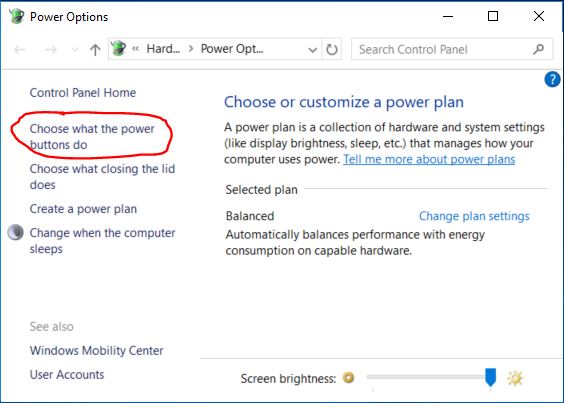
In the Power Options window select Choose what the power buttons do that is located on the left side of the window. Another window open that looks like this:
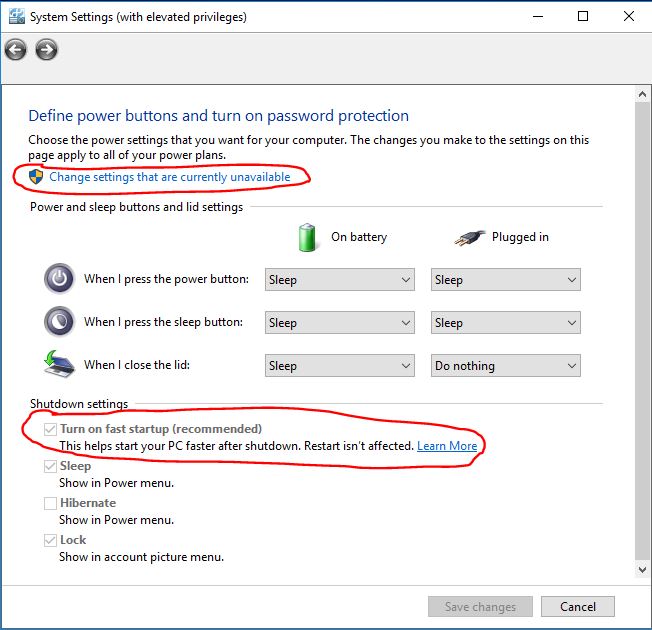
- Select Change settings that are currently unavailable so that you can change the Shutdown settings at the bottom of the window.
- Then uncheck Turn on fast startup (recommended)
Results
This fixed both the video card hang issue and the PARIS launch issue. Interested to see if others have a similar experience.You're a legend!
I don't know if I will get this issue but if I do, now I'll be able to fix it.Here's an article about Fast Startup with some more context if people would like to read:
https://www.windowscentral.com/how-disable-windows-10-fast-s tartup
With Fast Startup disabled, how fast _does_ your box actually start up now?
TedHey Ted,
25s from button push to ready to launch an app.
The only apps loaded onto this PC right now are PARIS and Adobe Reader. I'm going to load REAPER and a few other things. This PC has never been on the internet and has no virus protection software loaded.
Great article. Thanks.I want to also thank Kerry, Mike, and everyone here. I learned so much about recording. mixing. and mastering from the PARIS group, not to mention using Windows for digital audio, lol. I appreciate the positive energy and endless sharing that always goes on here.MEC Fan Details and Replacement Suggestions
I just pulled out the fan in my spare MEC. The fan and the vents are all located on the same side of the MEC as the power switch and the plug. The power supply is located here too.
The air flow is all going to happen in this local area, so I think the fan's primary purpose is for cooling the power supply. I don't see how it would move much air from the internal part of the MEC where the cards are located.
Here's some info on the MEC fan:
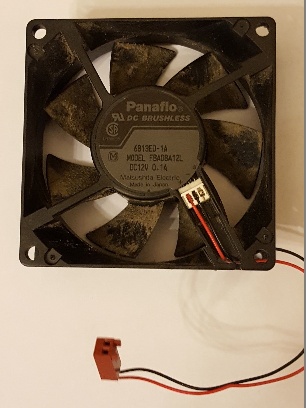
Panaflo DC Brushless
Model: FBA08A12L
80mm fan
12V - originally 3 wire but it appears Ensoniq removed the RPM wire.
From a web search, the critical performance specs are:
- 24 CFM
- 21 dBA
Picture of my old fan:
Full specs from Newegg:
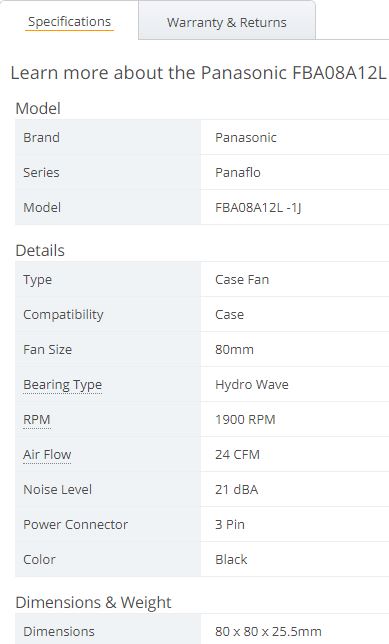
Replacement Fans
If you do want to put in a replacement fan, the Noctua's are a good bet because you can get the same air flow with lower noise, and based on what damien wrote it's not clear you need much airflow anyway. I put 120 mm Noctua FLX fans in my Magma.
Specific model numbers:
Noctua NF-A8 FLX
-3 flow/noise levels:
-30 cfm - 16.1 dBA
-24 cfm - 12.9 dBA
-17 cfm - 7.9 dBA (this is close to inaudible)
Noctua NF-A8 ULN
-2 flow/noise levels:
-20 cfm - 10.4 dBA
-15 cfm - 6.5 dBA (this is even closer to inaudible)Great stuff, definitive fan info.
I know I was bigging up Noctua, but that was because fans are their specialty and they keep developing them. They are expensive but the specs on noise vs airflow show why.
Those Panaflo fans were good reliable fans, but the design is decades old now.I just came across this if anyone is interested in a new build. I haven't tried it, but it looks interesting.
https://www.biostar.com.tw/app/en/mb/introduction.php?S_ID=9 55
It's a Ryzen X470 motherboard with two classic PCI slots.
All the best,
MikeI put the Noctua NF-A8 ULN fan, with the ULN adapter cable, into my two MECs. Per the table a couple of posts above, that would be 15 cfm @ 6.5 dBA. I couldn't get the Noctua rubber mounts to work well, so I used the original screws. I couldn't hear a difference in noise between the rubber mounts and the screws.
My thinking is that any air flow is probably better than none (i.e. no fan), and the MEC is still essentially silent. Unless you're recording snowflake impacts right next to the MEC, the fan noise should be a non-issue.
 FWIW, 5 cards in a Magma 13 slot. I could run up to eight (I have the slots and the cards), but 5 is more than enough.Who here uses pitch correction software with PARIS? What's the work flow? Mix down the track to a .wav and then open the .wav with the pitch correction software, create a corrected .wav, then import back into PARIS? Is there another work flow? What version, model, etc. FWIW, 5 cards in a Magma 13 slot. I could run up to eight (I have the slots and the cards), but 5 is more than enough.Who here uses pitch correction software with PARIS? What's the work flow? Mix down the track to a .wav and then open the .wav with the pitch correction software, create a corrected .wav, then import back into PARIS? Is there another work flow? What version, model, etc.
I'd love to say I don't need it, but the reality is that I splice up so many takes to get a good vocal track that it's time to admit that the software would save me a bunch of time. I'm a guitar player that sings.Hi Rich,
In PT12 I use an insert on the comp'd vocal track and it opens up within the DAW. Once tuned, I playback the track and record on to a new track. Delete the old track and audio. Done.
When I use PARIS it's cumbersome. I comp'd down to a single mono vocal track at 24bit. Render that track from time zero (render "track to disc". Close PARIS.
Open the file explorer/windows explorer, and use the old XP Wave Converter to convert the mono 24bit paf to 24 bit wave.
Open Melodyne and tune.
Convert the tuned vocal track from 24 bit wave to 24 bit paf with a modified file name, ie "-tuned".
Open PARIS, add audio file. Drag it to an adjacent track for time comparison. Clear old track. Mix. Done.
I have not had much success if any using it as an insert in PARIS. If you figure it out, let me know.
WayneHi Wayne,
Thanks for the response. The work flow that you're describing is about what I was expecting. I had no expectations that PARIS would be able to treat the tuning software as a seamless plugin.
Meledyne or Auto-Tune? Pros/cons? I'm not looking for one take magic. I have no issue doing multiple takes and getting it mostly right on, but I know that there will still be some notes that need help.
When you do bounce to disk on the vocal track, why not just do a 24-bit wav file directly? You could cut out a conversion step. Just wondering if there's some issue with PARIS' 24 bit wav.
1. Don't quote me but I think PARIS will only do 16-bit wave. Melodyne requires a 24-bit wave file.
2. PAF files utilize the full capabilities of bit depth in PARIS.
3. I've only used Melodyne. Currently their premier software Studio 4. I've used UNO and Editor 2 in the past. Lower price, less features.
WayneHi Guys.
I use Autotune v4 in auto mode as the first native plugin in the chain. I choose a scale that suits. (Make your own by bypassing semitones that aren't used if you can be bothered).
On the odd occasion that a note is so badly out that it goes to the next (undesirable) semitone, I use (don't laugh..) Paris's own DSP pitch correct on just that note. (Isolate the segment tune up or down by 50 cents or so), and create a new file for just that snippet. I usually use compression after autotune, so any funkiness caused by the DSP correction goes largely unnoticed.
If the tuning on the vocal take is really bad, I copy the entire take (dropins and all), to a spare track with only Autotune as an insert, and force the offending note to the correct pitch using Autotune set to a scale that excludes semitones either side. Then I cut the offending note into its own segment, highlight it, and "render selection to disk". Once corrected, (with timelock engaged), drag it to the active track.
Sounds complicated, but for me, having done it countless times with bad vocalists, it's actually quite quick.
Cheers.
Kim
Hi Rich,
I've been using Antares Auto-Tune 3 in my PARIS rig since 2000! It's inserted as a Native plug in, and I've used it mostly on vocals, but also on single pitch instruments like fiddle and saxophone.
I set the "input type" to Soprano, Alto/Tenor, Low Male Voice, or Instrument depending on what the track consists of. Then set the key of the piece. I usually set the scale "chromatic", then set the major or minor scale, leaving on any notes that may occur in the piece as passing notes.
As someone else mentioned in this string, if there is a particular note that still sounds weird because it's too sharp or flat and Auto-tune isn't sure what note to "correct" it to, I clip that note and use the PARIS pitch shift up or down 25 to 50 cents. Then cross fade the new pitch shifted file in and out. Sometimes I also need to give it a 1db gain to match the rest of the track.
Not sure if the newer versions of Auto-tune will work in PARIS. If not, maybe Antares would sell you an older version.
Gordon Belsher
www.GuernseyCove.caHi Gordon,
Thanks for the info.
What type of copy protection do these programs use and does it mess with PARIS in any way? I'm not trying to pirate the SW, but I'd like to avoid getting involved in complicated copy protection if possible.
Windows 10, for instance, was easy to set up.Looking back on the program info, it looks like Auto-tune 3 was PACE at the time. But of course, that's now 20 years ago (ha ha). Believe it or not, I'm still running my PARIS computer on Windows 98! That was always the most stable of their OS's in my opinion. And other than replacing some RAM, and a couple of video monitors, it's worked fine all these years. I think PARIS is miles above any other DAW for ease of use, and especially sound.
Gordon Belsher
www.GuernseyCove.caI was keeping a windows XP computer alive with the same strategy. Now that I've upgraded to a computer with modern hardware and Windows 10, I wish I'd done it sooner. With a Magma chassis and mods for quiet computing, this rig absolutely rocks. Fast, stable, huge screens, and noiseless.
Once again props to Mike for keeping PARIS relevant and functioning in 2020.
Back to tuning, I just bought Reaper. It comes with ReaTune. I'll give that a go first and see how I like it. It at least dips my toe into the tuning waters. It might be good enough based on the YouTube videos of ReaTune that I've seen. Is anyone using ReaTune for vocal tuning?
Also from the YouTube videos, for realistic tuning (not the Auto-Tune mechanical sound), both Auto-Tune and Melodyne can work well. Seems a bit pot-A-to pot-ah-to.
The other scary thing about this whole tuning deal is the quest for perfection. I'm a total sucker for that, but it's not always a good thing.
Here's a vocal tuning and Reaper update
I tried out Reatune, the tuning feature in Reaper. This is my first use of both a tuning program and Reaper. After watching some YouTube videos on Reaper in general and Reatune specifically, along with some notes here about settings to export 24 bit paf files back to PARIS, the results were pretty good. I imported the vocals and enough instrument tracks into Reaper so I could here the vocals in context, aligned them all in Reaper, did my fixes on the vocals, exported the 24 bit pafs back to PARIS, and realigned.
The tracks I used already had a lot spicing and fixing with many takes, so they already sounded good, but Reatune helped me tighten up both the pitch and the timing even more. The ability to stretch a chunk of vocal instead of having to hack off the end was really nice for aligning timing. For pitch I found that less was more. I locked in the ends of longer notes when necessary and hard fixed a few of the shorter ones where I just missed. I didn't hard fix across an entire note unless I really had to because it just didn't sound right when I did that. Overall the lead vocal had better pitch without sucking the feeling out, and the harmonies were tighter.
Reatune might be enough. I think it worked well on this specific song (mostly one acoustic guitar and vocals). I'll try it on some other songs and see how it goes.Hello Fellow PARIS Users,
I have an older computer that was built back in 2003 for my PARIS 3.0 system that is running Windows XP. I started receiving an error message this week indicating that the "File overview was damaged and is being recalculated." This message appears in every project that I open and there are audio segments that consistently repeat that were not in the original recordings. I can't find anything online to help me with this issue. I have had a number of errors populating over the last several years from Windows XP; one of them is attached along with the error message from PARIS. My computer also locks up quite often, which forces me to reboot. Any ideas of what these problems could be and how I can resolve them? I'm also contemplating updating to Windows 7 or 10 if possible. Can anyone please let me know what I will need and where I can find the requirements? I saw Windows 7/8 drivers for $50.
Regards,
RayMy guess is that your computer is dying. Sounds very similar to my situation with an old XP computer that kind of worked, but was super hard to get booted and PARIS loaded, and then would occasionally lock up.
I built a new system. Life is good now. I detailed the whole process here. Look for the thread from January of this year (2020).
If you're looking not to spend a bunch of money, I think you can spend a whole lot less than I did. You need another computer obviously. If the computer doesn't have PCI slots you'll need a solution for that. Then you'll need Mike Audet's 32/64 driver. If you're running Win 10 then you'll also want the ASIO driver too. I'm not sure if you need the ASIO for Win 7.
If you're running 3.0 with PACE then you have another problem. ID is not supporting PARIS anymore, so no response codes. Also PACE is not compatible with 64 bit operating systems. If you have a copy with the PACE problem fixed then no worries. PM me if you need more help on this issue.
Mike Audet is the guy who wrote the drivers and is THE tech resource on PARIS. You can buy the drivers on his website at ensoniq.ca.https://youtu.be/6ZTocjZt8tgSuperb John
Thank you Ted! This young lady was a real treat to work withSounds to me as if your hard disc has developed serious bad sector issues.
Cheers,
KimHi All.
I was given the opportunity to mix this song for Sarah McLeod (Adelaide band: The Superjesus).
As an animal lover and owner of two ageing dogs myself, I shed many tears during the course of the mix.
The recording was done by Sarah, and friends.
It is a Eulogy for her deceased beloved pet of 15 years.
It was a challenge to clean up all the noisy tracks, but thanks to some old Waves plugins that still play nice with Paris, I think it came up trumps.
It even made Rolling Stone magazine.
Pretty proud of this.
https://au.rollingstone.com/music/music-news/sarah-mcleod-si ngle-chachis-theme-16060/
Cheers all. Kim.
Really well done...very tastefull. You have every right to be
proud of that one. Keep it up! and stay safe  Nice nice !!I am not having any issue when I power up and start PARIS. I am completely unable to run PARIS after the computer goes to sleep or hibernates. After either of those events, I have to shut down and restart, so with my basic understanding of the quick boot feature and what you are describing, I think you are probably on to something. Nice nice !!I am not having any issue when I power up and start PARIS. I am completely unable to run PARIS after the computer goes to sleep or hibernates. After either of those events, I have to shut down and restart, so with my basic understanding of the quick boot feature and what you are describing, I think you are probably on to something.
-PhilHey all,
I have installed and am running on Win 10 64 with a modern computer. 10th gen i7 with 32GB ram.
After much work, I got everything running smoothly. PARIS is rock solid and sounding as good as I remember.
I purchased Waves platinum. All of the plugins I was running on my old system were from circa 1999 when I first started picking up PARIS hardware.
Now, though, I can't seen any plugs, other than the EDS effects. When I boot, nothing loads on the PARIS loading screen for DX effects like they used to. Also, I have tried multiple VST paths and nothing would happen, until, now, I get a pop up window while booting that says, "Could not find any Waves plugins. Please reinstall waves plugins in order to use waveshell."
I have used the 9.X installer. Reinstalled multiple times. Nada. Is there any way to use these plugs with PARIS, or do I have to just go back to my old 90's plugs?
Thanks,
PhilI'm having this exact problem with Windows 7 64 bit. It only started happening when I switched to SSD drives. The system boots in about 10 seconds, instead of the old 45 seconds or so.
I wonder if the underlying problem is the same??
Thanks for your investigations into this.
One thing that allows me to launch PARIS after first boot, is waiting about a minute before launch. Weird, but predictable. No biggie.
Cheers,
KimHi Phil.
Waves have ditched DX versions of their plugins.
I have had success with enabling newer VST plugins using one or more of these free plugins.
1) An old version of FXpansion VDX33 wrapper.
Download here:
http://download1476.mediafire.com/b1xutmowpslg/tw5ug39m2pncy m5/vdx33b2.zip
2) VB Audio FFX-4. It also is a wrapper (Yo!!) but has the bonus of being able to chain 4 plugins, and save them as a configuration (including all settings for all plugs), and only use ONE of the 4 available native FX inserts in PARIS.
Available here:
https://www.kvraudio.com/product/ffx-4-by-vb-audio
Once you have installed the (usually) bloated Waves plugin packs, you may like to hide them from the Paris native plugins list. This tool lets you disable/re-enable them at will. (Unlike the old Analog-X 'DXman", which deletes registry entries, so you can't retrieve the plugins. VB Plugman just runs as an executable, without any install. (As does the FXpansion VDX wrapper) It is available here:
http://download847.mediafire.com/c2va0ya68mzg/inpuhdfv3cbqxb 0/VB_plugman.zip
With a bit of luck, you should be aqble to use the newer waves Plugins once wrapped with one or both of the above wrappers.
Cheers,
KimDid anyone else try this one?
https://jstuff.wordpress.com/jbridge/Yes, that fixed the problem here...the pc is ready to rock about 22 seconds after hitting the power switch... Both Paris and Reaper load quickly without issue. Nice!! No, Ted. Have you?
Would be interested to know if it works.
KimNice job. Great sound.
I'm going to go pet my cats now. Mike mentioned JBridge on June 30 last year...said it worked well. Scroll down to the VST-Jbridge thread Hello Paris users on Mac OS 9,
I'm looking for working copies of Paris 3.0 and Paris 2.0 softwares, I remember these were available some time ago on a wiki, but that wiki seems to be offline now.
Let me know where I can obtain those copies/installers for Mac. I'd be appreciated.
Thanks,
MFOHey,
https://ensoniq.ca/
That is the link to Mike's PARIS drivers. The driver package that he wrote includes installers for both versions of PARIS.
-Phil
Thanks Kim. I am so appreciative of this still vibrant PARIS community. Thanks to all who still post here and who still love that PARIS magic.
I have downloaded the wrappers and will give them a try.
Best,
-PhilHi Phil,
I don't see Mac installers, only Windows. Can you provide the link to Mac installers?
Thanks,
MFOI recently upgraded my computer to Windows 7 Pro. I have a three card system. Paris seems to be running great except that the EDS external sends on cards 2 and 3 don't seem to be functioning. Both cards pass audio just fine... I thought it might be a word clock issue but the word clock lights are lit on all three MECs.
I attempted to modify the Paris cfg file to "UseHouseSync=1" but discovered I didn't have permissions. When I modified the permissions of the file to allow me to edit it Paris became unstable. So, I uninstalled and reinstalled and it seems to be OK now with the exception of the external sends on cards 2 and 3...
Anyone else experience this?Hello Rich,
Thank you so much for your reply! I had a super busy month for August and September, but life is back to normal now and I'm back to working on my problems with my computer for PARIS. Sorry for the late reply.
I have a Win7 computer that I've been sitting on for a while so I plan to use this computer. I'm not familiar with PACE though. Is this required for my Win7 setup? Once I install that drivers, am I good after that? I'm going to purchase the drivers per the resource you suggested. Thanks!!
RayWhy am I getting this and what can I adjust to prevent??
Thanks in advanceWell, I solved it, more or less. The problem was in one of my IF2s that I was using as an effects send.
I think everything works. Please let me or Kerry know if something is broken.
All the best,
MikeGlad that we're up and running again...was having serious withdrawal symptoms around here 
Thanks Mike and Kerry...stay safe out there, and keep making music!Yea!!! It's back up.
Thanks Mike and Kerry.Thanks again Mike for going over and beyond you are one of a kind!!Thanks Mike and Kerry,
Having the PARIS Forum is such peace of mind.
You guys are the best. I'd always thought it was a little strange that our favorite non-resident Paris Guru,
Edmund Pirali, didn't take his cat home with him when he left the building at v.3.1...
(of course, I say "his"...maybe it belonged to SSC) Still, he was apparently fond enough
of the little beast to have it with him to the office from time to time, and even to include a pic
in the Paris exe. (For those who havn't seen the cat: in the Editor, hold Control plus Shift,
then Right Click on the little cat icon in the Tools bar)
Then, a couple of years ago, I ran across something about coders who were hiding and exchanging code in,
of all places, cat pictures. Then I thought,"Yes!! That's it.. the source code isn't missing, it's hidden in the cat picture!!"
But then, nah, I suppose that when he compiled for the last time before handing off to Mike, that old bmp sitting
there was the last thing on his mind...
Something for the conspiracy theorists maybe...but still, if anyone could find a way to do it, the eminent Mr.Pirali would surely be one...
and I'm guessing that the equally eminent Mr. Audet could find a way to peek under the hood of that old bmp and check
Whew
Here is the picture. I wish I could get the source file out of it. 
I think a decompiler is our best bet, unfortunately. Hmm...if it had been a dog picture, I wouldn't have thought twice about any of this,
but as we know, cat lovers are a different breed. And, of course, I couldn't code my
way out of a wet paper floppy disk, so can't be of any help:)
Thanks for taking a peek anyway;)I actually took a look at the image file with a text editor just to see if any source code was there, but no luck. Hi everyone, I'm a new member of the forum trying to resurrect my Paris system. I have a working system used for mixing on an aging Mac G4 machine and I want to get a Paris system working on Windows 10 64 bit. I installed Mike's drivers and have Paris 2 running and Reaper sort of running, a bit confusing coming from Logic Pro in OS X but will figure it out.
I'm here to request guidance in getting Paris 3.01 working on the system. I have a PACE code for the Mac OS 9 version but apparently this does me no good in the current environment. Any help is appreciated. Feel free to PM
Thanks, DanHello out there! Trying to revive my Paris system using Mike's drivers in Windows 10 and an expansion chassis. Found a deal on this one:
Magma PE6R4-I - PCI-Express to PCI-X Expansion System
https://www.proaudiosolutions.com/Magma-PE6R4-I-p/pe6r4-i.ht m
Would this Magma chassis work with the EDS-1000 cards? It has PCI-X slots, not sure if that matters.
2nd issue: hoping someone might be able to help me find a copy of Paris 3 that will run on Windows 10-64 and bypass the PACE problems.
Thanks very much!Dear All,
i'm Alex from Italy, writing here on the forum for a little help.
I bought some years ago, with other stuff, a Paris system, which I have decided now to let it go (I'm more on Protools hardware).
The Paris hardware is untested but the seller assured me that it was working.
Obviusly, before selling it, I wanna be sure that everything is working perfectly; what are the minimum hardware/software requirements for a pc to be sure that all the boards/outboard are working well?
Many thanks in advance for your time
Ps: I'll soon post in the right section the list of all the hardware I have to sell.I bought a Magma Expansion Chassis this year so that I could run my PARIS system on modern computer hardware. I don't think the PE6R4-I will work. The plug and play solution is the P13R or the P7R4.
Magma is now sold by One Stop Systems in San Diego. (https://www.onestopsystems.com/). I called them and they worked with me directly to answer technical questions and get a cable that I needed.
Here's my post with details from from another thread, "A New Paris System":
********************************************
Here's the Magma info in case you're interested:
You want either the 13 slot P13R or the 7 slot P7R4. With the 13 slot you'll also need a card that goes into the Magma chassis: PCIEIF68. That's the card that the cable attaches to on the Magma end. For the 7 slot Magma the cable connection on the Magma side is part of the chassis.
Other Magma chassis' look similar but might not fit the EDS card. I know for sure that some don't fit. The EDS card uses one of the earlier standards for a PCI card.
The cable you need is either the 1 m long CBL1HF or the 1.5 m long CBL1.5HF.
For the host computer you can get either a PCI or a PCIe card.
- PCI - PCIHIF68 (very similar number to the 13 slot Magma side card)
- PCIe - PEHIFX1
I got both for flexibility.
You can buy new at One Stop Systems for $2500, or go used on ebay for $300-500. I had to buy all the parts separately, and get the cable new.
No drivers were necessary. XP and Windows 10 recognized the hardware.Thank for the reply, Rich. I've just educated myself in the history of PCI slots and learned the PCI-X standard doesn't work for us. I will keep my eye out for a deal on a compatible chassis.
Just waiting on a PCI-E firewire card (used currently on the Mac side for an Apogee ensemble interface to Logic Pro) to free up my one PCI slot on my Gigabyte Z97X-UD3H-BK board to at least get the Windows system going with a single EDS-1000 card set up for now. Unfortunately the EDS card is just too big, old and likely fragile to swap in and out as needed. Just tired of the time and headaches it takes to get mix files over to my aging OS 9 Mac G4 loaded with EDS and UAD-1 cards.
Take care, DanHi, I am trying to export an OMF and it keeps hanging up at 20% and not finishing. The wiki is down for now. Is there a trick to getting it to work?
Thanks for any help!
JoshHi, I am trying to export an OMF and it keeps hanging up at 20% and not finishing. Is there a trick to getting it to work?
Thanks for any help!
JoshMerry Christmas/ Happy holidays my fellow PARISians. I hope everyone is safe and with loved ones.
All the best,
MikeMerry Christmas Mike. Thanks for everything you do here, and looking forward to a great 2021!!
RichMerry Christmas Mike may you and yours have the Best of holidays!Happy Holidays, Mike and all wonderful PARIS users out there!Merry Christmas to you and your family and to all Parisians. Stay safe, healthy and warm. WayneMerry Christmas and Happy New Year!Hello PARIS Users,
My previous computer that I've used with PARIS for 15 years is finally starting to fail, so I'm going to have someone build another computer for me with Windows 7. My question is regarding the requirements for this PC. What I have from my research thus far is 16 GB RAM and preferably a 64-bit version of Windows. (I'm still confirming if Windows 7 has a 64-bit version.) Does anyone else have any insights on what else I should include for Mike Audet's PARIS drivers for Win7 since I'm starting over? If anyone has any ideas for Win10, or has success with Win10 working with PARIS, I would love to hear how you were able to get it to work. I'm planning on staying with Win7 since it worked previously. I've also heard that Win10 has a piracy hurdle and I'll need separate software or a license for that.
Thanks to all my fellow PARIS users and thank God for this forum!! I look forward to your input!
Regards,
RayHi Ray,
FWIW I was going through the same decision a year ago. I ended building a completely modern Windows 10 machine and it totally rocks. It's all detailed here. The main thread that includes a parts list for the computer I build and detailed information on the Magma chassis I'm using is here:
New PARIS System
A thread on a specific issue with Windows 10 is here:
PARIS Launch, RESTART, in Windows 10 Issue - Solution
And here's a thread on noise reduction on your MEC.
Replacing fan in Mec with silent one
I don't know about a Windows 10 piracy issue. Download it from Microsoft, install it, and pay for an activation code. I even did mine without the system ever touching the internet via phone activation.
Good luck.
RichWin7 has both 32 and 64bit operating systems. I have the 64bit. I know nuthin' bout the 32bit win7.
I have an XP machine 32bit and a win7-64 machine that run two PARIS systems in two studios. My XP has several PCI slots large enough for 3 EDS. My win7-64 computer has no PCI slots. I use an external expansion chassis with PS, 4 EDS card slots and PCIe cable to my win7.
Win7 is much faster. 16g ram. Two HDD. One op sys, one data. PARIS is stable with Mike's drivers.
XP works fine but slower. 16g ram. Two HDD. Same. Rock solid.
On both systems I can run 3 EDS great using one MEC. When I run 4 EDS things get a little buggy. I think I'm running 480w PS on both comps and use additional internal fans. EDS cards get hot so keep them breathing.
Hope this helps.
Wayne
Thank you so much Wayne for the reply! I'll proceed with your suggestions.
RayHello Rich,
There's no thread listed in your reply. I tried searching by the keywords but I'm still not finding your suggested threads. Can you send it again so I can add it to my build list? THANKS!!!!!
RayHi Ray,
The threads are named exactly as I listed them. They are not links though. You can search, or just scroll down a bit. All of those threads are on the first page, maybe 10 topics down.
If you only need one card, there are probably modern motherboards that have one legacy PCI slot. My Windows 10 system rocks through. I have three 32 inch monitors, all SS drives, passive cooling on the CPU, so it's wicked fast and totally silent. Runs Reaper great too. Hi Josh Dash I’m sorry that we never got back to you sooner, I’ve been caught up in lots of new projects lately. There’s a substantial entry on this in the wiki, but as the Wiki hasn’t been resurrected from the post-php upgrade fiasco from my server, I’ll do what I can from memory.
The bad news first: there are two factors that can kill an OMF export in its tracks. And once you have exported it, there’s only one app that can read it directly, and it’s not cheap: it’s the excellent AATranslator. Then the good news: it’s easy to work around all of those factors if you are pre-warned, and the one app that can read it directly can translate it into a vast range of file formats.
The two factors that can kill an OMF export from Paris are 1) improper naming of audio files/regions and 2) a corrupted audio segment.
1) This one’s easy to fix. Look at all of your channel strips and make sure they only use alphanumeric characters – no punctuation or non-letter/number characters. After that, go into your audio bin and delete any region names (For example, if you have an audio file called “CHORUSVOX” And you have pasted it into three different choruses, naming them say “CHORUSVOX/Chorusvox1”, CHORUSVOX/Chorusvox2” and “ CHORUSVOX/Chorusvox3” you will want to delete the portions after the slash. The nearest I can figure is that characters that are permitted in track names aren’t necessarily permitted in OMF and this didn’t get “bug fixed” before discontinuation.
2) This one is generally not hard either: If there is an audio region that’s ever caused you grief in the session, start there. The stuff that chokes OMF is contained in the file headers, so my logic was - force Paris to create a new file with a new header. All I did to do that was select the segment, duplicate it and tell Paris to use the duplicate. The extreme (but extremely simple) version of this would be to create a new directory, point Paris to that as the new recording file path, force Paris to duplicate all files, verify they’re all in the new directory, and then tell the Paris session to use those new files instead.
Between those two fixes, I was able to achieve 100% success in OMF exports, and AATranslator was then able to convert Paris OMFs into whatever I liked. Hope this helps!Thank you, Kerry! Better late than never, after 11 years! I'm very "H" with forums  Here again, veeery lately, a big thank you, Kerry. Here again, veeery lately, a big thank you, Kerry.
All the bestThank you very much, Kerry, much appreciated
Hi, Mark...hi, Kerry...hi, all...
excuse me for being the most dull forum user on earth's face, I don't see where's the "magic file" SMPTEUpddateDebug.zip, at least from my phone (even tried in desktop view mode). Can some angel point me to the file?
...Also, since I'm here: both the SMPTE card and OMF import/export remind mainly to synchronize Paris with the video domain, right?
Kerry kindly showed us that OMF export works quite fine using AAtranslator: but what about import?
Can a Paris Pro user invite a video pro and claim to successfully import an OMF session, without risk? If yes, what DAW/programs are compatible?
Sorry to remark this issue you likely discussed earlier.
Hi👋🏻,
being so far quite happy with Logic, only yesterday I checked Reaper 32 bit (I'm still on XP) to hopefully work beside Paris. As I launched Reaper by the Paris ASIO, at first Reaper listed all my available Paris I/Os (even the A8I/O cards), only to show "error in initialisating ASIO" seconds later and crashing.😟
The latest Mike's ASIO is what I used.
Any insight?
Into Logic Platinum (Pc) that driver works fine as long as I use the Mec analog I/Os; with the MEC Spdif I hear sometimes random clicks, may become ok after switching the Logic sample rate back and forth once between 44.1-48,.. but if I attempt to use the A8I/O interfaces those random clicks increase to become unusable. Don't remember if this happens at 16 bit, too(I'm not at home now).
I'd like to know if its my system to be wrong or if it's quite a common issue.
Cheers
...well, I meant I'm using Mike's "latest" 32 bit ASII driver, not his "very latest" 64 bit available at Ensoniq.caSOLVED: with the help of Mike I found my system being short on processing power: into the venerable ultimate ASIO driver of Mike I had to set the maximum value of 1024 samples and reduce the I/Os (A8I/A8O, in my case) to a minimum. Now it all plays nicely at 24 bit/48k both on Reaper and in Logic, even under a quite heavy load of plugins.
Thank you, superMike!!!It's with a heavy heart that I share the news of my friend, and someone we all looked up to here in Paris land.
Brian died This morning at 9am (Feb. 5) of Covid 19. He was in the hospital fighting for over 30 days, his body finally gave out.
I met Brian in 1998 on the Paris forum, and became great friends and was lucky to work together on my recording projects.
He had such a larger than life presence about him in everything he did, as well as on these forums, and in our beloved Paris world.
Say a prayer for his wife and family, and love those around you.
Michael Bliss Oh man - so sorry to hear this. He was such a positive influence to many many folks. I met him when he came to Toronto to demo Paris 20+ years ago. Quite sad and unnerving.
RIP BTThank you so much for letting us know, Michael. This is a sad day. I met Brian around the same time when he was in Vancouver. He was a true gent - always a helping hand and a voice of positivity. I'm glad he got to spend so much of his life doing the music he loved so deeply. He will be missed.I'm just heartbroken to hear about this. He was a wonderful person. Such a loss.Ha, that’s amazing! This popped up in my feed for some reason. Yeah, 11 years is a bit late, what can I say? I slept late Prayers to his family and friends. I never met Brian but felt like I did, when I watched the PARIS DVD with Aaron helping. Rest in peace.So sad to hear this. I remember Brian on the original PARIS boards back in the late 90's, or maybe early 2000's. He had a system running 128 tracks back then. During those early years, when it looked like that PARIS could be a viable thing, Brian was the guy. I never got the opportunity to meet him, but from his posts and all of the help he offered the PARIS community he seemed like a great guy.
My deepest condolences to his wife and family.I've got a copy on CD of 2.0 and 2.1. Sadly, I think 3.0 is unobtainable! Sorry, I just saw this, but I can copy the disk and "snail mail" it to you if your interested. I hear that Paris isn't backwards compatible, that sessions done in 3.0 can't be opened in 2.0. Which is a real drag, since 3.0 is PACE protected.
This is awful to know...
He was amongst those columns into PARIS community, everyone admired him.
I've seen his tutorial videos, looked a very gentle man.
R.I.P.I spoke with Brian a few times on the phone. He was wonderful to talk to. He was enthusiastic, supportive and kind. He sent me some 442s to test the driver with because I didn't have any. I probably was just using one of his 442s when I was re-working the code that initializes MECs and 442s over the holidays. I would have sent him a driver update in the next few weeks. I'm just heartbroken, both that he's gone and for his family's loss. He'll be missed.Hi Everyone,
I just thought that I would share some progress on PARIS work I've been doing. I was planning to do this work last spring, but COVID has changed everything.
I started reading a book on the Windows Driver Foundations last spring, the latest standard for Windows drivers. I read it cover to cover, taking notes as I went. I’d looked up WDM power management a few years ago, and at the time, it was daunting. WDF has power management just built in, so that seemed a better way to go. The book was huge. I got to the end, and opened up Microsoft's latest sample audio driver. That's when I realized that Windows still uses the pre-WDF driver model for audio drivers. Back to the drawing board.
So, I went through my old driver books, and started looking up how to add the power management code to WDM drivers and found what I needed. I sat down over the Christmas break to get started. I had to piece together a PC out of parts in my basement because my son is using my PC for online school and playing online with his friends while we’re stuck at home because of COVID. I put together a Phenom X4 with 8 GB of RAM.
I put two EDS card in, and attached MEC worked fine, but the 442 didn’t initialize. It took about a week to figure out what was going on, but it turned out that the 442 was transmitting bytes faster than my 2 GHZ Phenom X4 could pick them up. To make a long story short, I had to figure put a way to detect if a 442 is present in a new way because the “Who is out there” command would come back scrambled because of the 442 writing bytes too fast. A 442 and an MEC need the “slow down your transmit” command sent differently. While I was in that section, I rewrote the init code so that all interfaces are initialized in parallel on separate threads. I also got rid of all the time delays and replaced them with events. Start-up is amazingly fast.
Then, I got to work on the power management in the Scherzo. My first draft blue screened within seconds, but I just got it working last week. The driver can now handle a sleep or a hibernation, and upon wake, PARIS can be loaded without needing to restart the PC. It also sends commands to prevent sleep while the PARIS hardware is in use. I wish I could support hibernation and sleep while using the PARIS hardware, but the effects loading and a bunch of other things weren’t designed with this in mind.
Next, I’m going to add code to allow the checkbox in the device manager to select turning off the hardware when it’s not in use. Finally, I’m going to see if I can get rid of needing to run PARIS as administrator, but I’m not promising anything. I may not be able to get all that done by April.
April is when Microsoft’s cross signed driver certificates expire, and they’ve decided not to renew them. Going forward, only EV certificates will be allowed for driver signing. Plus, all drivers will have to be submitted to Microsoft for their signature, too. To submit the driver to Microsoft, one needs to be a Certified Microsoft Partner. I’m now a Certified Microsoft Partner, but I don’t have an EV certificate, and they are ridiculously expensive and hard to get. After April, I will likely only be able to provide unsigned driver updates, so I want to get as much done before then as I can.
That’s all I have to share. I hope everyone is staying safe!
Wow, Mike. That sounds fantastic. Can't wait.
RichParis 3.0 is dead on macOS - Intelligent Devices hasn’t provided challenge codes and the chance that some random coder will develop a workaround that will allow you to regain the use of your PARIS hardware on OS9 is effectively zero.
In fact if there’s anyone left who’s still working on PARIS 3.0 on Mac OS9 in 2020 they are on borrowed time - the arrow is already in flight, it just hasn’t hit yet. the moment their hard disk dies (and some day it will), that’s it - the installers can still be hunted out but there will be no re-authorization possible.
Things are completely different on the PC side of the house though - development has been pretty exciting, tons of new possibilities abound and workarounds exist for all those issues. So in 2020 you basically have two choices, a) write your Paris rig off or b) grab a PC and jump back in! If you think about it, the last PC PARIS knew about would have been 2001 - a 2010 thrift-store computer would make it feel like it just rocketed into the unthinkable future.
3.0 sessions can be opened in 2.0, but to make a long story short, it involves first opening them in 3.0 and saving them back with certain 3.0-specific features disabled, which doesn’t really help you much. You could always find a Paris user to do this for you - you wouldn’t need to send the audio, just the .ppj. Edmund once detailed how to do this and I think it was on the wiki, but that’s down temporarily until we find time to upgrade/migrate it). I’ll see if I can find it somewhere.Paris 3.0 is dead on macOS9 at this point. Intelligent Devices hasn’t provided challenge codes for years, and the chance that some random coder will develop a workaround that will allow you to regain the use of your PARIS hardware on OS9 is effectively zero. In fact if there’s anyone left who’s still working on PARIS 3.0 on Mac OS9 in 2020 they are on borrowed time - the arrow is already in flight, it just hasn’t hit yet. the moment their hard disk dies (and some day it will), that’s it - the installers can still be hunted out but there will be no re-authorization possible.
Things are completely different on the PC side of the house though - development has been pretty exciting, tons of new possibilities abound, and workarounds exist for all those issues. So in 2020 you basically have two choices, a) write your Paris rig off or b) grab a PC and jump back in! If you think about it, the last PC PARIS knew about would have been 2001, so a 2010 thrift-store computer would make it feel like it just woken up and rocketed into the unthinkable future.
3.0 sessions can be opened in 2.0, but to make a long story short, it involves first opening them in 3.0 and saving them back with certain 3.0-specific features disabled, which doesn’t really help you much. You could always find a Paris user to do this for you - you wouldn’t need to send the audio, just the .ppj. Edmund once detailed how to do this and I think it was on the wiki, but that’s down temporarily until we find time to upgrade/migrate it). I’ll see if I can find it somewhere.Hi Josh - I’m sorry that we never got back to you sooner, I’ve been caught up in lots of new projects lately. There’s a substantial entry on this in the wiki, but as the Wiki hasn’t been resurrected from the post-php upgrade fiasco from my server, I’ll do what I can from memory.
The bad news first: there are two factors that can kill an OMF export in its tracks. And once you have exported it (correctly) there’s only one app that can read it directly, and it’s not cheap: it’s the excellent AATranslator. Then the good news: it’s easy to work around all of those factors if you prepare in advance - and the one app that can read it directly can translate it into a vast range of file formats.
The two factors that can kill an OMF export from Paris are 1) improper naming of audio files/regions and 2) a corrupted audio segment.
1) This one’s easy to fix. Look at all of your channel strips and make sure they only use alphanumeric characters – no punctuation or non-letter/number characters. After that, go into your audio bin and delete any region names (For example, if you have an audio file called “CHORUSVOX” and you have pasted it into three different choruses, naming them say “CHORUSVOX/Chorusvox1”, CHORUSVOX/Chorusvox2” and “ CHORUSVOX/Chorusvox3” you will want to delete the portions after the slash. The nearest I can figure is that characters that are permitted in track names aren’t necessarily permitted in OMF and this didn’t get “bug fixed” before discontinuation - and the same with the “slash” character, which it inserts between the file and region name.
2) This next is generally not hard either: corrupted audio. If there is an audio region that’s ever caused you grief in the session, start there. The stuff that chokes OMF is contained in the file headers, so my solution was to force Paris to create a new file, with a fresh new header. To do that I selected the segment, duplicated it and told Paris to use the duplicate. The extreme (but also extremely simple) version of this would be to create a new directory, point Paris to that as the new recording file path, force Paris to duplicate all files, verify they’re all in the new directory, and then tell the Paris session to use those new files instead.
Between those two fixes, I was able to achieve 100% success in OMF exports, and AATranslator was then able to convert Paris OMFs into whatever I liked. Hope this helps!Hi Josh - I’m sorry that we never got back to you sooner, I’ve been caught up in lots of new projects lately. There’s a substantial entry on this in the wiki, but as the Wiki hasn’t been resurrected from the post-php upgrade fiasco from my server, I’ll do what I can from memory.
The bad news first: there are two factors that can kill an OMF export in its tracks. And once you have exported it (correctly) there’s only one app that can read it directly, and it’s not cheap: it’s the excellent AATranslator.
Then the good news: it’s easy to work around all of those factors if you prepare in advance, and the one app that can read it directly can translate it into a vast range of file formats.
The two factors that can kill an OMF export from Paris are 1) improper naming of audio files/regions and 2) a corrupted audio segment.
1) This one’s easy to fix. Look at all of your channel strips and make sure they only use alphanumeric characters – no punctuation or non-letter/number characters. After that, go into your audio bin and delete any region names (For example, if you have an audio file called “CHORUSVOX” and you have pasted it into three different choruses, naming them say “CHORUSVOX/Chorusvox1”, CHORUSVOX/Chorusvox2” and “ CHORUSVOX/Chorusvox3” you will want to delete the portions after the slash. The nearest I can figure is that characters that are permitted in track names aren’t necessarily permitted in OMF and this didn’t get “bug fixed” before discontinuation - and the same with the “slash” character, which it inserts between the file and region name.
2) This next is generally not hard either: corrupted audio. If there is an audio region that’s ever caused you grief in the session, start there. The stuff that chokes OMF is contained in the file headers, so my solution was to force Paris to create a new file, with a fresh new header. To do that I selected the segment, duplicated it and told Paris to use the duplicate. The extreme (but also extremely simple) version of this would be to create a new directory, point Paris to that as the new recording file path, force Paris to duplicate all files, verify they’re all in the new directory, and then tell the Paris session to use those new files instead.
Between those two fixes, I was able to achieve 100% success in OMF exports, and AATranslator was then able to convert Paris OMFs into whatever I liked. Hope this helps!Wow, what a week...Brian Tankersley, Chick Corea, and Rupert Neve all passing...
I learned most of my Paris habits from the DVD that Brian Tankersley and Aaron Allen made...one of which was
saying "Boom" when I dial something up:)
If all of us around here continue to use Paris, continue to have "ears"(like he said),and
are positive helpful Gentlemen(like he was), then he will be missed, but never forgotten...
and it won't hurt to say "Boom" once in a while... LorenOnce again, our PARIS community owes Mike more than we could every repay. I would encourage everyone who wants to keep PARIS alive to purchase Mike's many wonderful processers, effects and drivers at ensonq.ca. Very worthwhile expenditures indeed. And I also want to acknowledge Kerry Galloway's tireless efforts to keep the forum alive. Perhaps we could all Paypal some funding to Kerry for his invaluable contributions, as well.
Thanks, Mike and Kerry!I'm in. Sign me up. Fantastic Mike.
Sorry to hear about future restrictions beyond this April. Practically speaking, does that mean servicing what we have now to work with current operating systems without facility to work with future operating systems? (Yes it’s quite presumptuous of me to assume that you would even work with future operating systems but…)
Ted
Hi Ted,
My certificate expires in the fall, but the cross signed certificate that it relies upon expires in April. So, in April, I'll still be able to sign a driver, but Windows won't load it unless integrity checks are disabled. It's an extra step to disable integrity checks in addition to disabling secure boot, but it might be workable. I might be able to renew the certificate in the fall, and we can just keep working like that, having to disable secure boot and integrity checks. Alternatively, I can self sign the driver, and using the driver will require installing my certificate on the root certificate on the PC and putting Windows in "Test Mode" so that it will accept any certificate. This puts a water mark in the corner of the screen, but the driver will load. Some programs that rely on copy protection, like say a blue-ray player, may be programmed not to work in test mode.
It's basically a huge pain.
Maybe if I have time to move things forward enough, we might fund-raise to buy one year of EV certificate and cover any legal fees when we feel the driver is basically finished. But, after the year, I lose the ability to address bugs or adjust to OS changes in the kernel driver without coming up with another $500 US for the cert and whatever additional legal fees are involved. It's all a huge pain. Amazing! Your decoding/coding knowledge just blows me away. Many thanks for your efforts. I will definitely purchase your next driver/scherzo/exe product you develop, even if I stay on Win7-64bit for PARIS.
Many thanks to Kerry too.Wow!
How cool is that.
As far as syncing Paris as slave to a SMPTE timecode, I actually did this many years ago. I really can't remember how I did it, and I've never had the PARIS SMPTE card. But I distinctly remember recording SMPTE timecode on my Fostex B16, (I used an ancient box called an XR300, which I still have), and used the varispeed on the Fostex to actually control the speed of PARIS. It was when I first got PARIS with one EDS card, and was mid project. It worked! I was able to slow the tape down, and record a vocal track down a couple of semitones on PARIS, as the singer couldn't reach the high notes. I thought it was pretty cool at the time. PARIS with VARISPEED!! I still have a cassette deck with varispeed, and I'm sure I could use it to control the speed of PARIS.
Cheers,
Kim Oh Man. that's so sad.
He was somewhat of a hero to me. I even talked about PARIS with him about a year ago (A producer friend had dealings with him).
Truly a Gentleman. RIP.
Count me in!
More than happy to contribute!
You have given so much to the community Mike.
I can donate now if you like. (PM me).
KimI'm with Kim. This sounds like something we can crowd source, and I'm definitely in to contribute. PM me, or just tell me what I need to do.Thanks to everyone for the info, I managed to get a working copy.Awe man,this is so sad. R.I.P Brian TAwe man, this is so sad. R.I.P Brian TOne of my good clients wanted my to do an updated version of this classic. She's not a singer, but a song writter, and has decided to give singing a go! So, please be kind, but the track turned out great! All internal EDS effects, with my 2 new Behringer Synths, (Poly D, and Deepmind 12) and a 1978 Fender Rhodes. Let's see if I know how to attach a link!?!?
https://youtu.be/XDikxc5rSw0So sorry to hear this, eventhough like many I only "knew" BT via the PARIS group and DVDSuper cool! The chorus vox w harmonies are totally great!Sounds great! The meaning is pretty relevant these days, too.Awesome Kim!
Sarah's doing a free show at my local this Sunday, going along Nice one, John.
Tasteful arrangement. And you're no slouch on vox either.
Thumbs up!
KimJust an update:
I have the power management code finished. I had wanted to allow powering down the EDS cards when they are not in use, but that doesn't appear to be possible. I wrote all the code to do it, but when I send a request to the PCI bus to shut the power off, nothing happens. I've looked at the card's software interface, and there is nothing at all about power management. I've archived the code in case I discover something new. The driver prevents sleeping when it is in use.
I've also updated the INF file so that running as administrator is no longer needed. There might be an advantage to running as administrator still because it is supposed to allow raising the thread priority of the main buffer switch thread. On my old Phenom X4, it doesn't seem to make much of a difference, though. Reaper does 64 sample buffers about the same either way.
That's it for now. I'm going to take it as far as I can before my April deadline.
All the best,
Mike
Great job Kim; really nicely done. Sarah does some great stuff!
Nice to know there's someone else in Oz who's still championing Paris. I ran a Studio based on it for over 10 years; just about to get the old system up & running again (hopefully...).I have an update - I was able to get an updated certificate from Comodo (now called Sectigo) that is good until November. Microsoft claims that they will not allow cross signing as of July 1st, but I'm not sure how they intend to enforce that since all the certificates in the chain appear to be good until 2025 or later. Maybe they plan to revoke them. I don't know.
I have two months off classes from April to June, so this is a big deal in terms of what I can get done before I lose the ability to sign the driver.
I'm super excited to get this out because PARIS just loads so damn fast. I think it's going to be noticeable for people.
All the best,
Mike
Yeah Man!!Sounds really good Mike. Keep us apprised. What a bummer. I literally (like 2 hours ago) just watched a few minutes of that video to remember how to do something. Then I logged in here and saw this. Brian was star.
Coolest Brian trick from that video?????? Hardwire the SPDIF "in" to the "out" for clever routing tricks- especially with Autotune, or vocal comping to send to a new track.
RIP Brian!
-PhilI am still struggling with this. I have tons of material on disk, and endless love and respect for PARIS. I never want to have to hang it up, but I am between a rock and a hard place with plugins. I have the new Waves Diamond package and a few other of the popular ones- none of it works with PARIS. My old V 3X DX plugs that I used to work with all the time aren't working with Windows 10 these days. Can someone take pity on me and help me get PARIS set up to see all the great plugs I have so that I can start mixing and tracking again? Tracking into PARIS and then dumping into Reaper to mix is just a bummer.
Thanks in advance for anyone who can help.
-PhilCan someone remind me how to reset the start line? I seem to remember it is like you push play and stop at the same time or something. I am struggling to remember.
Thanks,
PhilDouble Click the rewind button.
Cheers.
KimAmazing, Mike. Big thanks.
I've been sleeping on my 2005 Paris rig for quite a while now, but am seriously considering a re-build, on the newest mobo I can find with at least two PCI slots -- or maybe try the expansion-chassis route. Could not/would not even begin to contemplate such a step without all your excellent work "under the hood" to bring out old Paris system along into 64-bit modern times. My hat is off to you -- and best of luck with your ongoing work.
Yesterday I gave a closer look to Brian's Vimeo tutorials. It makes sad to see his kind person and know he passed away too soon because of that virus.
His approach to recordings was just the opposite of what I used to follow, the audiophile/pristine Bob Katz school: BT tracks flow was entirely 16 bits and suggested to crank to "overs" the EDS as if Paris would be an analog gear!
Well, yesterday I tried, it gives surprising results with Eq in low shelving mode, with the original compressor, with Chuck's stereo chorus...A new wide palette of timbre shaping.
Felt like wasted this sonic opportunity for 23 years!!
Mr. Philip, it's maybe because I'm not exactly a teacher in english, but I didn't understand this trick of hardwiring the Spdif I/O...
Could you please tell me in simple words an useful example of the technique?
Cheers, Andrea
I thought I had my new system running smoothly with an ExSys 1031 expansion chassis with 4 EDS cards.
Then I loaded a 48 track project, and Paris choked.
I notices on the PCI-E card some jumpers that can switch the voltage to 3.3volt, "NC" (which I assume is 5 volt). and 12 Volt.(Didn't want to go there...)
Any Clarification would be appreciated.
Cheers,
KimI thought I had my new system running smoothly with an ExSys 1031 expansion chassis with 4 EDS cards.
Then I loaded a 48 track project, and Paris choked.
I noticed on the PCI-E card some jumpers that can switch the voltage to 3.3volt, "NC" (which I assume is 5 volt). and 12 Volt.(Didn't want to go there...)Whilst we are at it, does anyone remember how much power (in Watts) each EDS card draws? I would have thought the 250 Watt inbuilt power supply in the ExSys could cope with four EDS cards.
Any Clarification would be appreciated.
Cheers,
KimI thought I had my new system running smoothly with an ExSys 1031 expansion chassis with 4 EDS cards.
Then I loaded a 48 track project, and Paris choked. I'm guessing that maybe a 1X PCI-E card just can't supply the data throughput required by the four EDS's.
I noticed on the PCI-E card some jumpers that can switch the voltage to 3.3volt, "NC" (which I assume is 5 volt). and 12 Volt.(Didn't want to go there...)Whilst we are at it, does anyone remember how much power (in Watts) each EDS card draws? I would have thought the 250 Watt inbuilt power supply in the ExSys could cope with four EDS cards.
Any Clarification would be appreciated.
Cheers,
KimI run 5 cards through a 13 slot Magma. I put in an after market 600W, fanless supply. The EDS cards get HOT. I never realized how hot they got until I was testing the system with the Magma
Others know more, but my first guess is that the 250W supply is not sufficient.
RichThanks Rich.
I suspect that you are right about the power supply.
Most old motherboards automatically selected the PCI card voltage requirements.
Do you happen to know if the EDS cards are 5 volt or 3.3 volt?
I have rolled back to my old AMD Phenom II system with four PCI slots and installed enough fans to cause a blizzard.
At least it appears stable for now, albeit VERY noisy. Yes, those EDS cards get very hot, as do the two NVIDIA NVS290 PCI-E cards that drive my four 24" monitors. (I know, it sounds like overkill, but I like to see what's going on with each submisx easily).
Cheers,
Kim
Greetings Paris friends, I have had to do a fresh install of Paris after a hard drive fail, using Mike's latest installer,
now getting this error code, "Error in initializing Paris engine", never seen this before, anyone know what is my problem?
The install looks proper, however the Scherzos don't show up in device manager, system devices, as they would normally
do in past installs. Same XP machine I've used for a long time, just a new XP install, 2 EDS cards look good,
Black Mec, same as always, so some issue with software?
Any suggestions, I have a spare drive that has Paris on it, which will load and play Paris but the XP install is
ginky and not stable, hince the need for fresh install on new drive. I'm pretty sure an updated machine is in my future,
but until then would like to keep this one in the game.
and BTW, Mike Audit is cool as they come, his work is amazing, and thanks again to Keri for keeping this
thing afloat! Where can I donate to the effort to keep the forum going?
After 20 years, Paris still sounds great, thanks to all!
JohnnyAny caveats regarding multiple mixes with only one EDS card? Does it export all at once or only the EDS mix? What about the scratch tracks (17-18)? I just finished resurrecting my rig on the third attempt (which took many hours over several weeks). Thanks! Hi all,
I'm just posting an update.
Things are taking longer than I'd like. Part of that is because removing the "run as administrator" option means that I have to consider the security of the driver more carefully. That involves a lot of kernel mode changes.
I've been working on getting into the Microsoft Hardware Program so that I can submit the driver for their signature. A few months ago, I became a Certified Microsoft Partner. Last week, I got a Global Administrator Account on Azure (which is needed for the hardware program account), and just now, with the help of a fellow Parisian, I just order an EV certificate. As soon as that is issued, I'll apply for inclusion in the hardware program.
I'll keep you guys posted on progress of the both the driver coding and signing situation.
All the best,
Mike
Great you are the best!Great news, Mike! I plan on getting my system back up soon. I still miss the mixing quality of PARIS...Here are a couple of testing updates.
I rewrote the voice scheduling code in the PSCL a couple of weeks ago, and I finally got to test it today. This is the code that creates a list of sound buffers that make up a track of audio. Sometimes it has to tell the card that a new buffer has arrived, and sometimes it doesn't because they link together. It worked first try, which is really nice. I had to revise it because a version of it will soon be running in Kernel mode as well. That work starts later today.
I also just tested the power management code in Windows XP. I was able to put the machine to sleep, wake it up, and run PARIS. Previously, the PC would need to be restarted after it was put to sleep for the EDS cards to be accessible. It worked.
That's all for now, but it's progress.Thanks Mike!Anybody else help with this?
I have no real knowledge in this area ...
TedHi Kim,
I tried 4 EDS in the ExSyx 1031 with a PCI board in my XP 32-bit box and a PCI-e board in my Win7-64 bit box. Paris burped and sputtered pretty bad in the XP and was basically unusable but marginally stable in the Win7 box. I moved the expansion box from studio to studio as needed. I took out an EDS so the expansion ran 3 EDS. Both systems extremely stable, so it's what I run. I think I'm running a 480w ps in the expansion but everything is boxed up at the moment (another couple months) because my wife and I moved from Las Vegas to Cleveland, Texas to retire and be next door to the kids and grand kids. Life is beautiful but our home is in remodel mode as we build out (enclose) the porch into a studio room and fix plumbing, electrical and replace flooring also.
Hope it helps,
WayneHi Mike,
My wife I have moved from Las Vegas to south Texas just a month ago so I've got a lot items going on at the moment. Once I'm settled in and our remodel is towards completion I'll pay pal you some $$ to help on your certificates. It is much appreciated what you do for our community.
WayneThings were humming along just fine during the trial. Trial expired so I called ID and spoke with Graeff Phillips, who was VERY courteous and helpful. He got Tim to respond with a response for my PACE challenge, but now I am getting an "unhandled exception c0000005" during the "initializing effects" portion of startup. v2.x loads just fine although unfortunately all my files are in v3.
I don't know whether it's just coincidence that I've been unable to load Paris v3 since the PACE authorization or what. I've tried tinkering with the VST folder location and disabling directX in config but cannot get past this error. I hope someone here can help!Thanks Wayne.
That is exactly what I was experiencing.
I'm going to put the EXSYS PCI backplane in another enclosure with its own 550 watt power supply, and see how it goes.
Cheers,
KimThese manuals are very helpful. Does anyone have manuals for the 8-input, the 8-Output, or the ADAT modules? I'd like to know whatever info is available about the converters and other little-known facts.Wow Mike, it's great to see you are still hard at keeping PARIS up and running in 2021.I'm just learning of his passing reading this very sad news. Brian was such a class act and inspiration for me and many PARIS users. I am firing up my old PARIS system again because I need 8 analog inputs going to 8 ADAT outputs. Problem is that my ADAT card does not show up in the PARIS Patchbay. My manual doesn't have anything in it that I can reference. Can anyone here help?
Thanks,
David
Hi.
It should show up in the inventory window to the right of the virtual patchbay.
You should be able to drag it into the patchbay from the list of modules, and then make connections.
Hope it works.
KimHi.
It should show up in the inventory window to the right of the virtual patchbay.
You should be able to drag it into the patchbay view from the list of modules, and then make connections.
Hope it works.
KimSorry, Forgot to mention.
If your ADAT card is installed in mec 1, you have to double click "MEC A" in the inventory. This will open a window with the installed hardware. That's where the ADAT module will show. From there you should be able to drag the module into the patch bay view. (I have two MECS with two 16 I/O modules installed in each. I have my ADAT card installed in MEC 2. So you have to make a choice as to whether you want analog I/O, or Adat.
I know it's a bit convoluted, but it is what it is. Keep in mind, each MEC can only ever have 16 active inputs/outputs active at one time.
If you have two mecs, you're laughing.
Cheers,
Kim.Hello everyone,
I miss the PARIS converter sound very much and I'm looking for ways to incorporate that sound into my modern workflow.
1. Is there any way to use any of the different PARIS converters as an AD/DA without using an EDS100 card?
2. How is the ASIO working today? Anyone using PARIS converters via ASIO in Studio One?
3. Is anyone running a separate side computer just for running audio through PARIS, as a simple way to pass audio through into something else?HI Will
1. Not sure
2. Pretty sure the ASIO can be used to "feed" other DAWs.
3. I have one setup with Paris MEC from PC feeding Metric Halo ULN8-3D into Mac via SPDIF (to Studio One or Mixbus 32c). I configure the Main Mix out pf Paris in the Patch Bay.
I use this in order to load a Master Bus chain on the Paris Mix. Also allows me to sync to the WC on the ULN8 (which I think is cleaner/tighter than the MEC).
Sometimes I'll also run out from the ULN8 into external gear via Insert in the Mac DAW.
Best
TedHI Will
1. Not sure
2. Pretty sure the ASIO can be used to "feed" other DAWs.
3. I have one setup with Paris MEC from PC feeding Metric Halo ULN8-3D into Mac via SPDIF (to Studio One or Mixbus 32c). I configure the Main Mix out 0f Paris in the Patch Bay.
I use this in order to load a Master Bus chain on the Paris Mix. Also allows me to sync to the WC on the ULN8 (which I think is cleaner/tighter than the MEC).
Sometimes I'll also run out from the ULN8 into external gear via Insert in the Mac DAW.
Best
TedHI Will
1. Not sure
2. Pretty sure the ASIO can be used to "feed" other DAWs.
3. I have one setup with Paris MEC from PC feeding Metric Halo ULN8-3D into Mac via SPDIF (to Studio One or Mixbus 32c). I configure the Main Mix out of Paris in the Patch Bay.
I use this in order to load a Master Bus chain on the Paris Mix. Also allows me to sync to the WC on the ULN8 (which I think is cleaner/tighter than the MEC).
Sometimes I'll also run out from the ULN8 into external gear via Insert in the Mac DAW.
Best
TedDid you get this sorted out?Yes, thanks.
It turns out my RAM Slot 1 stopped working after I replaced the RAM. I must have damaged it in the process, but at least the 512 stock in slot 2 is sufficient (and certainly better than the single 256 it had previously).
I’m grateful this group still exists or I’d have been completely disheartened and may not have managed to pull it all together. Wow! I'm really surprised ID are still providing authorization for Paris.
I thought they had stopped that several years ago!
Glad you sorted it.
Cheers.Lucky us we have that PACE free version of 3.0 floating around.I’d sent a couple emails to no avail, so I ended up calling and they were very surprisingly attentive! It was also surprising (and somewhat comical) because they are not used to dealing with individual end-users. 😜Hi All.
I recall someone posting a tutorial about how to disassemble a C-16 for repairs.
I don't remember who posted it, but they said it was not a straight forward operation requiring a lot of care.
Can anyone point me in the right direction?
Cheers,
Kim.Awesome! Thanks for the info. Just an update - I'm still trying to meet the requirements of the EV certificate. I met with a lawyer this morning, and he filled in some forms. Hopefully, Sectigo will accept them. I say "hopefully" because I written them twice asking for clarification, and they haven't responded. So, I don't know if what I just sent them will suffice.
As for the code, I've decided to keep the "run as administrator" requirement for now. The whole design would need an overhaul for me to be comfortable allowing any process access to it. I may have time to work on that in the fall. It depends on how things go with schools staying open.
That's all I have to report for now.
All the best,
Mike
The EDS cards are definitely 5 volt cards.
I hope this helps.
Mike
The EDS cards are definitely 5 volt cards.
According to my tests, they draw roughly 20 watts each.
I hope this helps.
Mike
Go Mike!!! Thanks Mike!! Hope things are well in your world : )im going back to PARIS... where can i get a copy of PARIS for mac? im so glad that it is still alive!im going back to PARIS and found my old files and tutorial DVD that was made i belive 10-15 years ago... i think the authors should put it on youtube to get this party started again...
what do you think?
love that you still alive and kicking!!!
marko dimicOMG i just pulled out my old files and find all the PARIS software and DVD, watched it... and scrubbing thrue the forum(which i havent done for years,more like 10)... and just saw that He died... Im so sorry to hear it... my sincere condolences to the familly and friends.i just find out that Brian has died... im so sorry for the loss.Hi all.
Brian's Tutorial is still up on Vimeo.
It's in about 20 parts.
Here is the link.
https://vimeo.com/search?q=Ensoniq%20PARIS%20Tutorial%20Vide o
Cheers,
Kim
so glad that you guys are still here!!!
i was so sad when i heard about Brian, i dont know why(i did not knew him)
so many have left in few years, like old world is dieing...
i listened some stuff that i made on paris... and i was wooohooo...WTF!!!
im going back to PARIS.... so i was thinking that youtube is so much better place to get to the new users or people in generel ... then vimeo.
so we can construct or widen the comunity there...it is a DIY pplatform haha(as i see it)
Hi folks
Anyone here remember a tune called (I think) Dreaming of Francesca recorded and produced in Paris? I'm trying to find the tune/artist/producer.
Search doesn't yield any results here. It my even have been on the old greatidea site...
Best
TedRIP.. He taught us a lot! And, those mixes of his were/are killer..Hi Gang! Longtime.
I want to get Paris going again. But, I need to know what are you guys using for PCI expansion.
I still have my 4 EDS cards..? Thanks LaMont I bought a Magma 13 slot expansion chassis off the internet and hot rodded it with a fanless power supply and Noctua fans in the front. Works great. I bought a Magma 13 slot expansion chassis off the internet and hot rodded it with a fanless power supply and Noctua fans in the front. Works great. Running this on a Windows 10 system, totally silent (power supply, fanless CPU cooler, SS HD). Totally rocks, crazy fast. Hello, I am at a loss....I forgot to turn on one of the two Mecs I had used for a project and prompted some sort of error in Win10.
I now get a cache size configuration missing error message when trying to open the program with Paris.exe
It automatically appears to have wiped my Paris.cfg file, which is now blank when opened in notepad.
Thanks for any help, I am right in the middle of a project that had been going well...
All best to all,
Ben
So I closed my studio in 2016 and in 2017 I was badly injured in an auto accident about the time of recovering from that covid comes around the corner and I am currently rebuilding my Paris rig. It seems my PC running XP is not currently working. I was thinking of going with a more modern computer. I've been reading through posts and it seems the Paris has come quite a long ways and the last 10 or so years. The last thing I did was Paris was get mikes drivers for XP. I have 3.0 I believe. So I'm trying to remember exactly where I left off with this and wondering what would be a good place to come back in for example what computer should I build that is solid and what monitor should I get and what do I need in the way of drivers and things that Mike audet is involved in designing. Any suggestions would be appreciated. I've had Paris since been or late 90s and I also had a couple of 2-in machines in my studio. I really enjoy the sound of Paris and since I sold my business I will be working just for my own fun at home now. I have a ton of stuff in Paris. If I did not record it to analog tape and mix on an analog console quite often I would record the tape and transfer it all in and one pass and then continue with the dubbing in Paris. I just really enjoy the tone of Paris I would appreciate any input in getting my rig running again thanks so muchThis has happened to me several times.
I always keep a backup of the .cfg file on my desktop.
Look through your PARIS installation folder. You might find a file called Paris.cfg_bak.
Open it up in a text editor and see if the parameters are there.
Rename it to Paris.cfg and replace your empty cfg file with the .bak file.
Before doing so, open the existing .cfg file to make sure it is indeed blank.
If you have no luck, I can send you a basic .cfg file, but you'll have to edit it using MS Wordpad or Notepad, according to your configuration.
Cheers,
KimHi Mr. Pig.
I'm happy to make suggestions. But not right now, as I have my son over for dinner.
First thing I have to know is how many EDS cards you have. My first thoughts are to ditch windows XP, and buy Mike's new drivers (which include a full install of Paris 3.0. )
Next, you'll have to find a motherboard with as many PCI slots as you have EDS cards.
.....To be continued....
KimThanks you Kerry!
I had also written to Mike Audet, who gave me the same info..I am sorry you had the same issue, but am glad it was only a minor inconvience for both of us!
With best regards,
BenCheck out my thread called "New PARIS System" from early last year. Lots of detail, part numbers, and prices.
Good luck. So is it kind of the opinion of the group that a decent windows 10 computer with the right slot availability and a magma chassis with Mike's new drivers is a pretty stable system? I'm trying to figure out if that's the way I want to go since my XP computer took a crap. My old system was a magma chassis with three cards two expansion chassis and a 442 running XP with Mike's drivers. I want to move this over to a Windows 10 computer. I wouldn't imagine there problems awaiting me as I think Windows 10 is Windows 10 correct?So is it kind of the opinion of the group that a decent windows 10 computer with the right slot availability and a magma chassis with Mike's new drivers is a pretty stable system? I'm trying to figure out if that's the way I want to go since my XP computer took a crap. My old system was a magma chassis with three cards two expansion chassis and a 442 running XP with Mike's drivers. I want to move this over to a Windows 10 computer. I wouldn't imagine there problems awaiting me as I think Windows 10 is Windows 10 correct? And by the way this computer would have no internet duties whatsoever.Is it possible anyone who is in the US who might have some insight into this could call me? My number is one 801-520-5264. I need to know some information about Windows 10 64-bit and the Paris drivers and Paris 3.0. And pace. Thank you. I would like to go pick up a computer and get this done in the next day or so if possible while I have time. Thanks in advanceThis is a new install in Windows 10 and for some reason I can't get any audio out I don't think I'm doing anything wrong just no audio out. I recorded just a single mic with me talking and I get no output from the Mac Master section monitor which is a normalized default I believe. I also have some questions about the configuration for running external word clock. It is three cards in a magma chassis with two Mec and a 442. I'm not very good at this stuff anymore and my vision is not the best so it's hard to deal with the computer. If there's anyone in the US who could get on the phone with me and try and help me with this I'd really appreciate it. Thanks in advanceI give up. Too much for meDon't Give up. You've come this far.
If you could post a screen shot of the Paris patchbay, that would help. I'mbetting that it is not configured correctly. Just press "B" within Paris, and the patchbay will open up.
Cheers,
Kim
Does anyone have access to the EDS-STi-01 manual for the SMPTE card? Any help would be appreciated ...A Christmas Letter from Santa:
I was going to bring you all gifts for the 12 days of Christmas, but we've had some problems.
The 12 fiddlers fiddling have all come down with VD from fiddling with the 10 ladies dancing.
The 11 lords leaping have knocked up the 8 maids a-milking.
The 9 pipers piping have been arrested for doing weird things to the 7 swans a-swimming.
The 6 geese a-laying, 4 calling birds, 3 French hens, 2 turtle doves and the partridge in a pear tree have me up to my sled runners in bird shit.
On top of all this Mrs. Claus is going through menopause and keeps all the windows open, even in this freezing weather. Eight of my reindeer are in heat, the elves have joined Gay Liberation & some people who can't read a calendar have scheduled Christmas for the 5th of January.
Maybe next year I will be able to get my act together & bring you the things YOU want.
This year I suggest you get your ass down to Wal-mart before everything is gone.
Sincerely,
Santa ClausIf you are interested in selling your setup, please email me at willtheweirdo at gmail.com.Hope everyone is doing ok. Had a few questions that I couldn't find the answers to.
*Is there anyone here that can still modify MECs to combine them (or have a spare one laying around that they might want to sell?). Example for those that don't remember
https://paris.kerrygalloway.com/index.php?t=getfile&id=8 78&S=cb3cf11ee96768ad75f4851dd6f467b9
*Is there a dump of the wiki? There are a few pages that weren't saved and none of the downloads work
*Speaking of downloads, does anyone have a copy of the skins?
ThanksHello,
I've got to things I need to figure out on my paris system.
1) I can get into my adat cards to record but how do I send them back to the Midas M32r mixer. I don't think I'm getting any output on the cards back to the mixer.
2) Is how do you get output on the analog eight channel add on cards in my system I have (2) installed. I was hopping I could mix with my analog mixer as well on mixdown.
Not sure I can use either but it's worth asking, strange that they would build the cards but you can't access them. TriSound Recording wrote on Tue, 04 January 2022 22:52Hello,
Not sure I can use either but it's worth asking, strange that they would build the cards but you can't access them.
For sure you can access them - through the Patch Bay window (B) Then select and drag from the list of items installed in your system (right hand window)
onto the main window, then draw connections Input->Output and Vice Versa. This is assuming of course that you haven't already tried this, but it's the starting place.
Regarding the ADAT card specifically, I used ADAT I/O but of course it can only be connected to ADAT interconnects on the other piece of gear. Then you draw the connections
in the main Patch Bay window the same as you would analog connections.
Is this what you're asking, or am I missing something?
TedHello all,
I was looking at picking up the EXS-EX-1035 and EXS-EX-1095 card to run my PARIS system in my Win 7 DAW.
Anyone have a confirmation this EXS combo will work?Hey Rich, what model number is your 13 slot Magma?
I'm looking for solutions to have a 3-4 card PARIS system connected to my Win 7 DAW via PCIe.Those two look like the exact ones I'm using. The 1035 backplane came as part of the Virtua Via kit, but I'm using a 1095 PCIe card that I bought later, and the two work together fine.
I hope this helps!
MikeHey Ted, Yes I'm sure you have to map them to outputs, but how? I don't see anything but the Mixer A insert or mixer A FX. All the gray arrow's have to map to gray's. The Green arrow has to map to green arrows. The thing is I don't see anything to really map to that I think would work to get back out to return back to the Midas 32r mixer I'm trying to get back into to remix or the 16 output of analog cards I have install to use my analog mixer for re-mixing.
I don't see what I'm missing here, but I sure am at loss. Thanks for your help.
JeffMany thanks Mike.
I'll be emailing you with some questions.I'll try to install an ADAT card this coming week, and see what I see...Thanks Ted!!Here's the Magma info from another thread on this forum:
Here's the Magma info in case you're interested:
You want either the 13 slot P13R or the 7 slot P7R4. With the 13 slot you'll also need a card that goes into the Magma chassis: PCIEIF68. That's the card that the cable attaches to on the Magma end. For the 7 slot Magma the cable connection on the Magma side is part of the chassis.
Other Magma chassis' look similar but might not fit the EDS card. I know for sure that some don't fit. The EDS card uses one of the earlier standards for a PCI card.
The cable you need is either the 1 m long CBL1HF or the 1.5 m long CBL1.5HF.
For the host computer you can get either a PCI or a PCIe card.
- PCI - PCIHIF68 (very similar number to the 13 slot Magma side card)
- PCIe - PEHIFX1
I got both for flexibility.
You can buy new at One Stop Systems for $2500, or go used on ebay for $300-500. I had to buy all the parts separately, and get the cable new.
No drivers were necessary. XP and Windows 10 recognized the hardware.Here's the Magma info from another thread on this forum:
Here's the Magma info in case you're interested:
You want either the 13 slot P13R or the 7 slot P7R4. With the 13 slot you'll also need a card that goes into the Magma chassis: PCIEIF68. That's the card that the cable attaches to on the Magma end. For the 7 slot Magma the cable connection on the Magma side is part of the chassis.
Other Magma chassis' look similar but might not fit the EDS card. I know for sure that some don't fit. The EDS card uses one of the earlier standards for a PCI card.
The cable you need is either the 1 m long CBL1HF or the 1.5 m long CBL1.5HF.
For the host computer you can get either a PCI or a PCIe card.
- PCI - PCIHIF68 (very similar number to the 13 slot Magma side card)
- PCIe - PEHIFX1
I got both for flexibility.
You can buy new at One Stop Systems for $2500, or go used on ebay for $300-500. I had to buy all the parts separately, and get the cable new.
No drivers were necessary. XP and Windows 10 recognized the hardware.
There's a detailed description of the entire system with model numbers, prices, and the things I had to do to get it working. The thread name is: New PARIS System. The thread was started in January of 2020. There are a couple of other threads with some troubleshooting information close to this main thread. Honestly, the whole thing is not that hard to set-up. You will want Mike Audit's drivers.
Good luck. I'll watch more more questions.Here's the Magma info from another thread on this forum:
*****************************************
Here's the Magma info in case you're interested:
You want either the 13 slot P13R or the 7 slot P7R4. With the 13 slot you'll also need a card that goes into the Magma chassis: PCIEIF68. That's the card that the cable attaches to on the Magma end. For the 7 slot Magma the cable connection on the Magma side is part of the chassis.
Other Magma chassis' look similar but might not fit the EDS card. I know for sure that some don't fit. The EDS card uses one of the earlier standards for a PCI card.
The cable you need is either the 1 m long CBL1HF or the 1.5 m long CBL1.5HF.
For the host computer you can get either a PCI or a PCIe card.
- PCI - PCIHIF68 (very similar number to the 13 slot Magma side card)
- PCIe - PEHIFX1
I got both for flexibility.
You can buy new at One Stop Systems for $2500, or go used on ebay for $300-500. I had to buy all the parts separately, and get the cable new.
No drivers were necessary. XP and Windows 10 recognized the hardware.
****************************************
There's a detailed description of the entire system with model numbers, prices, and the things I had to do to get it working. The thread name is: New PARIS System. The thread was started in January of 2020. There are a couple of other threads with some troubleshooting information close to this main thread. Honestly, the whole thing is not that hard to set-up. You will want Mike Audit's drivers.
Good luck. I'll watch more more questions.I'm using the ExSys EX-1035 4 card motherboard and EX-1094/5 PCI/e card. The EX-1035 is in an old gutted Compaq case with just a power supply and 1035 card with 3 EDS cards. I have installed on my Win7-64 Paris computer the 1095 PCIe card and I have installed on my XP 32 bit system the 1094 PCI card. I move the Compaq case to which ever system I am running at the time and it has worked flawlessly in both systems.
Running 4 EDS cards on XP is troublesome. Locks and burps and glitches. On Win7-64 better but not as stable as I would like. Running 3 cards in the expansion box on either computer system is very stable.
FYI - recently moved from Las Vegas to Texas and remodeling my home. All my equipment is boxed up so I can not run any tests or verify any further. Just going off of memory for now.
WayneHey Barkingpig, do you still need help. The thread is over a month old and it sounded like you needed help immediately. Also, I can't help you with PACE at all.Hi my fellow PARISIANS,
I am still happily using my PARIS setup through the XP Platform, and I would like to get some new plug ins, such as the WAVES Platinum bundle, but it cannot be used with my Windows XP setup.
Does anyone have any suggestions? I am using the native PARIS plug ins as well as an old version of WAVES, but I am specifically looking for a quality vocal doubling plug in, such as WAVES DOUBLER.
Appreciate any input.
TomHey Barkingpig, do you still need help? The thread is over a month old and it sounded like you needed help immediately. Also, I can't help you with PACE at all.I just wondering if you had a dump of the Wiki. I was late to the Paris party and looking on the Wiki to get a lot of information but there are a lot of pages missing and was just wondering if there was repository or a backup that I didn't know about. Also looking for the skins, if still available. Thanks!Very sad to hear this, Brian was very helpful in my early days o
|
|
|
|
| Re: Scherzo beta 1.21 + new PSCL [message #101431 is a reply to message #101429] |
Wed, 03 December 2008 18:03  |
uptown jimmy

Messages: 441
Registered: September 2005
|
Senior Member |
|
|
and I was hoping that I could get some help around it. Was wondering if someone had the skins downloaded (would take all of them but looking for Camo, Neve, and Black) and if someone had the instructions for creating multiple headphone mixes. ThanksA little nudge for visibility...  TriSound Recording wrote on Sun, 09 January 2022 18:19 TriSound Recording wrote on Sun, 09 January 2022 18:19Hey Ted, Yes I'm sure you have to map them to outputs, but how? I don't see anything but the Mixer A insert or mixer A FX.
Jeff
I think this is heart of the problem you're having. You need to have the MEC Module icon in the main window of the Patch Bay. It is available on the top right "sub-window" where the other items are (Mixer-A, Mixer-A FX, Mixer-A insert etc)
If you don't see the MEC Module in the list, scroll down a bit. Once you see it, drag it onto the main window, then double click to open it up and "look inside". You'll see 2 lists for 16 Inputs and 16 outputs. Whatever hardware modules are
currently installed are listed in a column in a sub window down the right side. Drag what you want onto the Inputs and Outputs to configure the MEC. Double click on the hardware cards individually once they're in place to configure them specifically.
Then close that window and make your connections from those particular MEC Modules to wherever you wanna send/receive signal - Mixer, Mixer Insert, Mixer FX.
So, for example, if you've dropped the EDS ADI-01 into the 1st 8 channels of Input/Output, and you wanna send the audio out thru that ADAT t
|
|
|
|
| Re: Scherzo beta 1.21 + new PSCL [message #101432 is a reply to message #101431] |
Wed, 03 December 2008 18:48 |
Mike Audet
Messages: 294
Registered: December 2008
|
Senior Member |
|
|
o an external machine that can receive it, you would connect the source of the signal (perhaps Mixer
Insert send ch 4) to whichever ADAT Out channel you want the signal to pass thru to your external device (perhaps ADAT send 4).
From reading your post it seems that the issue is the MEC Modules icon is not in the main window for you to configure.
THey Ted, Yes, I'M on the right track. So I do have to map to the Mixer A Insert. I'm think that must be the only way to get back out of them Adat or analog outputs right? It still did not work when I tried that a week ago. But there is a lot of mapping on my mixer. So I will keep sorting this out. Thanks Ted.
JeffHey guys, Still trying to get the adat outputs to work. Since I know I can send 32 channels to Paris Pro from my Midas M32r (no problem) but seem to have no way to send it back to the mixer.
Just like the 16 analog outputs, I don't thin Emu ever planed to send them back to your analog mixer to mix all your tracks that way. Seems like they are more just for adding like a effect box to a track (if needed).
So I don't know if anyone has passed a signal from the Paris Pro's adats back to a mixer. Looks to me they are sent to the aux busses and you can turn them on or off. I tried that as well.
So yes, I'm having to think it was never set up to send all your tracks back thru adat to a digital mixer. Would be nice cause my mixer has some nice effects inside of it and has a great mix buss.
Any one have any ideas let me know?
Thanks Guys!
JAre we back?sure hope so...been awful quiet around here lately;)
Good to hear you're still alive and pickin'...I'm around....still waiting to see if anyone has those skins...lol.I'm around....still waiting to see if anyone has those skins...lol.
Hope you are doing well!Yes, thanks Mike! Well done!Thanks MikeyupAwesome!Good to hear.Yea!!!! Hi. I bought a Paris system with version 3 on a harddrive a few years ago, but had no luck transferring it. So I've been running v2.2 and loving it. But I'd really like to use some of the features in 3. You've heard this hard luck story before I know, but if anyone can help please PM me. Thanks. Hi. I bought a Paris system with version
|
|
|
|
|
|
|
|
|
|
|
|
|
|
|
|
|
|
|
|
|
|
Goto Forum:
Current Time: Wed May 06 21:46:43 PDT 2026
Total time taken to generate the page: 0.00584 seconds
|
 The PARIS Forums
 Search
 Help
Help Members
 Register
 Login
Login Home
Home



