Home » The PARIS Forums » PARIS: Main » Scherzo beta (alpha?)
| Scherzo beta (alpha?) [message #101295] |
Thu, 27 November 2008 17:42  |
 Mike Audet
Messages: 294
Registered: December 2008
|
Senior Member |
|
|
use MEC outputs 1 & 2 - the "Main" outs - at all.
TedHi Will, are you running PT9 and Paris as well? I have to use PT here in Atlanta but I prefer PARIS. I'm just wondering if they will lock up together like PARIS and Reaper will?
If not I'll jump to a PARIS/Reaper setup with PT9 there for compatibility with the outside world. Hi,
Never tried that !
Thanks for knowing...
Regards,
DimitriosI use the Main pair to feed the artist's headphone amp (a Behringer PowerPlay) so I can mute the monitors in the control room or solo a track for closer inspection while recording a take without interfering with it.The ADAT module 9 pin sync works well for me with my Frontier Dakota card in a separate box running Cubase.
I also transfer VSTi audio into Paris. Cubase slaves to Paris brilliantly.I use Paris as my master and a Dakota card as the interface and it works beautifully using ASIO Positioning ProtocolAnother Reaper with HDSP9652 slaved to Paris ADAT here, very solid.Are any of you guys running PARIS on a Mac or are you on Windows? I'm wondering if my problems are Mac OS 9.2 related and if I can expect better ADAT module performance when I switch to XP. Hi, Colin.
I believe (from my readings on this subject), that PARIS ADAT sync doesn't work in MAC OS. You are migrating to XP. as i understand it. So if you have an ADAT module in your Paris rig, and either one of the old RME cards, or, like myself, a Frontier Dakota card with the 9 pin Adat interface, You'll be SWEET!!
Thanks Kim. That's the impression I got from reading some old posts.
Do you use the PARIS ADAT module to send audio via lightpipe to another PC with the Dakota (or RME HDSP52) card in it? Running another application such as Reaper or Cubase or Nuendo?
I would be very pleased if I could synch 2 PC's together and transfer data in real time between PARIS and Reaper or Cubase. Can you do that via the ADAT module with 2 x PC's running XP? Hi Colin.
Not sure whether this is the scenario you envisage.
I have a separate box running cubase SX 3. It has a Frontier Dakota card in it. The card has 32 lightpipe outs which I don't use. (never got lightpipe cables long enough to reach the PARIS box...) I do, however use the SPDIF output on the Dakota to transfer cubase generated click and vsti output (when needed) into Paris. My Cubase box (with its own multi-monitor setup  slaves to Paris pretty much flawlessly, and is sample accurate. (using the DB9 ADAT sync connectors on both the Paris ADAT card, and the Dakota Adat input). I usually assign track 15 & 16 on submix 2 to receive audio from spdif from the Cubase box. slaves to Paris pretty much flawlessly, and is sample accurate. (using the DB9 ADAT sync connectors on both the Paris ADAT card, and the Dakota Adat input). I usually assign track 15 & 16 on submix 2 to receive audio from spdif from the Cubase box.
Clear as mud??? LOl!!
If you can get hold of one of the RME or Dakota cards, (they should be pretty cheap on ebay right now.., just make sure they have the db15 ADAT sync connector), and a DB15 cable to connect to your PARIS ADAT card, you should be sweet.
Good luck!Oh, yes, and by the way, you CAN send audio into the external box in real time, either by spdif, or lightpipe, I presume. ( I have never used the lightpipe outs, but if SPDIF works, then surely lightpipe would!) Hope this helps. I am but a mere "Buffoon". (FZ)Hey Kim
My second rig houses a Dakota card and Reaper...connected by the 9 pin SPDIF, BNC and four light pipe cables - 32 channels in either direction.
The Dakota rig is slaved to Paris using ASIO Positioning Protocol and it's rock solid for locked sync.
You can fly audio there and back in real time with less that 100 ms latency or just use it one way in mix down in with less than 10ms latency.
AND It's simple to set up Hi Don.
Glad to hear that the lightpipe works both ways. (albeit with some latency). I've never used it that way, but it's something I will explore with my new Paris PC. Yeah, the ADAT sync (asio positioning protocol)works a treat for me, just flying audio into Paris from my Cubase box.
I hope Colin can get his new rig up and running withoul too many hassles.
Cheers,
KimHey there guys, been out of the loop for a while, hope you are all keeping musically engaged. My old Paris rig running on ME has imploded and I'm trying to set up a new rig on XP. I believe I followed the installation correctly as per Chris Thoman and Mike Audet, downloading and installing PACE, the XP driver, placing the effects library in the same path as Paris, but I can't even get the program to open. Your help is appreciated. Thanks, Rich
When I boot up the computer, the first thing that gets my attention is: NVIDIA reports that the graphics card is not receiving sufficient power. Wow, I just learned that there may be a supplimental power connector not hooked up? I should probably start there.
Gigabyte EP35-DS3R
NVIDIA Quadro FX 3400
Intel Core 2 Quad
2 Gig Ram, only 1 Gig installed at the moment
Sent from my iPhone
I use auxes for stereo cue mixes. mm Ok, limited to one submix until i get another mec and use the buss trick with spdif.
very good for cutting basics tracks live ; i don't use it for overdubs with alot of tracks already there.
- setup a pair of aux (let's say 1&2) pre-fader on all tracks and external.
- in patchbay, route FX 1 left (or right) to an output
- in patchbay, route FX 2 left (or right) to an output
- connect your two physical output to an headphone amp
- swithing on aux1 on a track you got it hard panned left
- swithing on aux2 on a track you got it hard panned right
- switching on aux1 & 2 on a track you got it center
- adjust your aux send levels to taste to get it everywhere in stereo field.
you can go up to four stereo mixes, without messing with your monitor mix.
I've never had such a good sound in my headphone in any studio before.
Something like a DL380 with 2 Go xeon CPU, 4 Go ram, hardware raid controllers, 4*36 SCSI Go drives, LTO drive for backup, 5 PCI slots ==> it can be found from 0 to 150$. Parts are standard, but get a spare server, and you can host paris for years to come.
- Performance are certainly not top notch but i personaly don't care for fancy plug in (still prefer analog for EQ & comps).
- Reliabity & security will be top notch : RAID 1 or 5 or 10 + real backup policy, and archive a LTO tape from time to time in another place.
...provide you have a separate room, cause those beasts are noisy. a lot more than a mec.
Is there someone who can share his experience with this ?I've worked out the video issue...... forgot to connect the PCI express adapter cable. Anyway, I still cannot get the program to open up. Anyone have a suggestion? Thanks, Rich
Intel Core 2 Quad ?
It looks like you need the multicore driver (mike audet's one).
Maybe there's some other things, but this one is probably a must as the standard XP driver is not multicore compliant.
hope this helps
I am trying to install Ensoniq Paris to work in Win 7 64 , I have last drivers that should work with Win 7 32 , but the problem is that Win is not seeing my Ensoniq card ..... is anyone trying this ? What shall i do ?
Post some help please ))
CheersCan i be beta tester Interesting
| Zex wrote on Wed, 27 July 2011 23:20 | Can i be beta tester
|
We're all beta testers.Got Paris running here on win7 - 32, been a while since I set it up so I forget the hoops I had to jump through but I know its possible.Been a hardcore Paris user since 98 but decided to add PT9 to compliment my studio setup and was wondering if any other Parisites are dabbling with "The Dark Side"?
Man, what a "brain-twist" but i'm startin to see the potential and its scary...!! 
Cheers
Rob Absolutely - with PT9, ProTools finally "arrived" at full usefulness for me.I was able to finally configure the Magama chassis with my G4 setup and dual monitors, it came to be a system software issue.
I reinstalled Mac OS 9 and it then worked.
Cheers,
MFO
It was in fact my outputs I was monitoring via out 1 & 2 on the MEC and not 3 & 4. 
Cheers,
MFODo you have it synced to PARIS? If yes then how?Have no luck even recognising a card in win 7 64 ....
People please chime in weth your experience .
I am using Paris just as ADDA conversion with RME 9652 , so I dont need anything special , just for card to work
Thaaankkksss Sadly I am not ... please help if You have some solution .
ThanksHungaristan's joking, I think - AFAIK the 64-bit win7 drivers haven't hit alpha yet, let alone beta. Contact Mike Audet directly (his email address can be found at his site, linked above) for more info and to hopefully get yourself on the beta-tester list.Thanks a lot| kerryg wrote on Sat, 30 July 2011 18:25 | Hungaristan's joking, I think...
|
I think so, too  . But it's actually true if you consider our user base... and we'll all be happy to do our job once Mike will share the result of his work with us.looking for a 64 bit USB midi patchbay . But it's actually true if you consider our user base... and we'll all be happy to do our job once Mike will share the result of his work with us.looking for a 64 bit USB midi patchbay
any suggestions?
Be sure your BIOS is setup to allow a Plug and Play OS. If your card is working properly, Windows WILL see it and complain vigorously about you providing a driver for it.
Has Mike released the 64 bit driver yet? I assumed that was still under wraps. Win 7 32 has been successful under certain circumstances...mine wasn't one of them. I finally chalked it up to trying to use a 2003 vintage 2.8 ghz HT P4 system (plenty for Paris). Something about that combo never synced up just right and I just Blue Screened upon loading Paris. Finally settled for XP.Doing more than dabbling. Just built a brand new i7-960, 3.2 Ghz, 12 GB triple channel RAM system a couple of weeks ago to run PT9...the sucker just screams outragous performance. I had been running it on my Dual Core laptop and now finally can move things over to the big boy. I'm using a Presonus StudioLive 16.4 as the firewire engine and it does a very decent job.
I haven't (and don't plan to) sync'd Paris and PT, but, I have recorded the same signal to both systems simultaneously. The StudioLive also has direct-outs so I drive the MEC with those while using the firewire into Protools. Worked like a champ of course. I have assorted outboard preamps I can run ahead of the StudioLive so I have some flexibility there...not just stuck with the SL preamps....which are actually quite good for stock mixer pre's.
That gave me the unique opportunity to compare the sounds as recorded by both platforms, from an identical source. I have to say that there was only a very mild difference between the two. Everything from say 500hz on up was for all practical purposes the same. Below that, the Paris I/O provided a slightly "fuller" bottom end, to the point of being a little bulbous relative to the "flatter" sound as recorded through firewire to Protools. I've noticed over the years using Paris that I ended up having to tweak the bottom end down a tad in the mix just about anything I record through the analog I/O. Now I realize it's probably just the Paris "heat" that it is so famous for.
Oh and, because they weren't sync'd, one recording was a few thousand samples different than the other, so this isn't really practical to use in the real world if you plan to use them together in some way.
I too came to the conclusion that it really was time to move on to a modern platform and I have to say, some of those scary, brain twisted, dark side things (as you say.. you can do these days will get you hooked in a hurry. After you settle into PT (or really any other high end modern DAW) you realize how far the capabilities have moved on beyond our Paris comfort zone. I will always keep my Paris system up and running for access to old stuff as well as to remind me of what I did to get THAT sound in THAT song...after so many years it tends to get a little hazy so the mix itself becomes self-documenting. Plus, I'm planning to use Paris as my mastering platform for now until something better comes along.Apparently I didn't have notifications turned on! Sorry - hope you see this - will enable presently, and thank you!Just to mention re Console, it works great EXCEPT that it won't save settings outside of Console, by which I mean when you reopen a project in the PARIS native effects it retains Console itself, yes, as a plug, but going into Console it doesn't retain what you had before. There's a reasonable though tedious workaround: you save the effect chain WITHIN console in some fashion you can easily remember and recall it when you go back into PARIS. The problem is you have to go everywhere you have a Console chain and open and reload it when you reopen the project. I use a naming convention of S-CC-E in Console (as the saved settings are local to the Console instance in the project) where S = Submix (e.g., if it's the 3rd out of PARIS' 8 submixes, S=3), CC = Channel (e.g., if the 15th channel strip then CC=15), and E = Entry number down the list of native inserts (e.g., if you have 3 Console plugins in the first 3 slots of the native effects of the 4th channel strip in the 1st submix, the whole name = 1-04-1 for the one on the top of the native effects, 1-04-2 for the Console plugin just one below that). Hi guys you can do these days will get you hooked in a hurry. After you settle into PT (or really any other high end modern DAW) you realize how far the capabilities have moved on beyond our Paris comfort zone. I will always keep my Paris system up and running for access to old stuff as well as to remind me of what I did to get THAT sound in THAT song...after so many years it tends to get a little hazy so the mix itself becomes self-documenting. Plus, I'm planning to use Paris as my mastering platform for now until something better comes along.Apparently I didn't have notifications turned on! Sorry - hope you see this - will enable presently, and thank you!Just to mention re Console, it works great EXCEPT that it won't save settings outside of Console, by which I mean when you reopen a project in the PARIS native effects it retains Console itself, yes, as a plug, but going into Console it doesn't retain what you had before. There's a reasonable though tedious workaround: you save the effect chain WITHIN console in some fashion you can easily remember and recall it when you go back into PARIS. The problem is you have to go everywhere you have a Console chain and open and reload it when you reopen the project. I use a naming convention of S-CC-E in Console (as the saved settings are local to the Console instance in the project) where S = Submix (e.g., if it's the 3rd out of PARIS' 8 submixes, S=3), CC = Channel (e.g., if the 15th channel strip then CC=15), and E = Entry number down the list of native inserts (e.g., if you have 3 Console plugins in the first 3 slots of the native effects of the 4th channel strip in the 1st submix, the whole name = 1-04-1 for the one on the top of the native effects, 1-04-2 for the Console plugin just one below that). Hi guys
Dumb Q - does PT9 Native run VST plugins if so it might be time to have a serious look at it
ThanksYup, with the fxpansion wrapper.
http://www.fxpansion.com/index.php?page=15
Yea, I presume you would still need the wrapper, which kinda sucks but I hear that UAD Version 6+ will support RTAS directly, no more wrapper. Hello,
Can someone please post instructions(and make it a sticky) of the most complete, detailed, up to date version of a fresh install of Paris, from start to finish. Including software, drivers etc.
I do think others could benefit from this 
I just had a hard drive failure and now I cannot seem to get everything running again even after a new install and I assume it is user error...so the more help the better!
Thanks!
~DonHi, guys. I dimly remember something about this from years ago, but it never plagued me until recently, though I've always done a lot of edits and cross-fades.
I'm rendering some bass tracks and I keep finding the rendered tracks offset by a good bit, but the amount of offset varies across the length of the track, getting further offset as the track goes on. I can edit things back to snuff, but I wondered if there was a workaround.
I'm using Mike's drivers on XP, with an MEC synced to a Lucid wordclock generator.
JimmyCheck this thread
http://kerrygalloway.com/ParisForums/index.php?t=msg&got o=101477&&srch=render#msg_101477
THi,
Here is what I do which is dead simple...
Just make yourself two empty paf files, say from within wavelab that contains really nothing.
Make them like 6 minutes long one for 16bit and one for 24bit.
Now what I do is insert on an empty slot the empty paf file, then move all edited and crossfaded pieces of the track with timeline engaged onto the empty paf track.
Now just highlight the whole track and just render.
BE SURE to put all your empty files at the very beginning of the song.
That is it.
Nevere fails me.
If you need longer empty file just copy the one you have and put it after, doesn't matter. You could really have just a small, one minute file and just copy it 4-5 times one after the other to make as long and empty file as your song is.
Regards,
DimitriosThanks, guys.
Guess I had the problem years ago and forgot about it. Don't know why it popped up again.
I don't have a copy of Wavelab, as I don't have any non-EDS soundcards on my computer, Iwonder if there's another way for me to get an empty file?
JimmyI think you could create an empty file by record-enabling a track and then "recording" with no actual audio transferring (ie: don't connect any physical mic or pre to it).
TDELETEDThanks Ted, just had the same idea last night. And thanks, Dimitrios, downloading file right now.
JimmyD,
That was a stereo interleaved file. Paris won't import it. Or I'm missing something.
Trying Ted's trick right now.
JimmyYes sorry !
Here is the mono version.
Regards,
DimitriosThe trick I use is -
1) snip a couple of seconds from the beginning of an existing track. It doesn't really matter how much (a second or two will do), or whether it's completely silent or filled with "pre-take noodling".
2) copy drag it to the beginning of a fresh track
3) RENDER IT TO DISK (this step is essential - the next part will be a destructive edit!)
4) open the newly rendered file in the wave editor
5) Edit > Select All
6) Edit > Silence
After that you can just take your new segment of silence, copy it as many times as you like and render it down to a region that's as long as you want.
Hi Jim,
When I have this render problem I just bounce (not really a bounce, no disc selected) the track to a new track and don't use render.
ie, hard pan left the trouble track, use or don't use any aux's or eq (I usually go dry and no eq), mute all other tracks, take the main left out and bring it in on a new track, record enable the new track and record. New track with all the fades and edits.
I usually don't see any offset, but if so, maybe a sample or 2.
wayne| kerryg wrote on Sun, 21 August 2011 16:25 | The trick I use is -
EDIT>
2) copy drag it to the beginning of a fresh track
|
Related Question-
I've come from a Mac where I could select any item on the playing field and
Option>Drag to any other location I wanted and it would copy and place the first
item.
Now working on PC, is there any similar way to do this? I have been selecting>copying>selecting new insertion point>pasting to do this... PITA
Ted
yes
control C
Thanks Don -
Yeah I know the copy / paste routine (Control-C etc), but on Mac, you can physically
click on a file (that you want to duplicate and place elsewhere) while holding Option
and it automatically creates a duplicate copy while dragging to the new location.
This is esp helpful when the singer sings the last half of the last chorus with the wrong words and I need to place the last half of the first chorus in that spot while she's standing over my shoulder.
I did it in a few minutes, but before I could do it in 20 seconds...
TTed - that one drove me crazy at first too. You're going to hate hearing how simple the solution is - to copy a segment in PARIS, just drag with the right mouse button instead of the left.YOU GOTTA BE KIDDINGI'm afraid not.
[I'm not going to embarrass myself by telling you how long it took for me to figure that out after I moved over to PC... suffice to say it was not "minutes"...]That's the one!
Duh...where was my brain!
This not using Paris regularly is not a good thing.
 Howdy. Howdy.
Funny thing, recently my latest little song project has had intermittent soft popping sounds that seem to be associated with distorted bits of audio being louder for a second. The problem is most noticeable when I stop playback, and the plosion/woofy popping thing is isolated for a second. It's not constant, it seems to come and go.
I run 3.0 with 2 EDS cards and 1 MEC clocked to a Lucid Genx6-96, with 2 Kurzweil FX boxes synced to Paris via SPDIF.
Is this a bad EDS card? I've got spares...
JimmyHow's the heat been - both in general where you are, and inside the PARIS computer in particular? PARIS doesn't much like heat.I agree, Kerry.
Heat can create all sorts of audio popping issues. Worst case scenario is a fried EDS. (or more specifically the fx daughterboard).
I run my Paris box with the side cover open, and one of those larger slow rpm fans (almost inaudible), blu-tacked to the bottom rear of the case, and angled toward the front to provide gentle air circulation to all four EDS's, (and in particular the daughter boards). Four EDS's with daughterboards on a standard MOBO are very dense, physically, and need a little assistance, not so much an issue during winter, but our Australian summers can get quite oppressive. And this is the first song I've been using Paris FX on, probably ever, as I just purchased Mike's ported FX.
Hmmm...
Well, I'm gonna bump up the fans in there, and I've got spare EDS cards if one is fried. I'll report back.
You guys are good to me.
BTW, gonna start studying computer stuff in tech school this spring. Any advice is appreciated. Restaurant business is getting old, and I always felt comfy with computers, just never tried my hand at code. Better late than never, I guess.I have three words for you - "iPhone app developer". Is this no longer in the works?
Brand new guy here...I own a dual Yamaha DSP Factory system...no longer supported of course. 
I am an avid Samplitude user.
But I have always had some interest in Paris since it first came out.
Curioius.
Thanks!
Adam
Extra fans didn't solve the problem, and running the current project without EDS effects didn't solve the problem, so I switched out the "A" EDS card for a spare and the problem seems solved. Three hours session time tonight and not a single soft popping noise.
Guess I had a bad EDS card.
I've got a few more spares, but maybe I'll send this bad one to TheSoniq and see if he can fix it. Just for fun. And for posterity.
JimmyDevelopment is ongoing and knowing Mike we'll probably be hearing from him soon.Mike , can You chime in please ?!3 weeks with no new post (not counting classifieds).
This has to be a record.
Hope everyone's good.
Ted
Hi there Y'all!
I have had a 5 card 4 MEC system XP SP3 for years.
I'm using Paris as a mixer fed by an RME 9632 card via Light pipe.
Got Mike's new drivers.
Off & on over the years, my second MEC wouldn't see any
audio. I would restart the PC & it would be fine.
I grabbed a new fresh drive loaded XP & Paris & followed all the
PC stuff on the Wiki site. Paris seems happy but ??
I can only get Lightpipe signal to one MEC at a time.
If I change my master card to MEC B I get all 16 channels of lightpipe there but not Card/MEC A. If A is the master I get
only audio assigned to A.
Please help me if you can
I will be FOREVER grateful!
Blessings!
Michael Hodge
Just to clarify you can hear either all the audio on A or all the lightpipe signal on B but not both.
Hey Ted
I'd doing fine.
Lot's of work at the new studio. We're using Reaper fed by RADAR V into an RME 9652 with 4 loaded UAD cards and various waves plug-ins driving a pair of ADAM P33 monitors.
Haven't touched Paris in ages and will probably retire the system soon.
That being said I check in once a day to see what's new.Thanks for the reply!
I can see all the lightpipe audio on either mec if I assign either one of them as Master.
So weird!
More dumb Qs
Have you got all MECs connected via word clock?
Is your patch bay configured correctly?
Are your channel inserts configured correctly?No dumb Q's only dumb me:-)
All MECs & computers are connected to a master clock and sync'd.
I thought about the patch bay, Loaded some old setups,
no change.
If I switch the SELECT MASTER CARD to card B in the Paris configuration window ,(restart Paris) it sees the Light pipe audio of MEC B in Submix 2 like it should.
In the Master Mixer, If I switch the A & B cards in the Submixes 1&2, when B is still the master, the B audio shows up on the A Submix like it should, but still no audio on Submix 2 card A.
Lightpipe audio is for sure hitting both mecs.
I only see audio on the Master MEC.
What the Heck!
THX for your time!
It's very kind.
Glad you're busy with your setup Don.
Best
T
Hi gang,
I check in every other day or so. Still love the Paris sound.
Wayne
Audio-Audition.comI had problems with splitting 16 channels of lightpipe between ADAT cards in two MECs. I suspected at the time that it might have been connected to the fact that the submixes were separated by 7 samples and some form of necessary compensation for this wasn't happening. Never got it resolved, but if you have a chance to move both ADAT cards to the same MEC itd be interesting to see if it persists.Michael,
Have you tried moving the second Mec to Card E? Might not be how you were setup before, but I remember this being a suggestion from way back in the archives.
JH Thanks Kerry & JH!
I have a couple ADAT cards in each MEC.
I don't see lightpipe in the 3rd MEC either.
Only shows up on the one assigned as master,
I will try switching to a different card... great idea!
Any more ideas totally welcome!
THX again!
Michael
Hi Mic, probably not a solution but have you tried moving the ADATs around within the MEC slots?
I know I had 2 ADATs passing audio in the same MEC in my last Paris setup. Never tested multiple adats in multiple MECs thow..!!
When I was running Paris, my ADATs where in the last slots and my 8in and 8out where in the first slots.
Good luck
Rob_AHi Everyone,
I'm so sorry that it's been so long since my last update. I've been working on this is fits and starts because of scheduling problems. I'm looking after my daughter during the day and working in the evening. My wife is a teacher, and she tries to look after Isabelle in the evening, but she's had a lot of marking and planning, so time has been very, very tight.
I have made major progress today, though. The PARIS app loads under Windows 7 64! It doesn't work properly yet, but it initializes the hardware and loads!
I've attached a screen shot of the very first time ever that PARIS has run under a 64 bit OS.
I hope this restores some hope to the community. I am doing my very best. This is a much, much more difficult task than I appreciated when I began, but we're getting closer and closer.
All the best!
Mike
yeahhh! good work! I will wait for it as long as it takes MikeHi
Great !!!!!!!!!!!
Waiting here...
Thanks !
Dimitriosvery cool!!!...still one step ahead of AVID. Well....would at least like to think so after their latest offerings....still ahead in the pocketbook anyway. | mikeaudet wrote on Thu, 27 October 2011 21:57 |
I'm looking after my daughter during the day and working in the evening.
|
Mike, 32bit systems will die out soon and I'm sure that Isabelle would be very disappointed if she couldn't use PARIS on her first PC...
This is awesome Mike! Keep up the great work, as your life allows. I can't thank you enough for your efforts!
Rod
Thanks Mike -
You know we really appreciate it!!
Best to the family.
TedGreat news..Looking forward...Thanks Mike!
Another vote of confidence and anticipation, Mike.
Thanks,
JimmyMike,
This is so cool. I can wait. You're the man.
Win7-64 is where I'll be headed. I already run video on 7-64.
WayneI'm currently using PARIS locked to Reaper but I was wondering has anybody locked PARIS to Presonus Studio One v2?I can't wait I gotta get my rig built
^_^Hi all, Newbie chiming in here.
I discovered this forum a few weeks ago, & the development of a driver for Win 7 has had me more excited than I've been about a piece of equipment for years!!
I used to run a Studio over here (Australia) based on Paris in the late '90s. When I shut up shop in about 2004, I kept the basic core of one of the Paris systems just for personal projects. It still runs to this day, although the poor old Mac G3 it's installed in is really starting to wheeze & splutter!! I've tried out a few newer DAWs & interfaces, but the warm sound & intuitive layout of Paris is a hard act to follow.
I'm definitely up for the Win 7-64 driver when it's ready. I'll be a complete noob at getting Paris going on a PC (only ever used Macs back in the day), but it'll be a good challenge for me - & probably a source of great entertainment for my Wife... 
Cheers all,
P.Glad to see this thread is still progressing. I haven't checked in around these parts for a while, but I am still plugging along with my Paris on 7-32 rig.
Hi to you, Mike. Don't let Paris eat up too much of your time in the coming holiday season.
Best to all-
-Philwelcome aboard Paisley...not quite as active here as most boards but still a great place for all of the worlds PARISites.Thanks mate. Already picked up a stack of good tips just by going through some of the pages on here; wish there had been something like this around when I first started running Paris all those years ago!
I've got a PC running Win 7-64 which is ready to go, although I'm half thinking of just picking up another machine running Win 7-32 & buying the current 32-bit driver to see how things go. The other thing swaying me towards doing that is that the EDS-1000 won't fit in the case of computer I've got here. For what it's going to cost me for a PCI expansion card & chassis, I could probably pick up another machine running Win 7-32 with enough room in the case for the EDS-1000.
Decisions, decisions.... 
Anyway, thanks again; will be in touch with any new developments.
Cheers!!  | Paisley wrote on Thu, 10 November 2011 15:31 | For what it's going to cost me for a PCI expansion card & chassis, I could probably pick up another machine running Win 7-32 with enough room in the case for the EDS-1000.
|
Did you check virtuavia.eu ? Their PCI expansion chassis works perfectly well for some of us (incl. myself).I have 2 Parises. I put 2 PC cards into my PC and install drivers and Paris software. I have two Paris mixes (hardware with knob controls and faders). So we can say, that i have mix A (chanels 1-16) and mix B(chanels 17-32). When i increase volume of chanel one (mix A), in software is increased chanel one and seventeen. So i am controling both Parises with mix A only. What i sould do, when i want to control first Paris with mix A and second Paris with mix B? Result should be to record and control 32 chanels. Need i some cable to connect PC cards inside my Computer?
With lot of thanksThat would be my first question...do you have the two EDS cards connected together with the proper cables?
If not that's where you start
| hungaristan wrote on Thu, 10 November 2011 09:19 |
Did you check virtuavia.eu ? Their PCI expansion chassis works perfectly well for some of us (incl. myself).
|
Yeah I did see the Virtuavia stuff, although they don't have an Australian Office & I haven't been able to track down a local dealer as of yet. Besides, even if I could find an Oz dealer for them, we often get slugged a fair bit with gear over here.
To give you an idea, I contacted the local dealer for Magma to get a price for a single slot chassis setup. They quoted me $1100.00AUD!! 
If I ordered direct from Virtuavia, could I specify a particular voltage? (we're 240V 60Hz over here)
That could be the reason. Do you know if it is possible to buy this type of cable somewhere ?The hardware mix controllers you've called "mixes" are called "C16s".

If I recall, by default both C16s will be controlling the same submix ("Submix A"). Hold down the "submix" button on the second C16 and press "2" on its numerical keypad to assign it to Submix "B", that should solve the problem.Why need a local dealer? They ship worldwide and accept paypal.
Check these out:
http://virtuavia.eu/shop/pci-express-to-pci-expansion-box.html
This one uses a generic 12V DC PSU that you can buy locally.
http://www.virtuavia.eu/shop/pcie-4-x-pci-expansion-atx-kit.html
This one can be installed in an ATX computer case of your choice, just like any mobo.
The PCI expansion hw is identical in both ones.
They work flawlessly and their price (220 EUR) makes the decision a no-brainer.Actually I'm off the hook with the expansion chassis; I just picked a 2.8Ghz PC with PCI slots & enough room for two EDS-1000s. It's currently running XP; it did come with an OEM install disk for Win-7, but I don't have a key for it. Not to worry; I've ordered the XP driver from Mike, so I can at least begin the task of migrating the system over to PC, & upgrade to Win-7 later on. Very excited!!Hey Folks --
My prehistoric 98 box has finally gone the way of all flesh. Moving to a newer XP PC -- and running up against a weird glitch... My copy of the fx subsystem consistently refuses to open, with an error message about "file corrupted." I have recently purchased Mike Audet's updated XP drivers (thanks Mike, for being so freaking baddass all this time), and I think I'm not tooooo far off from getting this system running -- but, this one error has me stumped...
Anybody have a working copy of this little item laying around?
Gracias...
And, by the way -- if rumors of working 64 bit drivers for Win 7 prove true, I will gladly jump in with both feets...
-- thanks -- chas.And I've come crawling back, looking for advice, as usual... Glad to see there's still a forum, even if it ain't exactly crowded...Heya Chas - download the 3.0 installer here and the FX subsystem installer here - between the two all that stuff should get replaced fresh. Let us know if you need any help!
A new PARIS setup can be a right PITA, but if it's done right it only hurts once Mr Administrator sir! Thank you very kindly. I will proceed with these and let you know how I fare...
This might help too (I tidied the XP install docs a bit and put all the necessary file links together...).Been a long long long longlong long time since I rambled through the forums here... Gotta say, I LOVE that there is still development.
I Have been dreaming about getting the Paris rig installed in a machine again, and it would be amazing to throw it on my 64 bit.
Keep up the good work! MECgyver
http://kerrygalloway.com/ParisForums/index.php?t=msg&th= 15177&start=0& and http://kerrygalloway.com/ParisForums/index.php?t=msg&th= 15163&start=0&
is running Windows 7 32 fine on a Gigabyte GA-MA785GM-US2H, with an AMD Phenom IIx2 555, and 2gigs of ADATA memory. It's small system and I'm not a power user but it seems very stable. I was borrowing an EDS card and had to return it to my friend so it is currently not in use but will be again soon. Well, first thanks again for the assistance -- lots of good things happened this morning, and I successfully launched with one card under XP... This is 3.0 with the new fx subsystem and with Mike A's new drivers. Lovely. Then -- can't get card number two working... I have shuffled slots repeatedly -- either get a "no interface connected" or an unhandled exception. Tried many different combinations, with similar grief. It's an Abit NF7 mobo from around 2004, five slots; some kind of Athlon at around 2.6 ghz. I had three cards running in this box not long after it was built... Which is to say -- I know it works... Any ideas?
-- thanks -- chas.Just had a quick question.
For years I've been running 1 MEC with 2 EDS cards but I've got more outboard gear than can be run off one MEC now, so I'm gonna hook up my second MEC to my second EDS card.
To do this, I can either:
Use MEC 1 as master WC generator and run a BNC cable out to MEC 2 WC in
OR
I can use my separate WC generator as house master and run out to MEC 1 then from that out to MEC 2 WC in
Correct so far?
AND, in either case, I do not need to update Paris .cfg changing the "Housesync=1" rule.The updating of Paris .cfg is only needed with 3 or more MECs right? (although there have been some who've run more than 2 without updating the Paris .cfg)
Have I got this right?
Thanks
TedAfter a few false starts, & some well appreciated advice from Mike, my Paris system finally booted up on XP. Haven't had time to run any projects as of yet, but it all looks to be in order. However there is one hiccup!
After loading Mike's drivers, I installed Paris from my original Paris Pro V3 disk, which of course asked for authorization. in the entire time I've owned it (from new) it's only ever thrown up two different challenges, & I've kept a record of both responses. I can't remember what the challenges were, so I can't tell you if the current challenge it's thrown up is different from the other two, but either way neither of the responses I have will work. I had to open it up in demo mode, which gave me 7 days to run it.
A couple days later I found the link on this forum to download the Paris V3 installer. I uninstalled my version & ran the download, hoping it might not require authorization. However it did, so again I opened it in demo mode, which gave me - 5 days left to run it!!..
Does the V3 installer from this forum require authorization? If not, it looks like my original disk of V3 has left some sort of file tucked away on the computer that polices the demo period. Anyone know where I might find this file, & how I can get rid of it?
HI Paisley
You'll have to send the challenge code into Intelligent Devices. They'll give you a response that will work.
Assuming nothing's changed with them...
http://www.intdevices.com
Ted
Well
That was easy. Hooked it up and everything worked.
Imagine that.
TSometimes we get lucky - heheheThis message from Mike Audet moved from here...
Hi Everyone,
I'm so sorry that it's been so long since my last update. I've been working on this is fits and starts because of scheduling problems. I'm looking after my daughter during the day and working in the evening. My wife is a teacher, and she tries to look after Isabelle in the evening, but she's had a lot of marking and planning, so time has been very, very tight.
I have made major progress today, though. The PARIS app loads under Windows 7 64! It doesn't work properly yet, but it initializes the hardware and loads!
I've attached a screen shot of the very first time ever that PARIS has run under a 64 bit OS.
I hope this restores some hope to the community. I am doing my very best. This is a much, much more difficult task than I appreciated when I began, but we're getting closer and closer.
All the best!
Mike
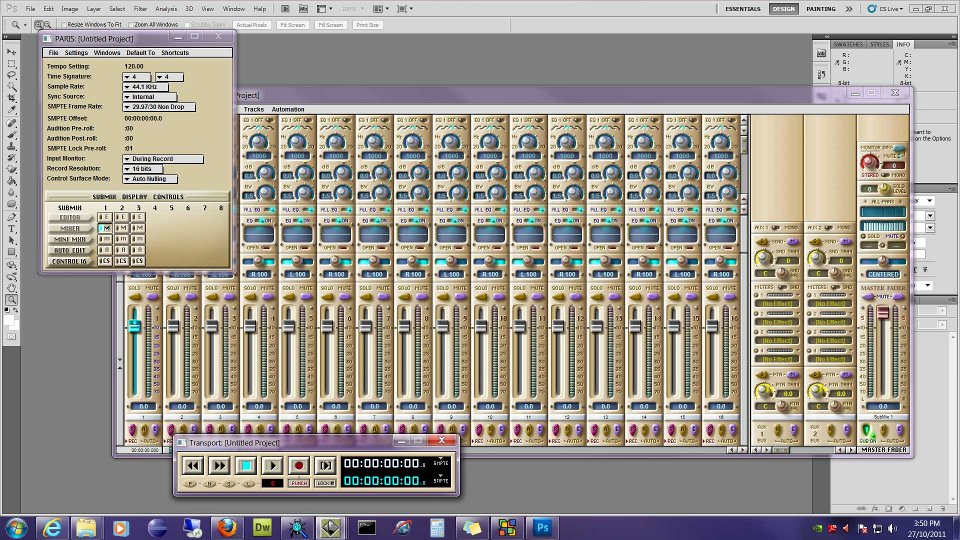 Not to sound repetitive Mike but Not to sound repetitive Mike but
You Da Man!
FWIW....interestingly enough I could not get the last response code from ID to work after cloning a multi-partitioned hd a couple of months ago. I checked everything...and they absolutely have no clue either...running de-paced right now. Thanks for that link Ted. Had a code back from ID within hours; Paris is happily unencumbered now!! Good news.
I still find it fascinating that they support the product like this...
TAs long as they keep responding they'll continue to charge for 3.0.
The fact that we're still waiting for 3.1 which I believe was part of the deal with Creative still stings.
Due to circumstances beyond my control I am being forced to give up my music room so that we can house my son and a friend of his who has moved in with our family.
This of course will require dismantling and putting into storage (or selling) my beloved Paris rig. The only thing that is saving it from going up for sale are the ASIO drivers Mike is working on which allow me to use the rig with Reaper as it's front end which will provide continuity on projects at the studio (assuming the rig moves into our second studio)
To say this is the end of an era is truly appropriate...I have mixed several projects in there over the years and was hoping to use it as a second mix room for our humble little studio when projects backed up...alas that is not meant to be.
Times they are a changingIndeed -
Good for you for helping out those who need it.
Best
Ted
I'm going to hand off the source code for a precision Mastering limiter with dither to Mike Audet. It was originally demoed @ NAMM in 1999, but never released.
I never released it because there were problems with multi card systems that I could never figure out. I worked on it for months, gave up and forgot about it.
I don't know what if anything Mike will do with it, but it's been waiting to be released for 12 years now and I thought it was time to set it free.
Also note that there is an increasing pool of old time paris buddies on FB. I'm keeping up regularly with several great folks.
My personal facebook name is 'Charles Duffy' and my facebook 'fake band' page is 'Chuck Duffy'.
ChuckOK - the handoff is complete - just contacted Mike and sent him the zip.I can provide a zip of the entire paris site as it existed the day it was shut down in feb of 2004 if anyone would like to host it.
ChuckJust another reminder that there are many of us old paris users in touch on a regular basis. Dubya, artguy, sarahtonin, paul artola, erling, etc......
Thanks Chuck!!
(aside - glad to see you and Dubya are talking...)
just kiddingChuck I've been wanting to touch bases with W Mark with a question. Could you connect us? On FB I am Jim Drago Ministries... Thanks| Ted Gerber wrote on Sat, 26 November 2011 11:26 | Thanks Chuck!!
(aside - glad to see you and Dubya are talking...)
just kidding
|
Oh man, if anyone get's the joke it's me. It's a testament to the fact that people can change, and I'm not just talking about Dubya
| Jim Drago[2 | wrote on Sat, 26 November 2011 11:42]Chuck I've been wanting to touch bases with W Mark with a question. Could you connect us? On FB I am Jim Drago Ministries... Thanks
|
Hi Jim - W. Mark Wilson on facebook. Hope that helps Hey Chuck, tried searching W. Mark Wilson with no results. Any more hints. Thanks| Jim Drago[2 | wrote on Sat, 26 November 2011 12:13]Hey Chuck, tried searching W. Mark Wilson with no results. Any more hints. Thanks
|
I guess it must be his privacy settings. In that case the best I can do is forward him your facbook - Jim Drago Ministries. Hope that helps.
ChuckThanks Chuck.... Be blessedMaybe we should set up a Paris FB page?
thoughts?Facebook ain't for me. FWIW.
It gives me the same vaguely creepy/incredulous feeling I got back in the dot.com bubble days...Hello all,
sorry to post possibly simple questions, but I'm a bit confused,
Can Paris 2.1 record in 24 bit wav files?
Currently I can only record and export 16 bit wav files or 24 bit PAF files,
do I need a better driver? (ie. Mike's driver)
or do I need Paris 3.0?
I guess by the sound of it I should wait for Mike's new Driver that does 64 bit?
Thanks for your help,
TomPARIS itself only does 24bit in PAF and will export WAV at 16. You can though open up a PAF file in wavelab and convert to 24 bit wav if you really need it or if you export via OMF it will create a 24bit wav files.anyone still doing this or have any issues when trying? I have some projects I would like to start mixing while I am away on my laptop and have tried importing the whole project into Reaper via OMF export and AATranslator (V5 now). It seems to complete the export in PARIS...does the translation in AAT but when I open up the project in reaper the files open up on the correct tracks and most of them lined up but about 1/4 or them are randomly moved forward or backward or the item showing different portions of the original take and not the edits I made in PARIS. I have tried both wav and paf files in Reaper 3 and 4 but get the same thingHere is what I am talking about with the original PARIS project tracks 1-16 and the resulting Reaper project of those same tracks   Seriously cool, man... Good luck with it -- chas Seriously cool, man... Good luck with it -- chas
(maybe we can take up a collection around here and hire a babysitter to free up a little more time...)I have a keyboard with an ADAT out (its set to output 24bit 48khz, same setting in Paris but Paris is Master),
when I record in Paris via the ADAT card the level of the signal is low... I get way more signal if I record analog,
is this normal?
Cheers,
MFOHmmm - I can export 24 bit wavs (Audio>Functions>Export stereo file)
But if there's any confusion, certainly 24 bit PAFs converted in Reaper, Wavelab etc will be safe.
Also - the "64 bit driver" Mike is working on refers to computing horsepower, not audio resolution. 32 and 64 bit operating systems mean more computational crunching. Audio is still at 24 bit depth resolution (or 16 bit depending on your settings).
Ted
yep....and that way as well... I was just thinking about a disk bounce at the time that I think does 16bit if you select to save as wave there Forgot about that function in the audio window!I always like to hear what people are working on so here are a couple of working files into the first true metal album I have worked on. Just got all the instruments finally finished last weekend so here are a couple of those.great thanks a lot for your help on this,
much appreciated,
cheers
tomHello,
Any Paris users using Mac OS 9 plugins (vst's etc etc? Would you know where I can find some interesting plugins for OS 9?
Thanks,
MFOHello all,
I keep getting the same message when I try and play projects with a full mixer,
"An error occured during playback. Ran out of memory for disk transfers. Try increasing disk cache size."
I'm running paris on a decent computer on windows,
I have optimized my computer for maximum cache size, in 'regedit'
My friend said the problem could be because my projects are being save to the same hardrive that paris is running on, and if I had a firewire external hardrive that I could save and write audio files to that would fix the problem,
any thoughts?
Thanks a bunchI make Paris changes in the Paris.cfg file.If you're not using Mike's drivers and you use a multi-core machine then you need to disable HT hyperthreading in the bios.NiceGreat job Mike. Sorry I haven't responded sooner, whole family got slammed with this damned cold and it's been a job to keep up. I'll definitely take that on, and I can host or archive anything else you think is of interest. Thanks!ok - I'll get a zip together and send you a link later today. I know the drill when the whole fam gets sick. It's tough!
ChuckAh, was just looking at this again and remembered that I did get some odd results like this when I exported a song that referenced a couple of damaged audio files. Re-rendering that clip as indicated here (scroll down to the section labeled B) Make sure your audio isn't corrupted) fixed things.Excellent. I'm on DropBox by the way if that's easier for you.I will give that a try then when I get a chance this next week. I figured if the audio files were corrupted they wouldn't play anywhere and would be in every song I tried.I decided to have a crack at loading the Red Anodized Skin into my system. Downloaded the XN Resource Editor, followed the instructions, & imported the bitmaps successfully. However that's when I hit a snag; XN Resource Editor wouldn't allow me to cut or paste the bitmaps (the cut/paste functions were greyed out). Is there a problem with the XN Res Edit install, or have I missed a step somewhere along the line?Hi Paisley, I have never had any issues with the program. They used to offer a free 30 day unlimited trial, maybe they have changed their policy. If i can i will give it a try within the next couple of days...Thanks mate. Actually when I went to the link for XN from the Skins instruction page, it did offer a couple of options for downloading. I just downloaded the 'new install' version; maybe there's another component from the page I need to install as well?
Probably something simple (user included.. ).LOL been there. Hope you enjoy the skins. The bronze skin is very easy on the eyes as is the camo. Be blessed: JimSell the Mac and get a PC? Holy crap, maybe I'll have to now! @ Ted.... too funny man. Yeah, I came across Chuck and Sara about the same time. Sara will tell you I've got a whole different take on life these days. A protracted divorce, career change, birth of a son 8 years ago and remarriage recently.... all factors. I still track and mix in PARIS. Even doped up my man Chuck with some remote guitar parts I do off my old website www.hotguitartracks.com Still mastering from time to time.... just did a nice smooth jazz disc master. Aside from that, I still play live locally--giving and gettin a lot of total satisfaction doing that.
Jim Drago.... email is the best way to get me.... mark@avidrecording.com
I suspect you're wondering about that controller we spoke about a few years ago. I still have one and love it. Pictured here the day I brought it home. http://avidrecording.com/x1.htm Maker went out of business but I think he still has a few left.Very unwelcomed news but thanks for sharing. It's amazing to me how this increasingly small community seeded relationships that have managed to weather time, distance, absence and the like for what 10, 12 years?
Mark (Dubya)Hi,
I can host this site if it doesn't have any copyright issues...
Regards,
DimitriosWoo Hoo!On a FB related topic, I thought I'd pop this page up for whoever's interested.
https://www.facebook.com/pages/Dash-McIvor-The-Surfmeisters/ 230974483625382
It's not totally up & running yet, but if you go to the 'Musicstore' link on the LH side of the page, the song that you can preview was recorded entirely in Paris - as will be the rest of the Album, thanks to Mike's drivers & the help & support of this site.
Cheers everyone!! Yeah!!
Really good. I like it a lot!!
Good playing and nice vibe.
Ted| Ted Gerber wrote on Thu, 15 December 2011 17:14 | Yeah!!
Really good. I like it a lot!!
Good playing and nice vibe.
Ted
|
Thanks for the kind words Ted!!
That song was recorded over a year ago, & was actually the last song I recorded before the old Mac I was running Paris on really started to spit the dummy! As a result, the whole album project was eventually shunted onto the back burner, where it stayed until the recent rebirth of Paris on PC.
Few teething issues here & there, but for all intensive purposes the Album project is under way once again!
Yay!!Thought I would touch bases with you and refer you to this thread if you are still having issues. Don't give up if you are, this will help.
http://kerrygalloway.com/ParisForums/index.php?t=msg&got o=104820&#msg_104820
That looks interesting; thanks for that Jim. I'll be back from holidays on Monday, so I'll give it a shot then.
Cheers.You're welcome. The editor in the above link is much easier and allows the MIXER bmp to be changed...Way to go Mike!
Keep up the awesome work!
I still Paris on OS 9. I use Waves - Gold Bundle, v.3.2. Also have a UAD-1 card or two but I seldom use their plugs anymore. The latency is a hassle and there are some weird bugs. Just not worth the aggravation although they do sound nice.
Gantta few more on the opposite end of the spectrum from this week from singer/songwriter Ken Englert....a couple instrumental and a couple songs he wrote for each of his daughters weddings....Really nice. 1 and 4 have extremely nice tonal and presence. And your playing is sweet, calm and passionate.
What did you do to get that short delay to fills out the stereo field so nicely? And what was the acoustic you played? Sounds like a Taylor but could be a Gibson or even a Martin. Is it an internal pickup or did you mic it?
Great work. Everybody should take a listen.
WayneThanks Wayne....wasn't me playing...just capturing
I usually double track guitars whether in a full mix or by themselves and also stereo mics. The guitar was a Yamaha and I really need to ask the guy what model because it is one of the best sounding guitars going in that I can remember. I used an x/y stereo setup about 18 inches in front of the guitar with a MXL V69(with modded tube) towards the sound hole and a AKG 451EB facing the fretboard. Also used just a touch of Peluso 2247 room mic and a touch of direct from his pickup to get a bit of the attack which helped place the image. I think I used an API 512 on one mic and a BAE 1023 on the other just slightly 4:1 compressed with a distressor on one and 1176 on the other.
So....with the stereo mics and the parts doubled and some good steady playing I was able to get what I did. Just got all the vocals done on about half of that metal album too this weekend and was pleased with it so might post more of that soon and the I start after the first of the year with a female artist that we are going to try and go towards a jazz/funk/rb sound.....should be fun! Hi Matt,
Thanks, I appreciate the info. Hope you have a wonderful "Christmas and a joyous new year. Then back to work . . .
WayneHere's wishing you all a very Merry Christmas and all the best in the New Year
Merry Christmas to you, Don, and to everyone out there in PARIS land!Yes -
Best to everyone!!
TedMerry Christmas all.Merry Christmas and Happy New year to all my fellow Paris-Ites!
| dnafe wrote on Sun, 25 December 2011 11:02 | Here's wishing you all a very Merry Christmas and all the best in the New Year
|
Well, I know not many of us still hang around here on a regular basis but I need help! Been running PARIS 3.0 on a 1.25 gHz dual processor (not that DP amounts to much in OS 9) Apple G4. I have a Magma 13 slot expansion chassis and have had 3 EDS-1000 cards and 2 UAD-1 cards in the Magma for... a couple of years I'd guess. 2 MEC's, one w/ 2 ADAT cards, 2 8-in cards, 1 8-out, the other with 2 8-in cards, 1 8-out. Except for the occasional crash (usually when using plugins, usually Autotune) it has been pretty amazingly stable for a long time. About a week ago the G4 began having trouble seeing my external firewire drives - I use Granite Digital hot-swap fire-wire cases. After a day or two of struggling with plugging and unplugging fw cables and trying different ports (had a PCI firewire card) I went to turn the G4 on one day last week and... NADA! After much hair-pulling (don't have much to pull either) and some research I figured out that the power supply had crapped out. Ordered a refurb PS online and spent a day making my old 867 mHz G4 ready to run Paris again. Had much aggravation moving HD's around and switching jumpers and vid cards and adding a PCI USB card because only one USB port was working but FINALLY got it working. Still 3 cards, 2 MEC's. Worked most of last week with few problems. Got the new PS just in time for the old G4 to begin being difficult - not booting - so I spent yesterday rebuilding the 1.25 gHz DP machine. Took all day to sort out master disks/slaves/jumper settings/HD locations in the cable queue but I finally got it working on the bench. Went to intall it in my PARIS system first got no boot. Figured out there must be a conflict w/ either the PCI firewire card or the PCI USB 2 card. Took them out and got bootage. Then PARIS wouldn't boot - error 7/7, error -42/ffffffd5. I was up until 5:30 AM yesterday (OK, today, technically) swapping EDS cards, trying different MEC -> EDS setups. Finally created a new OS boot volume, did a fresh install of PARIS on it and began from the ground up - one card at a time. Got it up to 3 EDS cards w/ both MECs playing back on all 48 channels. YAY! Except I can't get it to record to Submix 2 to save my life. I have a 3rd MEC with a spare set of 2x8-in + 1x8-out cards. Plugged that in. The LEDs on the MEC register input but nothing appears on the mixer. Submix 1 is beautiful. Submixes 2 and 3 play fine but no record to Sub 2. My old setup had card A (closest to the PCI processor card in the Magma) being the master card - submix 1. Card C was submix 2. I can't recall how I figured that out but it was something I found in some PARIS resource about finding out which EDS card is which in the scheme of things.
So where I seem to be is that with MEC 2 connected to card B I have all 3 submixes playing back fine but I can't record to submix 2. Any ideas are appreciated. I can probably work around only recording to sub 1 but it's gonna be a pain and if I need to do more than 16 tracks live I'm screwed!
Thanks! And Happy Holidays!
Gantt It's 12:45 AM EST and I'm not staying up all night again! My email is ganttmann@gmail.com. Please write if you can think of anything new to try!
GanttCheck your scsi cable on the card that is giving you the problem. Sometimes them itty bitty pins sometimes get bent or go into the wrong hole and it can cause issues. I also had a mec power supply crap out and it took a couple of mec cards with it so you might swap the input cards that you are trying to record with to a different mec chassis/eds card and see if it works.
Good luck
KurtSorry I'm a little late but Merry Christmas to all
JeffProbably already did this but hook up one MEE to the first card, one to the third card, then verify word clock termination is setup properly. At that point I believe it is a software issue of assigning submixes to cards. Trying to go off memory as I am still getting my Paris rig back online after a (gulp) four year hiatus.
JeffHmm, off the top of my head, those symptoms do sound familiar. Check this story out and see if there's anything there you can work with - you might try assigning different cards to different submixes, maybe even creating an "extra" submix just to have one to waste.By the way, looks like you got past this one already but the ffffd5 error has been suggested as potentially indicating worn (or most likely dirty/oxidized) contacts on an EDS... Jeff, we're all using a system that's ten years out of production, by those standards you're breathtakingly punctual Nice job on all! The acoustic guitar was clear on the high end while still being warm. The metal stuff has a nice big sound. And it all sounded good on my crappy computer speakers!The latency isn't due to paris...I've just adjusted to Pro tools
Kurt - You were right! Checked the pins on the MEC 2 SCSI cable and, sure enough, 2 were bent, one of them squashed so badly it couldn't be fixed! Fortunately when I built my computer closet I pulled 3 SCSI c ables thru the wall, thinking that I'd have my Interface 442 connected to the 3rd card. The 442 never got used so I now have an extra SCSI cable! Switched them and BINGO! - MEC B records and plays audio!
THANKS! And Happy New Year!
Gantt
| imajon wrote on Tue, 27 December 2011 01:40 | Check your scsi cable on the card that is giving you the problem. Sometimes them itty bitty pins sometimes get bent or go into the wrong hole and it can cause issues...
Good luck
Kurt
|
THANKS!After three long days and late nights - OK, I confess I was NOT working on my PARIS system every hour of each day! But I was up 'til 5:30 AM the first night and 1 or 2 AM the last two!- I have a working 3 card, 2 MEC system again. Whew! Thanks to everyone who read my scream for help!
About 11 years ago i was DAW shopping. I had some experience with Protools at the time - I had been using Sound Designer II for years by that time and had Protools set up using the SD II card. I guess Logic, Cubase and Nuendo were around as well as a few others, but I was a Mac guy and determined to remain so. I had heard about PARIS from my Mac dealer but didn't take it very seriously until I began reading about a guy named Brian Tankersley, a world-class recording engineer in Nashville who had built a studio around his PARIS system. I discovered a newsgroup full of people who were absolutely NUTS about PARIS. Ultimately my decision was based on a) what I read about PARIS' sound and flexibility and b) the passion and level of informativeness (is that really a word?) and helpfulness of the PARIS newsgroup. Our newsgroup is gone and our ranks have shrunk, but the passion and helpfulness are still here on Kerry's PARIS forum. Pretty amazing. I don't know how much longer I'll be able to continue using this Digital Antique Workstation, but for now I still love the sound and I know it inside and out. I was editing and mixing a project with a die-hard Protools guy and at one point during a quick, tricky little edit he said "OK, I see what you mean! PARIS is quick!" I still use PARIS every day. I own Protools LE w/ a Digi 002 and MOTU Digital Performer but I don't much care for either. If I decide to stay in this crazy business for much longer I will probably have to make a choice to find a new system but I have had a good run with PARIS.
Thanks everybody! Thanks Kerry for keeping our Freak Flag Flying! Happy New Year!
GanttDITTO! How many people still use Paris on a day-to-day basis (like me!)? How many make their livings (if you can call this a living!) with Paris (like me!)?
GanttUnfortunately not any more.
I lost my home based mix room to my son and our new shop is using Reaper with Radar V as it's front end.
I do miss it but not the work-arounds.I may not be using PARIS right now but I'm positive it will be brought back into the fold soon...the ease of editing is awesome, the sound is as good our RADAR V rig and quite frankly I love the look and feel of it.
I do miss itDay to day if on a project. Weekly if I'm just keeping active. Monthly when I've got video projects on the burner. I've been a user since 1997.
I don't make a living (per se) with Paris. I'm a retired (20yr Navy vet) and I gig with a lounge band in Vegas for additional income, but I do use Paris to earn income in multi ways.
I have a video/audio studio and I use Paris for recording and editing, fixing other people mixes (sometimes tracks, sometimes stereo mix's) and mastering. I earn a few bucks.
I use Sonar Cakewalk to write sequences which I dump in Paris and use Paris to master stereo tracks which I use when gigging.
I use Paris mastered stereo tracks for Sony VegasPro on the video computer when creating video projects for clients. Earn a few bucks this way too.
Below is my studio website. All the videos and most of the audio is done thru my studio.
Wayne
www.audio-audition.com
Hey Wayne - Do you know a guy named Buzz Evans? Lived many years in Vegas playing guitar and pedal steel. He moved to Austin a few years ago but I think he's back in Las Vegas now. I lived there for about a year somewhere around 1979 - 1980. Details are kinda fuzzy - I hadn't quit drinking and drugging yet!
Nice to meet a fellow Paris-ite!Sure do. Played with him once on a gig where I sub'd in on cause the guitar player was sick. Nice guy. I knew he moved to Austin but I hadn't heard that he was back. He would only vagely remember me if at all.
Every time I think of migrating I keep coming back to the things that make PARIS what it is. I will sync to Reaper when I have the need for VSTi's but just find my way around PARIS comforting like each pair of Gazelle's I have bought for the last 25 years.
Protools 10 does look somewhat inviting though for mixing though I have not tried it but do get inquiries now and again to mix a project done on protools but til now have just had them give me zero'ed out wav files as I like to start from scratch anyway if it is an outside project. My next computer build I might think again about a modern option...or not. After three days of struggling to get my old G4 running w/ PARIS again I should just be grateful to be back to work, right? Except that for some reason I've lost all of my EDS effects' presets - both factory and the ones I've created. Anyone know where those guys live? I have PARIS copied to two other volumes in the same computer so one of them must still have my presets if I only knew where to look!
Thanks!
Gantt Geetings!
Do the skins work for v3.0 only?
They look very cool, and seem like they'd help make things easier to spot..
I am still running v2.1 though,
when I used the XN resource editor, it didn't seem like things were "lined up" with what was expected.
Cheers!
Just updated my Reaper to 4.14 and no I cannot open the paf files. I checked that the "libsndfile wrapper" and "libsdn-1.dll" is in the plugin folder. When importing files paf is not in the scroll menu anymore. In the Reaper 3 this was working. Someone got a idea? http://www.youtube.com/watch?v=IDXIWre9LVA
http://www.youtube.com/watch?v=eHgbGZnkg58
http://www.youtube.com/watch?v=5d9qE1qB9wc
I know these guys recorded this material in paris, what do you think, can you hear the "parisness"?
Have my MEC standin here, its waiting for the new drivers
Ah and happy new year, guys!
Deep, rich and three dimensional.
Hotly debated topic, whether one DAW has a "sound".
The only thing I find with Paris, is there's a lot of low-mid build up that seems inherent. So I usually have to work at getting the vertical height of the image increased. Means subtracting bass and/or boosting treble with a hi-pass. This often means trouble for me...
Ted
That's the analog sound
I usually have trouble with the same thing getting that definition with the lower end in a dense mix. Anything else you do that works for you Ted?Yes 3.0 only. 2.xx skins were different.Your welcome!
Happy New Year! I am wanting to move my Paris rig over to win 7 32 so I will follow progress of your build. Was leaning toward GIGABYTE GA-Z68X-UD3H-B3 LGA 1155 Intel Z68 with i7 2600k processor. Would I be better off with an anthalon build?
KurtI can't answer that. I went with the components I did strictly for financial reasons. I already had a PS and DVD so have just under 200.00 in it. We must remember what PARIS was designed to run on.It can also sound like this.
http://www.myspace.com/sandbandinfo
Sounds great. good job all 'round!
yeah, more Swedish music the ones postet above by me are native Swedes-
And also like this, http://soundcloud.com/micha-w/god-created-the-gameboy-to-kil l-your-ears
I made it with no experiance of anything and almost every channel was in the red indicators in paris because I thought it sounds cool
http://www.youtube.com/watch?v=KYwo7eiiE0E
It's a classic now, and all done in PARIS.Check out ICHABOD TODD " FREAK "on You Tube. Also a Paris track, along with 90% of the ichabod Todd tracks on his you tube channel. Yup, ya gotta scupe some of the mud out!Doug Wellington was working on this a while backHey,
I used these plugins
http://www.digitalfishphones.com/main.php?item=2&subItem =1
Yep. Blockfish was a great little compressor. I also used some of the free MDA plugins, particularly Combo which gave me access to some nice "degraded" or "radio voice" FX.Hi there. In order to keep these forums spam-free I filter all account requests manually; for example, I quickly check to ensure an applicant's IP and email address have never been associated with spam attacks on other forums.
That's the *sole* purpose of the filtering process: I maintain no blocklist or banlist for any other reason except spam, so if you're a real person and you've been refused entry, it's because you've been mistakenly identified as a spammer, full stop.
Spammers are still easy to spot and I don't think I've made any mistakes yet, but I mention this because they're growing more frequent, sophisticated and convincing as time goes by, so the chance that I'll accidentally block a real person is going up. If you're an actual person reading this and you've been refused entry, shoot me a quick email at the address link at the bottom of the page and I'll let you in.
[I might have one or two quick questions about your PARIS rig but I guarantee they'll be nothing a real person can't answer - or explain why they can't. ]This thread contains the most up to date info...
http://kerrygalloway.com/ParisForums/index.php?t=msg&th= 15130&start=0&
Nice to see you here DJWaaaa! My 12 year old Windows 98 Pentium PARIS machine is apparently dead of motherboard failure. I'm in the middle of a paid project w/deadlines, so I have limited time to remedy the situation. Unfortunately, I also have limited funds. Should I try and replace this old motherboard? Build a new Win98 or XP machine on the cheap? I'd love a fast new dedicated machine, but like I said, funds are limited. I have an older XP machine I could re-purpose, but I'd have to steal it back from my roommate who needs it for school. What's a mother to do?
Love,
Sarah
www.sarahtonin.com
sorry to hear....at first glance at the title post I thought maybe some PARIS component gave up the ghost.....naaahhhhHI Sarah -
Normally you would not want to do anything that you will have to "undo" later, but since a new sleek machine is not possible - I would do whatever I needed to do to get through the existing project. If that means begging a machine from someone else, even if you have to give it back later - then you should do it.
The physical aspect is easy enough: unplug the EDS card(s) and plug it into the other box. Then the software auth needs to be done, but that is quick and easy (maybe easier than ever before). There might be an issue with re-authorizing plug ins from 3rd parties if you have some.
I would not throw a new motherboard into an old box. Build a complete new computer, or borrow back the one that your friend has to get you past this deadline, then re-assess.
FWIW
TedI just thought I would add to this problem,
I also saw a c0000005 error message, with location 77c42a16
on load up
I uninstalled all my plugins and this did not fix the problem,
but I found a file in my paris folder that was made the morning that this problem started happening called, Paris_Fx.var
and when I moved this file out of the folder, paris worked fine
thanks for the ideas, it helped in the problem solving,
TomThanks Ted,
That helps. I am a little worried about the plug-ins though, since we have Waves Native Power Pack, which I use a lot, and cost a lot, if I remember correctly.
Thanks again,
SarahTwo questions!
Question #1 - Does Reaper work with the Paris interfaces?
Question #2 - Does anyone have experience with running Paris on any of the brand new super speedy PC's that are available? I have an old Magma 13 slot expansion chassis so I would only need one old-style PCI slot I think. Assuming that my old Magma will work with a new PC. I'm a Mac guy, so all this PC stuff is a mystery to me!
Thanks!
Gantt
I'll leave question 2 for the many others that know better than I, but as for question #1 - yes it does, but it works far, far better without it. Get yourself an RME 9652 PCI card and flow Reaper into PARIS through that - you'll never look back, you'll have options you never dreamed possible.Hey Kerry! I keep meaning to call and life gets in the way! What do you mean by "flow Reaper into Paris"? What are the downsides of running the MEC interfaces?
Thanks!
Gantt
| kerryg wrote on Tue, 24 January 2012 23:29 | I'll leave question 2 for the many others that know better than I, but as for question #1 - yes it does, but it works far, far better without it. Get yourself an RME 9652 PCI card and flow Reaper into PARIS through that - you'll never look back, you'll have options you never dreamed possible.
|
When I select "export stereo file" from the audio window the "type" defaults to .sd2 and I have to change it to .wav every time. Does anyone know how or where to change this to default it to .wav?
Thanks,
Wayne
Kerry - do you mean send from Reaper to Paris on the same computer using multiple "sound cards" (9652 and MEC)?
I can't get that to work on my i7 XP box using an M-Audio Firewire I/O and the MEC.
Heck if I even use Reaper/Wavelab/Studio One at the same time as PARIS is open, then PARIS will not pass audio afterwards.
As it is, I'm splitting the PARIS master buss feed out to my MacBook Pro and into Logic or Studio One just to use spectrum and phase meters in real time.
T
This came up in the last year and at that point no-one knew of any way to do this. Guessing the code is what's needed (as opposed to one of the editable .exe files we have as end users).
Yeah sd2 is really no longer the standard.
THi,
I recently purchased a Big Ben it seems to be working with my 'master' MEC, but not with the slave. I have connected it two different ways as follows:
1) Big Ben set at 44.1 Khz, WC out 1 and 2 plugged into MEC "Master" input and MEC "Slave" input.
2) Big Ben set at 44.1 Khz, WC out 1 into MEC "Master" input, and MEC "Master" output into MEC "Slave" input.
I had the same results with connecting it both ways as follows:
- MEC "Master" will configure to the External Word Clock at 44.1 Khz.
- MEC "Slave" is configured to Internal clock at 48 Khz.
Any suggestions?
Thanks,
PeterThanks Ted. Guess I missed that post. ~ WayneIIRC the readout of MEC slave is not relevant when using an external clock ie- it doesn't matter what it says, it will function as you specify in the project window.
Also - pretty sure it's best to use your 1st setup. Passing clock signal through any other audio devices in a daisy chain setup can jumble it making the use of an external clock of no real value...
Ted
Yes, I absolutely do mean both on the same machine, without a hiccup. Sounds very much like a setup issue, the computer in question is most definitely not as powerful as an i7.
What M-audio FireWire box is it? Their drivers can be nightmares. RME is the way to go.Really starting to rethink my setup and have a question in regards to what Ted has also mentioned. This last project I am working on and about ready to mix is a metal album and I really noticed this low/mid build up more than other times....maybe I am just listening more to newer stuff. I am wondering if it is more the way PARIS sums many tracks once you get a large track count going 40+....or just the converters are showing their age. I am wondering if anyone has found one way or the other better to remedy this....
way #1...track in PARIS and mix in another platform to get a more open sound
way #2...track through new converters and mix in PARIS.
I know some of you have mixed in other platforms and ran stems in to PARIS but did you record in PARIS as well? Did limiting to just a few stems keep the lower end less muddy due to less tracks being summing in PARIS? I am sure it is a combination of both but I am trying to find the most efficient way to work these days. I got a mix project in the other week that was done on protools and used AAtranslator to open the project in Reaper and just doing a rough mix using some UAD plugs with no work around I was feeling I was getting a better mix to start with and not missing that analog low mud. Hi Kerry,
I can't find the password reset page.
It's not in account settings (that I can see)
Sadly, I just did this somehow last week, and can't even find the email that had the reset.
If you could send or post a link, that would be great,
Thanks,
Jeff Batterway #3 EQ low mids out?
"radical" mid eqing is useful for making distorted stuff more sitting in the mix i think. does the guitar really need much low end? often it comes from the bass, so its not needed. ain't i right?
Way # 2 is way more desirable than #1 assuming you're good with all the well known current limitations of Paris.
If on the other hand, you're happy with the Paris AD and find bussing capabilities and automatic plugin delay of Reaper etc really really speeds up your mixing, then maybe that's the better route for you.
All I know is that a number of folks have used other ADs - Radar, Apogee etc (I use Lavry) - and mixed in Paris, finding that to be a good combination.
TYeah Ted....that is what I am thinking as well. The last few projects I have been integrating Reaper more and more especially with VSTi's and using some plugs that don't seem to keep their presets in PARIS, specifically the Slate Trigger plugin which I am really liking. I also got a project in to mix a couple of weeks ago and just imported it straight into Reaper and am finding things to be much more efficient. I have not yet but will eventually send some stems into PARIS for that and see what is going on. I am just afraid I do need to spend the money on new converters and once I do I will be happy without PARIS as I am finding I really need to be more efficient and really would like a more streamlined workflow...although tracking and editing in PARIS is a breeze but I guess most things might be after using them for over 10 years. First off - I'm not a pro mixer.
True - I spend way too much time doing this for the amount of money I get paid for it, but it is not my principle occupation. Therefore my abilities or lack thereof work against me producing top level mixes on any platform.
Having said that, I have tried mixing in Logic, Harrison Mixbus, Studio One, Reaper and CuBase and even if I reach acceptable results quickly, they never seem to have the 3 dimensionality that is quickly apparent to me with Paris.
Maybe if I learned the approach suited to those platforms more, things would change. But I have the suspicion that if I did mix in those programs, I would be craving major external comps, verbs, eqs and summing, which I can't afford.
I have and use an API2500, ADL 1500, Smart C1, Overstayer FET, UBK Clariphonic and TC3000 and Lex PCM 91 with Paris now, and you would think with these external boxes I could get great results using the other programs, but I just have difficulty doing so. Things just seem to collapse more quickly...
T
Yeah....when I go back to PARIS I get the depth I am missing but do seem to loose a little bit of width. So if anyone has any tips on widening the stereo field in PARIS while keeping the depth I am all ears here to. I am thinking maybe new monitors are in order as well to help translate the low mids better when eq'ing. Leaning towards a pair of Focal 6 solo's to replace my tired and aging Tannoy Reveals. Just trying to make the fight easier. Got about $2500 to spend on some upgrades so just looking as always to get the most for what I need right now and that is to clean up the mud in some of my dense mixes and take that veil off of my PARIS ones.Last year I purchased Izotope's Ozone 4. It was $200.00, I think. I did it for a mastering tool. It is a native resource hog with a serious latency so I don't use it within projects.
I mixdown a project to a stereo mix I then pop it in a new project and use the Ozone on track one, engage the stereo function and it grabs track two. It can really widen the mix, has multiband compression, delay, a boat load of presets, a master reverb, parametric eq with 10 or 12 nodes and a master reverb.
I haven't really been able to get super good tight low end because I don't know how to use the modules that well yet. But it does widen well on several of the presets.
Don't try to use it in a standard mix, just the stereo master mix in it's own project. I think I was able to have a 10-30 day trial period too. I can't remember exactly. I downloaded the software from Izotope.
Waynehi ted - i found the thing that makes a native daws image collapse almost immediately is the very thing we instinctively do in paris - recording super hot and pushing the faders.
If you can get over that one single habit i think you will see some serious 'gains' in any native daw u choose - all that great external gear you have should just make it better.
use 24 bit and track conservatively peaking around -12 or so. mix peaking @ -3 or so max.
watch very closely for clipping in individual insert plugs
trick yourself by trying the following before mixing (it's what paris did behind the scenes anyway..) use the builtin trim - or a trim plug first on EVERY single channel and lower it by about 10db. Set it up in a template - then get amnesia and forget you did it
HI Chuck
Thanks for the input
Yeah I'm aware of that process and tried it a few years ago in Logic. I could probably do much better today than I did then.
In fact i don't track that hot in PARIS either - aiming for -10 or so peak and -20 or so average. I also use the Sonalksis Free G on lots of channels.
Thing also is that I don't have 16 channels of good ADDA to run outboard. I did install an SSL Alpha Link here ( I sell them) to run Paris ADAT in/out through and it was better conversion but I couldn't get rid of a ton of clicks and pops no matter what WC config I tried.
If I had better ADDA outside of my PARIS i/o I would do much better I'm sure. In fact, I'm waiting to try the new Focusrite Rednet with Ethernet on my laptop to see how that works.
The Alpha Link is one of the great audio deals out there right now - 24 ADDA with 3 ms latency using a PCIe host card, or 10ms latency in standalone, all for about $3K. The Rednet looks good 'cause I can use it on my MacBook Pro.
TBTW - one of the things I noticed right away with the SSL ADDA was less low mid congestion...Chuck and Ted....thanks for the detailed responses. Looks like I will have to make due a bit longer with what I have. Just found out about 3 days ago I am being furloughed for about 4-6 months from my "other real job" so a couple purchases I have been looking at will have to be put off. I guess I get to work harder on my mixes.
Attached is where I am at with a song off that current metal project that they finally finished tracking.
UPDATED MIX 9:24 CST 2/7/12.....Now I think we are getting somewhere Hi gang,
I was wondering if anyone can give me a general idea of where they find most of the PARIS low mid mud and build up. Do you find it at 125, 160, 200, 250, 300, 400, 500hz? Just a general idea and non genre specific.
Are you using a thin bandpass with .2, .3, .5 BW and how much are you finding you need to, ie, 2, 3, 4 or more db cut to clean it up? General info.
Lastly, are you sweeping this out on individual channels/tracks/instruments and/or across the entire stereo submix and/or stereo global mixdown?
I just re-watched Aaron Allen's and BT's PARIS DVD for the 18th time and Brian says it's loose or sloppy and muddy on the low mids but he didn't mention how he tightens it up or reduces the crowding.
Any suggestions or user data would be helpful. Most of my mixes are are between 16-20 tracks and pretty good but I do notice a build up that seems to crowd a fairly large area bandwidth in the all important richness area.
I'm staying PARIS for as long as I can.
Wayne
Paris user since 1998.
with the exception of that dead snare you've nailed itThanks for the encouragement Don. I think once I started doing some filtering and cutting my biggest help was actually a pair of Altec Lansing earbuds that I bought for listening to stuff while I am gone a few months back. Never really thought about using them until referencing other material through them and realizing how much detail they had which is what I was looking for to clean things up.....funny. I don't have a sub with my Tannoys so I think I like to track mixing for a really full sound but end up fighting that in my mixes in the end. Yeah, I should probably go back and add a bit more of the original snare in or use one with a bit more ring as I can probably add that back in now as I found which wrapper let slate trigger keep its settings too.These helped a lot for what I am currently working on and assume for anything with higher gain electrics it will help you...
http:// www.ultimatemetal.com/forum/andy-sneap/674724-systematic-mix ing-series-1-poking-holes-high-gain-guitars.html
http:// mixingtips.org/forum/~-andy-sneap/golden-tips-andy-sneap-rev eals-some-of-his-techniques/
http:// www.ultimatemetal.com/forum/production-tips/533146-andys-c4- preset-image-anyone-have.html
also...for the 2-4k cuts I found by using a very tight Q and sweeping through that area I could always find a very nasty freq...usually around 3.3 for what I was doing but not always quite the same but in that ballpark and very easy to find.
and for the rock drums...
http:// www.ultimatemetal.com/forum/andy-sneap/675045-systematic-mix ing-series-2-soviet-russia-drums-slam-you.htmlOnce I started using the high pass filter on every track - including bass drum - as a starting point, I found myself getting better, more transparent mixes without aggressive eq-ing. Now I rely much more on mic placement etc for my sounds, not how I mix or use plugins etc.
From the link above;
Start with filtering.
High and low passes are commonly the first stage in the sequence of processing done to guitars. This is because the filters reject the most useless of frequencies. Everything that is entirely unmusical and messy can be rejected significantly with these.
Poking holes was quite informative. Thanks MattNext song on the project...this snare any better? Yes it is. Sounds really good.
Everything (snare/kick, guitars even vox) could use more pronounced attack though.
More chunk.
And surprisingly, when I compare to Ermz' stuff on his site (referenced above) there's room for _more_ lower mids on your mix, or at least less on the upper end of the guitars. Could be a little darker overall IMO.
Really good though.
Good job.
Ted
I agree with Ted, particularly about adding some beef, oomph. etcI second the high pass filtering. It can really clean up the low end.
Also bear in mind that the dominant freqs for bass guitar are around 250Hz. I often scoop those freqs a bit on the kick so that they're not fighting each other.
In general you want each instrument to have its own spot in the frequency spectrum. A good example is the early Police recordings. If you look at them on a spectrum analyzer you will notice that there is not much else going on in the frequency range of Sting's vocal. The same with the other instruments.
Panning is also helpful if two instruments inhabit the same frequency range like acoustic guitar and high hat.Thanks Mike.
I usually EQ out peaks or over resonance on instruments and understand trying to give each instrument a spot. I hadn't thought of where they overlap as much. I can see how this could help.
I never really considered filtering highs for placement back into the mix, I just did it because of peaks stood out to me, but I can see where this could help and now understand why I was doing it.
wayneAn excellent way to check your mixes for frequency clutter is run them in Mono...this allows you to hear if anything is fighting for the same air space.
Yes - especially effective when there are two instruments very similar, like double tracked guitars.
The thing about mono is that much of what we hear is in mono. Like as soon as we walk to the end of the room, or are in a store, or listening to music in one room that's being played in another room. So it's not just about AM Radio play that mono compatibility is important.
Lanois recommends turning up mixes and listening to them from another room to check for overall level balance and frequency cohesion.
Conversely, at the same time, headphones are more in vogue than ever before (iPod earbuds), but whatever works in Mono will work in Stereo.
T
I'm running Paris 3.0 with Mike Audet drivers, on Win XP SP2.
Here's one issue that i can't figure out. It's about Aux send level display. Check the picture below:

So, we have Channel 1 and 2 routed to Aux send 1. Each channels is panned hard L and hard R. So one would expect the aux bus to show send amount on level meter to be equal at both channels. However, for some reason, Aux bus is showing just the left channel in its meter.
Can anyone with similar setup check this? It's a very simple setup. Two channels, one Aux.
Thanks in advance!!Currently the Send is set at Mono. "Slide" the button at the top of the Aux strip to the right, and it will both show and become a Stereo send, at which point the Send level meters will show both left and right sides sending audio.
As it is, with "Mono" selected, the default send is Left.
THI Kerry -
I can't post on the Reaper/Paris thread of last month, but I wanted to follow up on using Reaper into Paris "live".
It seems like a good thing to do, particularly since Paris will not zoom as deeply as all the other DAWs for editing drums (aligning snare & kick with overheads for instance).
1. Are you submixing in Reaper (ie drums) and streaming to Paris for buss duties, while at the same time running other discrete tracks in Paris for mixing - OR are you submixing all groups in Reaper and sending to Paris _only_ the busses for summing?
2. I would probably want to just edit drums in Reaper or Mixbus and send a drum buss to mix with other existing tracks in Paris. In this case I would use DGog or Slate Trigger for drum enhancement. Reaper will handle Delay compensation within itself, but how do you account for that with the other tracks in Paris?
3. Are you sending audio only through ADAT using ADAT sync? How do you find the 20 bit limit on Paris ADAT channels?
4. In a 2 channel buss scenario one could use S/PDIF in to Paris from the 9652 (to keep passing audio at 24 bit), but will ADAT sync still work in this setup?
Thanks for the help
Ted#1 - I have done both ways with no issues including ADC if I remember correctly
#2 - Good question and I don't have the answer handy...it's in my notebook at the studio but see #1
#3 I didn't notice the limitation of 20 bit
#4 More than likely but can't confirmThank you a lot!!!
Solved!!!
Songwriter Demo
Here is good before and after example when a local songwriter decided to record her first song this week. Link to her song before production... http://www.youtube.com/watch?v=ev-BJDT3Y1E&feature=relmf u
Myself-
Drums done with Supperior Drummer
Bass via keyboard patch
keys/strings/organ
Songwriter-
acoustic and vocals
Other player-
Elec Guitars
Thanks Don -
Anyone seen a cheap 9652 anywhere? They don't seem to be hanging around like they used to...
TVGwe're looking for a second one too and it looks like the going price is $400 or so
grrrrokay.....for anyone who listened I have a question for you and for others about dealing with rookies. She loved the song and today I get a call saying she wants to add more pizazz as her husband can't put a pin on it but thinks it sounds like Lawrence Welk. So how do I politely tell her...after doing so before we started...that you can only do so much with a slow country ballad that is serious and deals with regret and she wants a snappy Shania Twain meets Amy Grant. She is really a beginner and I think I gave her more than anyone else ever would but she has eyes wider than her vocal range let alone chords she even knows. And yes...the old saying about polishing a turd comes to mind. Well, leaving completely aside the issues of budget and your time, if they can point you to a song with similar tempo, instrumentation, key chord types and content that sounds more the way they like it, that would be where I would go.
If they can, then it would have been good to sort that out from the get go.
If they can't, then the point is made for them.
TedSpecifically about more pizzazz, some sibilance on the vocals is good; shorten up the attack of the rhythm parts with compression (quick release times) or with SPL Transient Designer, and also shortening reverbs to tail off within quarter notes might help.
This after only a quick listen, which is all I could do at this time...
Ted
"Well, leaving completely aside the issues of budget and your time, if they can point you to a song with similar tempo, instrumentation, key chord types and content that sounds more the way they like it, that would be where I would go.
If they can, then it would have been good to sort that out from the get go.
If they can't, then the point is made for them."
BINGO! and please listen to her original as that really is the extent of her ability and talent. She played 5 songs for me and wanted to do this one first even after suggesting one or two of the others. Gave her a $300 budget per song as I felt songwriter demo is as far as it was worth taking.OK I just had another quick listen on cheap speakers, which is sometimes really helpful.
To reduce the Lawrence effect, I would drop the pads and piano and replace that space with more drums.
The mix is great, but if they're complaining it's too middle-of-the-road, I would beef up the drive of the rhythm. Normally on a tune like this, the lead vox would be loudest with the snare next in line, as loud as you can without obscuring words that are sung on the same beat as the snare hit.
Then the bass would balance with the kick, and the keys/pads etc would rest just at or below the bass...
At least that's what I've seen from some really good engineers, far beyond my experience.
Ted
and here is one other song of hers I found posted to get an idea of where we are coming from....
http://www.youtube.com/watch?v=xqNGc_WOL9w&feature=relmf u
Really want to try and help and encourage her but have a feeling it is time to be a little blunt. Her 12 year old daughter says she plays all her songs the same.Excellent idea Ted.
Listening to both (youtube and your mp3) I'd say you did an outstanding job. Your rhythm section and strings really do the song justice.
It's a long song, yet your kept it from going bla. Hat's off.
Wayne
I have a RME 9652 I'm about to sell for $300 if you're interested.Thanks but I found a couple locally in Toronto area.
Best
TedActually the one I found here is a PCI card, which is OK except that it uses up my last PCI slot.
Is yours PCI or PCIe?
Ted
Will - check your PM's Nice tune. I would second beefing up the drums a bit. The strings could come back a bit. One of the things I do when balancing a mix is to gradually roll back the volume in the control room and listen to the order in which the instruments disappear as the volume goes below a whisper. The last ones to disappear are the loudest. On my computer speakers the last thing to go away is the strings and piano. The crucial point here is that on a ballad like this the last thing left should be the vocal... Not trying to criticize just trying to help. Thanks for comments you guys...still like this site for a bit of personalized opinions. I usually do listen to stuff at different volumes but I like your suggestion Mike, about going all the way down to hear what goes away last...will give it a try but I am sure you will always end up with things in the upper freqs there as they require less dbs to hear interesting idea though. Not sure how much more I would bring her vocal up as it is if it does more than sit in the mix its not something you want to focus on. It was a comping nightmare after about 6 takes and still found auto tune to be my friend on this one. I think her husband just wanted his wife to come out sounding like an upbeat, sparkling, modern country star. I am going to have her sit on this awhile and let her hear some opinions other than her husband as
i got other stuff to catch up on. Just always want to make sure I am not missing something obvious. Thanks guys!I find this DVD.Can you help me folks ??I'm currently interested in purchasing my first PARIS system. I figured I would turn here for assistance.
Thesoniq will sell me a full package of the blue model for 713 shipped. Is this acceptable? Should I hold out for something better?
Thanks again, and happy to be here!depends on what's in the system
going prices for Paris components are
$100 for a MEC
$150 for 8 in / 8 out / ADAT cards
$50 for a C 16
$20 for a 442
shipping will be the killer as this stuff isn't exactly light
hope that helps
I'll see if I still have mine...might be a couple of days as I'm dealing with some family issues that take priority
PM or email me if you haven't heard by ThursdayThis is not unfair from TheSoniq - the thing to remember is that his stuff should be checked over and be "as new".
You can get used parts from others for less for sure, but you run the slight risk of it breaking down anyway.
The main items to suffer with use are the EDS cards, and the C16 control surface...
Having said that, the only thing I've had break (other than the C16) were my MEC and EDS1000 because I bent a pin on the connector and shorted everything out.
TedI want to add an RME 9652 so I can run Reaper alongside Paris with ADAT sync, and I'm out of PCI slots.
I don't want to buy the full 4 slot expansion box from Virtua Via, and am wondering if this one slot adaptor will work fine?
http://www.virtuavia.eu/shop/pci-express-to-pci-adapter-p298 55.html
Any thoughts?
TedI have one here, could encode it into avi or something.
I dont think anyone would mind...?OK !!No problem !Hey Ted, I bought one of these adapters to run a PCI UAD-1 card in my Paris box a few years back, it worked great.
Still have it today in my PT10 rig, running this adapter with a PCI UAD-1 and also have a PCIe UAD-1 card, so I would say, give it a shot.
Cheers
RobThanks Rob!
I appreciate it.
I actually phoned the number listed for Canadian customers of Virtua Via, but they never got back to me...
Ted
At Wavelab works well. But for Reaper generates an error. People, help me understand!I looove this tutorial, the way Brian explains it is really cool and laid back.
Im trying to make an avi, just have to try some apps- and wich one is the best, gimme one week you'll need to give us a better explanation of what you're trying to accomplish as well as how you presently have things connected etc.
I unfortunately am not psychic
Ted, if I remember correctly, I just got mine off of ebay, I dont think mine is a virtua via brand. Also, I seem to recall that it was a bit cheaper as well.
Something like this.
http://www.ebay.ca/itm/PCI-E-Express-1X-PCI-Riser-32Bits-Car d-Adapter-Win7-/400228882970?pt=LH_DefaultDomain_0&hash= item5d2f801a1a
Cheers
Rob Wow -
That looks good. They have a Toronto hotline which I just left a message on.
I already ordered from France (the shipping was as expensive as the card) but at this other price, I'd pick up a few as backups.
Thanks a lot Rob
Ted
I want to use Paris to record sound in Reaper. I placed the driver
in a folder System 32 and Wavelab sees two inputs two outputs of Paris, and when you run the Reaper gives the following error:
"There was an error while opening your audio hardware.Error initializing ASIO driver.Would you like to view your audio device
configuration." On Cubase is the same!Right.
I believe I had the same issue unfortunately my notebook is at the studio but I think it had to do with the order of startup i.e. Paris then Reaper or Reaper then Paris
I'll check tomorrow...maybe Mike or Kerry can chime in here
Also in my scenario I had to flip my main outputs in Paris from 1/2 to 3/4 for me to hear sound in reaper
Hey Everyone,
Hows everything in PARIS land? I'm not really producing much any more, but I miss it.
Mostly just focusing on web and mobile apps lately.
Can I check out some recent stuff done by you guys?
Justin / Just Cron / Phat BassWhoa, wait - Reaper and Paris can't share the drivers, it's either-or. Either you run Paris, or you run Reaper via ASIO. A far, far better approach is to buy a dedicated audio card for Reaper (highly recommend a used RME 9652) and flow audio into Paris from that
Andrew, contact Mike and ask him for a copy of his development drivers.But Reaper can run on the Paris hardware...which is what I was speaking about in my commentsWhoops! Oh well, never mind me then
- KI use external sequencer where everything is in bars/beats so, I've enabled the Bars-Beats ruler because I assumed it would make things easier. But here's the problem. I wanted to go to position 3-1-000 (beginning of bar 3), however when I move along the ruler by holding the shift, movement is being snap to the 2-4-959 instead of 3-1-000

I wonder is this a bug? Because to me it makes no sense, since i've enabled the grid. Now, the first beat of the third bar is 3-1-000. Why is the "Now Line" being snapped to 2-4-959 instead?
Ok so i assumed this was a bug. So i went to manual location input. Here is exactly what I typed in:

Yet here is where the "Now Line" actually went:
Is this a bug as well?
Maybe i'm just doing something wrong. Yep, more or less a bug - a known issue anyway. The "bar grid" has about eighty samples of "slop" - this was somehow related to allowing PARIS to play back files of different bit depths in the same session. Here's some more info from Edmund.Thank you Kerry for the explanation.You're still correct Kerry assuming he's using a separate card for Reaper
I certainly wouldn't recommend running Reaper on Paris Hardware at this point in time - it's not ready for prime time yetSpammers. Spammers. And more spammers. Seven in one batch a couple of days ago.
I'm now at the point of immediate deletion if someone's application looks the least bit shady, so email me and let me know if you've been mistakenly ID'd as a spammer and I'll let you in.Hey, guys.
I was going to try to use Autotune on a few tracks for fun. Is there latency? And if so, what's my best trick for dealing with it, Sampleslide or Faderworks?
And MIke's plugins need some latency-compensating too, right?
Jimmyok, now I created an iso image of the DVD, because the quality is already not so enourmous and with the conversion to avi it gets not nice. the image has 4,5 gb, where could i upload this?try encoding it in an H.264 format or a straight MP4depends which version you are using the newer one is...
Evo 1380 at 44.1 I think and 2660 for the full version.
Faderworks all the way.
Sandbox I wounder do you use Faderworks for your UAD cards?
And bye the way wat a nice studio you got!Okey now I have the whole DVD encoded in h.24353-ish, every chapter separately in a low video quality, the audio however is 128kb/s stereo aac, so not that bad.
The reason for the low video quality is that my DVD (which is probably a rip) already has not so good video quality, the difference between my DVD and the encoded files is not that big, so I think it is forgivable.
The last digit before the .mkv file extension is the chapter number.
http://dl.dropbox.com/u/13165169/Paris_Video.zip
(Pro tipp: Use VLC Player and stack all the videos in a play list, in the right order of course)
Thanks....yeah I usually wait until all tracking is finished though as I find it a lot easier to remember what's on or off because if not and you overdub something with it on your new take will then need to be moved the amount faderworks has as its total because it deals with the whole mix. Works great though once you find the workflow and is the best thing for dealing with the no ADC in PARIS.Happy to here I am not using pluggs when recording if needed i let the outboard gear take care of that. I will have a battle with faderworks an se if the UAD cards latency will be controlled that way.I tried with the demo version of Faderworks once but didn´t get the amount of time to value it with UAD. If this install will work I post a how to from a dummie in the wiki.
Hi all,
I've opted to revert back to Paris on a Mac in order to retrieve a few past projects that I'd like to rework.
The old Mac was kaput, so I've bought a G4 (Quicksilver 2002) & formatted the drive & installed OS-9.2.2 (came with OSX).
Then something I wasn't expecting happened - it wouldn't recognize the Paris software CD!! Whenever I try to run the CD, I get either a "Prepare for Burning" alert, or it just spits the CD back out!
The CD Rom seems to work OK (I installed OS-9 from a disk), so why would this be happening? I'm using my original Paris V3 disk which is for PC or Mac.
Is there some sort of extension I'm supposed to install to have it recognize certain CDs? It was over 10 years ago that I last set Paris up on the old Mac with OS9, so my memory of settings is a bit stretched...(lol).
Can't remember if you need the Joliet Volume Extension (or one of a number of system-installed extensions) - I don't think so, but the OS9 installer is still served via the parisfaqs link in the header if you have any problems. Good luck!Thanks for that Kerry; all sorted!! I forgot about the direct downloads on that page; downloaded V3 for Mac, installed it & it fired straight up!! Listening to some old recordings from about 10 years ago as I write this!
I hate to think where I'd be without this forum; you guys have made life so much easier!!
For sure, for sure.The latency introduced by UAD card(s) will be noted by the UAD Meter software that comes with the card. I believe each system is different depending on computer specs, so the UAD meter app takes care of telling you how much latency there is on your own system.
Very handy.
Then you just enter that value into the right hand column of Faderworks PDC window. If you think you'll use more than one instance of UAD per channel, then just stack up a bunch of instances to select from. I had 3 or 4 of them and 3 or 4 Nebula. Rarely used them all, but they were there if I needed them.
TedMike you rock. And rule. You're a rock 'n' ruler.
http://www.youtube.com/watch?v=fOg7mj1_-skhttp://www.youtube.com/watch?v=A0L-wvU5bHkhttp://www.youtube.com/watch?v=lf5EJ6Q7tLchttp://www.youtube.com/watch?v=pzxDnFYG8U8http://www.youtube.com/watch?v=Vuk-4abiQaYhttp://soundcloud.com/maxproducent/briga-1
http://soundcloud.com/maxproducent/ohrid-2
http://soundcloud.com/maxproducent/es-train-for-wayne-promo
http://soundcloud.com/maxproducent/martina-misterija-promohttp://www.youtube.com/watch?v=yx1fiU2vgN0Do you understand now why I am crying for Win7/64 drivers ? Hi All,
I know it has been a long time - and I can't even write for very long because my little one just woke up from her nap - but I just heard audio from the PARIS hardware under Windows 7 64 for the very first time!!!!
It was by using the ASIO driver under Reaper. PARIS.exe crashes when it tries to initialize the DX/EDS effects - and I'm going to look into that as soon as I can.
I'm still getting an occasional blue screen when the ASIO driver first tries to talk to the PARIS hardware, and I have to sort that out.
But, it played audio today for the very first time, and it proves that the core of the driver design is solid!!!!
I'll write more as soon as I can!!!!!
Mike (with a very big smile on his face!)woo-hoo! You made me smile today! WayneWoot! Very impressive, Mike!Great Work!That is all I need !!!!
I am using it as ADDA over spdif with RME 9652. Dx are disabled ( I don't know what is the other )
Send it to me , send it Would it work without asio ??? ( or am I having problem with translation ) The PARIS app still crashes on start up, so ASIO would be needed.
I don't know how many of you remember the story that a disgruntled Ensoniq employee deleted the DX source code when Creative labs shut down Ensoniq. Well, that code is crashing under Windows 7. I'll have to de-compile it and see what I can do.
I just fixed a bug in the PSCL that was causing the ASIO driver to crash if it was opened and then closed and re-opened.
So, as far as I can tell, the ASIO driver is working really well in 64 bit Windows. I think my next step will be getting the ASIO to pass 24 bits. Then, I'll take a stab at de-compiling the old Ensoniq effects library.
I should clarify how this works under Windows 7 64. The ASIO driver and the PSCL are still 32 bits. It's the scherzo driver that is 64 bits and can thunk to 32 bit processes. So, I've got a 32 bit version of Reaper ruining under Windows 7 64 using the PARIS ASIO driver.
To get a 64 bit app to use the PARIS hardware, we need to convert the ASIO and PSCL to 64 bits, which is something I want to do, but it's a really big job.
There is so much to do..but we're getting there step by step.
Cheers!
MikeYou are da MAN If it passes audio trough Paris and I can connect it via spdif and adat to my RME 9652 , I will buy it in advance and you can send me updates later
I don't need asio , i don't need DX , I don't need paris fx. Just need patch-bay and to receive spdif and adat from RME . Keep up the great work!!!
wow Mike...who would have thought. PARIS....the DAW that keeps on ticking. Who's Holly?
Seriously, what are they puttin' in that Peterborough water?
Good work.
Ted
Hi Faithful Paris friends!
Hey...
Thanks so much for your time!
No matter what song I open the monitor volume is
always set to 20.
Is there something on the cfg page I can change?
Paris still rocks!
Blessings!
Michael
If you have multi c16's one of them might have the knob turned up. It's happened to me this way before. WayneYep, particularly if one of the C16s has a twitchy volume pot.Sweet! I'll try it. Thanks!!Lookin' forward to the day -- credit card in hand... thanks, man. Good work!!!
I will buy.Currently putting together a Paris rig on a Gigabyte P55-UD3 Mobo with Win7 32bit (for now)....currently just using the BetaXP drivers for test drive purposes ...
On first attempt EDS cards got way hot, but I think there was a problem with the Radeon 5770 I was using - so went back to GTX460 graphics (sadly blocking another PCI slot) and system is stable.
However still getting error 7/7 or 1/1
...well update - after deleting and reinstalling all the Paris stuff, I was still getting error 1/1 - but found that I had 3 Scherzo drivers for just 2 EDS cards - so disabled one.
OK - so after pluggin the MEC back in (doh!) I now am getting error 18/12 "Error initialising Paris Engine" ...well it's progress, but still no cigar.
Update - tracked down the error 12/18 to Adat cards with beta XP driver - checked an MEC without cards and Ureka - was able to run Paris for the first time on the new machine - so now to get the new drivers and install v3...
Anybody have any ideas for this.
Whenever I set the second loop point, the first one disappears.
After a few attempts all's well but it's a hassle, lol.
TIA,
Lance
(love paris longtime)
Hi gang,
My PARIS 2003 XP machine is getting weak. I run 2 internal EDS cards but have 2 additional cards which I'd like to use. My questions are simple.
Magma has a 4 PCI chassis (rack mount) which has it's own PS and I can choose PCI or PCI-e card for the host. The PS has both 3.3 and 5v lines so I think the EDS will be happy.
Question: If I run 4 cards in the chassis and hook it to the Paris comp with the host card:
1) is there any latency different to an internal installation?
2) what do I expect in the IRQ? 1 IRQ for the host card only or 1 for the host and 4 IRQ and scherzo's for the EDS?
Comp question: Since Mike's XP 32-bit multi-core drivers do great and I run all cards via the Magma w/ PCI-e host card in the comp, wouldn't any new Win-7 multi-core computer do just fine? If all cards are external it would seem that the mobo is not a critical issue this way, but I could be wrong.
fyi - I did look at Vitual-Via expansion (I think in Europe, and much cheaper) but didn't see info on the 3.3v and 5v issue or it didn't include a PS at all, so I would expect it to be run via the host card and that didn't seem adaquete for the power hunger EDS's. Did I miss something?
Thanks for helping. Any chimes would be greatly appreciated.
Wayne
Paris since'97Do you have a second C16 to try and see if maybe it's a button issue... Can you do it using the transport window?Hey Wayne, here is a little info on my Paris win7/i7 multi core build from 2010. This box worked great with my 4 card Paris sys and still does with my PT10 rig. There was a detailed post here on the forum of my build but I cant seem to find it anymore. Anyhow here is the parts list and 1 pic.
I also had a PCI to PCIe converter in this box that was used for my old UAD1 PCI card, worked great and was cheap off ebay, approx 25$ if I remember correctly.
Good luck.
Cheers
Rob
2 EDS cards in system (1 spare)1 MEC in use (1 spare)
2x 8 in cards 2x Adat cards 1x SMPTE.
(not in use:442, 2x IF2)
1x C16 in use 1x spare
May put together 2nd system with the "spare" stuff - but first got to get current i7 build to work!Hello everyone,
Just wanted to let all know that this issue is not only
related to Windows as Im on Mac Os and I get a bursts of loud
volume and clicks on a specific track only (no plugins, no effects).
When I move the audio to another track it plays fine, its really akward, any ideas?
Cheers,
MFOHi Wayne,
This info can probably help I run 4 EDS on a Magma but Im on a Mac. It makes no difference at all as far as speed response time(I used to run all 4 cards in the Mac tower previously).
Cheers,
MFOThanks guys. Both replies are very helpful. Anyone else want to chime in? WayneHi again all; yep, more turmoil in the street of Paris...(lol)
It's partially my fault this time, by being a bit slack. I got Paris up & running on the Mac, & just ran it in demo until I got the authorization code from ID. I probably took a bit too long to request it from them; when I finally got it, I didn't have a chance to fire the Mac up for a few days. By the time I did, Paris had expired.
Come hell or high water, I cannot get this code to work!! I was assuming that it must have been because Paris had expired, so I uninstalled it & downloaded the software again (the G4 still won't recognize my original Paris-3 disk). Same thing happened; when I tried to run it, it came up with the expiry alert; so it was obviously still recognizing the fresh download as the same copy of Paris.
Will Paris refuse to accept the code if it actually expires, or have a got a dud code? I've emailed ID twice about it now, but have received no response as of yet.
Cheers.Stop Press; mystery solved!!
Just heard back from ID; it looks like they must have checked my files & saw that my first request was for a PC; they sent me the code for the PC version of Paris! The reason I hadn't heard from them was because it had them stumped & they were trying to work on a solution.
Have the Mac code now; will load it in when I get home from work. All is right in the World!..
Success!!
Paris running!
i5 2500k Quad Core Processor
Win 7 Ultimate 32 bit OS
Asus P8Z68 - V Pro Gen 3 MoBo
240 gig SSD Drive (for dual boot 32 bit or 64 bit win 7)
16 gig mem (64 bit only)
2 500 gig sata drives
1 250 gig sata drive
Pace Driver 1.2.0.5555
Studio Control Lib 7/13/2002
Studio Control.dll 4/4/2010
pthru setp 7/30/2002
pthru.drv 7/30/2002
Adat.dll 12/7/2008
Paris XP Effects installer 4/24/2002
Scherzo set up 12/7/2008
Scherzo.sys 3/14/2010 ver 4.1.0.0
CPU affinity control panel
Thanks Mike and Chris for making this possible!!!Just curious what sort of experiences other people have had with syncing Paris to an external clock? I've heard the difference a good clock source can make to cheaper pro-sumer gear, but I'm not sure if the Paris internal clock is in that range or a few notches up the scale.
I've got an opportunity to get a Black Lion Audio 'Micro Clock II' for a good price, but can't unfortunately try it out first (it's 1000km away). Would I notice any significant difference in Paris with a good clock source, or would the quality of Paris's clock render any such upgrade insignificant?Hi, there was an entry in here a few years ago from a Guy who had good success using an apogee big Ben, and then from there to a Lync or Lucid unit which resulted in fa tastic sound. Its probably still in here somewhere. I've tied a couple of cheaper external thru the spdif jacks. I'm sure Paris was better. I'd love to a big Ben a run however because I've heard good things . Hope this helpsThis was already answered a while ago. However my NS10 monitors make me believe that its between 250 and 350. I usually set the Q at 1 octave and pull it down 2-3 DB on most tracks. I always hi pass. Narrowing the Q on the hi pass seems to help tighten the bottom end also. I've been clocking Paris to a Lucid genx6-96 (via wordclock) for years. Not sure if it improves the sound.
But it does allow me to clock two Kurzweil FX boxes to Paris via SPDIF, which doesn't work without an external clock. I love using those FX via digital send/return. Wouldn't want to do it any other way.
I think you have to have a pretty high-quality clock to do this sort of thing, right?Thanks for the replies guys.
I'm pretty sure the internal clock in Paris would be right up there in terms of quality, considering how much effort Ensoniq put into getting Paris sounding nice. Who knows, maybe the clock may even be a sizable element in Paris's unique sound??
To be honest, I would have never considered such a move with a clock unit lesser than something like a Big Ben; however I'm pulling up a number of reviews & comments claiming the BLA Micro Clock II is pretty much on a par with the big boys, albeit in a no-frills package. The only problem with this is all the hype could be exactly that - hype!! As cheap as it is, I'd hate to invest in this thing only to find out that it's less solid than the Paris clock!!
The other thing is too; I'm looking at hanging a Behringer ADA-8000 of the ADAT card to access some more external effects during mixdown. I'm sure the Paris clock would have no trouble syncing it up, but a nice solid clock signal going to both units wouldn't hurt either.To All Paris Win 7/32 bit users
Error Code
ID:eWin:24/BlkD:1290
Message says" The program issued a command but the command length is incorrect"
Any Ideas?
Think it might be Pace problem?
ID:eWin:24/BlkD:1285 has to do with the root folder name length according the the FAQ on the Pace web site so I am guessing it might be similar to that.
New Win 7/32 bit i5 Box migrating from os9
Asus P8Z68 pro gen MOBO
TURN OFF ANTI VIRUS. lost 2 days on that.
Got all software loaded and new Scherzo Multi core, pscl, adat.dll by Mike Audit/Chris Thoman.
Searched forums for as much information as I could get.
Thanks Phillip and all others for your posts on your build.
Im close but got to get past that error.
Big jump from os9 to win 7 but determined to get it up and going.
Thanks John.Hi Dash,
I commented on Big Ben 2 yrs ago. BB made a difference. It tightened and separated the whole mix overall. The lows especially cleaned up, the kick and the bass separated on the low freqs and the Paris highs became more transparent and open. Overall it helped with depth perception also. You have to listen closely to actually hear what happens from internal to external clocking.
I thought Paris sounded good before the BB, which is why I still use it to this day and my system continues to grow, but BB made Paris sound like a mix from a large commercial studio.
I'm not endorsing any specific clock. I remember Aaron Allen and others using a Lucid genx with much success.
FYI - BB has six outputs but I'm only using one for Paris thus far on a straight narrow 1:1 setting.
Good luck on your decision.
Wayne
BTW FYI the error code was either Root file name too long or installing the pace driver 1st before anything else. C drive was named "32 bit system" and renamed it to "32 bit"
I am not sure which did the trick as I did both on the last attempt.
Got my authorization today!
Now have a 2 card 2 mec system/ aardsync wordclock / running win 7 32.
Haven't tried adat cards and Allen Heath Zed r-16, thats next.
Worked on mac... should work on PC
test recording 32 tracks at once ... no hiccups
Adat worked with Zed R-16
Adat send from Zed to Paris... perfect.
Some kind of issue with adat return to zed from paris
Had the same issue on mac/Paris build.
Minor issue though and tracking from the Zed to Paris is the main thing.
I used a Big Ben for a while, and initially was really impressed with the results.
However, at the time I was also auditioning new converters as well, and to fund other gear, let the Big Ben go, thinking the new converters running through the ADAT ins of Paris were making the difference more than the Big Ben was.
Now I'm not so sure, and would be really interested to try a Big Ben again, having gone back and listened to some of those tracks I laid down at the time.
I am running a BURL B2 now into an RME UFX, and was planning on getting the Black Lion UFX mod and their Micro Clock when I can. I am using this into my MacBook Pro for portability and use Studio One Pro2 or Logic with outboard inserts more and more for mixing. The main challenge I have with Paris, aside from the routing/latency issues, is the low-mid mud that is spoken about in another thread here. Having read some of the posts there, I'm inclined to look at it again.
I do know that when I run Stems into Paris, there seems to be so much more headroom.
The difference is quite startling really. Even when I lower all the faders in Native programs and push the gain on the external mixbuss.
But I'm way off topic now...
Ted
Thanks guys; yeah I think the BLA might be a nice little investment if it lives up to the praise it's been getting. If it's even 75% of the way to a Big Ben, it's an absolute bargain!
The old Paris system won't know what hit it; on top of possibly getting this clock, I've tracked down another Bundle-3 system over here with an 8-in card for $400, as well as an 8-out card from a forum member here; so the old girl's having one heck of a facelift!!
In fact the more I think about it, having two MECs & the Behringer ADA-8000 kind of ramps up the priority of a having nice solid clock generator!
Way to go Mike!
Beta Tester here if needed!!
Just got my win 7 32 bit up and going with Paris. (Moved from OS9)
64 bit partition waiting and ready!!
Excellent! How goes the transition so far?Hi Kerry,
The VST portion of the PARIS effects subsystem is crashing. It doesn't appear to have anything to do with the driver.
I've turned my attention to the ASIO driver. I got partial 24 bit working about a week ago, and when I looked into why I was getting some clicks, I decided to re-write about half of the ASIO driver. That re-write is about 95% done.
I'm going to write a proper control panel that allows for selecting MEC modules and then release the 64 scherzo and 24 bit ASIO. Once that is done, I'm going to work on patching or decompiling and rewriting the effects code (for which I don't have the source)
Cheers!
MikeHi all,
I just wanted to post to clarify where I'm at in terms of my commitment to PARIS development. It's got to have been a bit trying, waiting for so long for this driver to come out. I started working on this when my time became constrained by two career changes and the birth of my daughter. And, it was about 100 time harder a project than I thought it would be. But, I'm as committed to PARIS development as ever. I still hold out hope that eventually, ID will allow me to work on the PARIS app, and if not, I'm going to re-write it from scratch. I plan to be working on this stuff for the next 20 years. As long as I'm alive, this work will continue. And, I swear, more software will come out!
Happy father's day!
Mike
Hi Mike
Happy Father's Day to you too.
Thank you for your development efforts thus far and any future coding you do. Many if not all of us truly appreciate your work.
Waynewow motivational speech
cool man I like that!Still with you Mike. Though I don't post much Thanks for the work.
Hope the 64 bit is working. Good Job, thx for that !
Hey everybody, I'm sorry if this has been discussed before. I tried a search on it and didn't really find anything, though that may be due to my lack of search skills...I've been running PARIS 2.2 on a Win98se machine for years and I'm doing a little remodeling inside the computer. I know there are WinXP drivers but I've only heard about them working on v3. Does anybody know if they will work on v2.2? I'd love to get more RAM going.
Thanks! I can't swear to it but I believe the XP drivers were tested on v2.0, 2.2 and 3.0.
To my knowledge Win98 and WinXP are both 32 bit systems and will not see or use more then 3gig of ram.
XP can be a solid rig but if you plan to use your existing components, ie, motherboard, hard drives, etc, be careful. Some older comps will not work with newer components or software. For
instance, I can not load Win7 32bit on a 32bit XP machine...to my knowledge.
FYI - I just picked up 2 full XP comps (computer, keyboards, mice and flat panel monitors) from a local pawn shop. Both are Pentium 4 XP machines @3.0 speed and each with 1+gig ram, 200+gig SATA hard drives at 7200rpm, DVD drive and Radeon X300 dual output video cards. I paid $140 for both out the door. Yep. The saleman said they don't have much call for XP machines. They were not on the shelves. They were back in the warehouse. I did fresh XP installs and SP2 update and both rigs scream although I did have to replace both DVD burners. I went to OutletPC and purchased 2 memorex DVD burners for $24 bucks each.
Thought you might like the info.
WayneCool, thanks for responding! Yeah, Win98se actually can only use up to 1gig of ram, which is why I want to go to XP. I have another 1gig stick and would love to double my ram. Everything else should work fine as it's older. I have an Athlon XP 3200 so I'm thinking with the doubled ram I'll be doing pretty well. Thanks again!I can't seem to find the Chris Thoman XP Driver. Do you know if there still an active link?
-DavidHere's the driver you want.It's flawless.
http://www.ensoniq.ca/drivers.htmlDoes anybody know if Chris Thoman's single proc XP Driver is still available, and if so where?
Thanks!Yeah, I've heard really great things about these drivers. Sadly, I am a student and totally broke. I'm only running a single proc, and my friend recently gave me his copy of winxp and an xtra 1gig stick of ram, so I thought I'd try the upgrade. I don't really have $50 to spend though, and heard the Chris Thoman driver is good and was free, at least back in the day, so I'm trying to locate that.I suddenly started having problems with PARIS opening. It has worked fine for years, but now, all other programs on my computer opens except Paris. I deleted the paris.cgi file, then copied the paris.cgi backup file and saved it as paris.cgi and it worked. (I found this technique on the 3.0 CD ROM.) I shut down the computer and tried again the next morning and it stopped working again. I repeated the same procedure above and nothing. Anyone have any tips on how to get this problem resolved? I'm using version 3.0 on Windows XP. I have not changed anything outside of the basic system and so I'm using only 1 card and 1 MEC.
RayI've got nothing myself but while we wait for one of the other users to chime in, PARIS now has a Wiki of its own, give the bugs/troubleshooting section a shot while you wait just in case something jumps off the page at you - and welcome to the PARIS forums, glad you found us! Check out Mike Audet's developments, if you haven't been here yet then prepare for a few surprises Thanks! I did check out the trouble shooting section, but I didn't see anything yet. I tried the process that puts a text file in the Paris folder but it didn't work. I'm working on it more tonight.
Thanks for the response. I'm so glad we have a forum for Paris users. Great site!
RayRay, I've got a couple of ideas.
I understand that PARIS worked before. I don't know if an automatic update screwed things up or not. I don't update my PARIS XP rigs past SP2. I have 2 new fresh XP installs and use an XP SP2 install disc which was mailed to me years ago because I was on dial up.
So with a fresh install of XP and SP2 I then install Paris at C:\PARIS_3. With no second hard drive I put the Paris audio folder at C:\PARIS_AUDIO and projects at C:\Paris projects. Everything right on the C:\ directory.
Some people have had better luck installing the Paris program right on the C:\ because Paris may not be so good with long file names. Remember it's older coding.
1st I create a folder at C:\Paris install. I place the 3 install components in here.
2nd I install the XP drivers and reboot. I check the system folder in the device manager to make sure the scherzo is there and when all goes well it has it's own IRQ.
3rd I install the Paris program to the C:\ prompt as above. And reboot.
4th I install the subsystem and reboot again.
Then before I launch PARIS I open the config in Textpad and change the config to 128, 8192, 128 and 256. I noticed that the install Paris config has very low numbers like 10,2048,128, 256 or something like that. I think I even had a problem on my new installs and changed the config in Textpad and it's worked superbly since. So, this might be your culprit.
I just did 2 new installs this way last week on a backup system and a garage system (video green screen recording mostly, see website below) and both are rock solid. My main rig in my home studio is pretty solid too. All XP machines. On the 2 new machines HyperTreading is disabled in the bios. My studio rig it's enable but I'm also using Mike Audet's drivers here.
I've tweaked every machine to be audio friendly. Turned off all windows enhancements, updating, indexing, hybernation, system restore, firewall, fast user switching, messenger disabled, etc. Disabled all com, lpt, ports not used, etc. Disabled almost all startup items and I don't run anti-virus. The only thing on is the clock in the lower right corner.
I hope some of this helps.
Wayne
Audio-Audition Digital Studios
www.audio-audition.com]I connect one 8 Channel Outputcard to second slot of Paris MEC. In which way should it appears in patchbay window ?
I can`t find it there !? 
I have an 8 channel Inputcard too. Maybe is it automatically in this Input Interface MEC Modules A connected ? Or Maybe if second slot(B) trouves a card it appears at patchbay window as MEC Modules-B ?
Actually Screenshot of my patch where at first Slot installed 8 Channel Input Card and second slot installed 8 Channel Output card:

The Backside of my MEC Module :
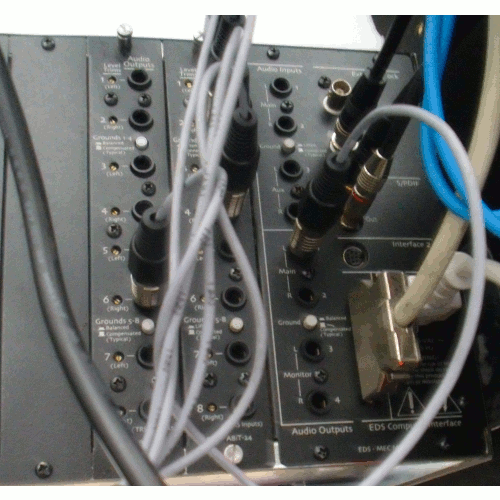
Sorry for bad English hope you can understand and help me.
THX !Hi Dan,
See the MEC-Modules A 16/16. 8 of those are you input and 8 are your outputs.
Drag that module into the patch bay. Double click it. It will open up the module and you'll see both.
WayneHaven't posted much in while but here are a couple songs that a local band did this week in between other projects...
"Rejoice" is an original of theirs.
"How He Loves" is a cover of one previously recorded by David Crowder....mix C is for them...mix A is just one I played around with some strings on that is a bit more "commercial"
Hope everyone is doing well and should have some more stuff soon of another Romania artist I am working on an album with.Hi Thx for fast reponse !
I did see the card now !
Can you tell me in wich way connecting and routing a Hardwarecompressor with both cards. I got a Setup of Microphonepreamp Universal Audio 4-710D. As Compressor I use a 1176 AE from UA.
The 4-710D goes into Toslink/adat by RME Soundcard into Paris 442 Module SPDIF.
I don't know the right routing into Paris Patchbay to use this Hardwarecompressor after Record.
I´d like to record clean sound and after record i like for example to compress or something like that with hardware.
I haven't done any patching out to hardware loops so I'm no help here. THX no Problem, i try this first, looking for it all the day and hope will working well !
http://fanera-minus.narod.ru/paris/faq/faq.htm
I will response later if it works, to be a good part of a good community!
->Edit<-
I dont like to write another message. Go to postet link at the Top of message. You can find at point 22 a working answear of this thread. If there any problems u can send PM to me ;)->/Edit<-
Is a PCI-X slot compatible with EDS 1000 Card ? Does the EDS 1000 fits on PCI-X slot ?
The PCI Slot runs with 64bit 33 MHZ.Nope, won't work. A Virtuavia or Magma chassis would take care of that, but then there's the issue of getting a PARIS- friendly OS onto that Powermac. Probably better to look at a slightly newer Intel processor Mac, then you could dual-boot.The Digital Noise appears at startupsequenz of Computer when booting win XP.
I tried a lot, but i cannot stop Digital Noise. I located this digital Noise by Ensoiq Paris Sytem.
When i turned off Channels of Mixer (yamaha 03d ) where Paris is connected the digital Noise disappears.
I approved following steps :
- Deinstall all Fans(pull of wires of mainboard).
- Deinstall 4 HDD Raid 0,1 System and Install SSD Raid System.
- Change Power Supply.
- Deinstall RME 9632 Audiointerface by Pull of card from mainboard.
- Deinstall UAD 2 SOLO by Pull of card from mainboard.
- latest Bios Update.
- Install 50$ scherzo Driver.
- Run Paris 2.1
My Paris Setup is :
- EDS 1000 Card
- MEC
- 16C
- 8 Input Card
- 8 Output Card
OS Win XP SP 3 latest Updates.
Driver all latest Updates.
On Board Sound is off.
Used On Board Parallel Port, Lan, Grafic, USB, RAID Controller.
When i start the Parissoftware, Digital Noise will disappers. The Digital Noise appears at that moment if you do internal Routing for example: Routing of externel Effects.
Example of my patchbarouting can see it the following Picture. It will appears , when i am routing over Mec Module A 8 Input Card or MEC Master (A/D)too.
It doesn't appears when digital routing by example SPDIF In/Out is used.
Patchbarouting when Digital Noise appears :
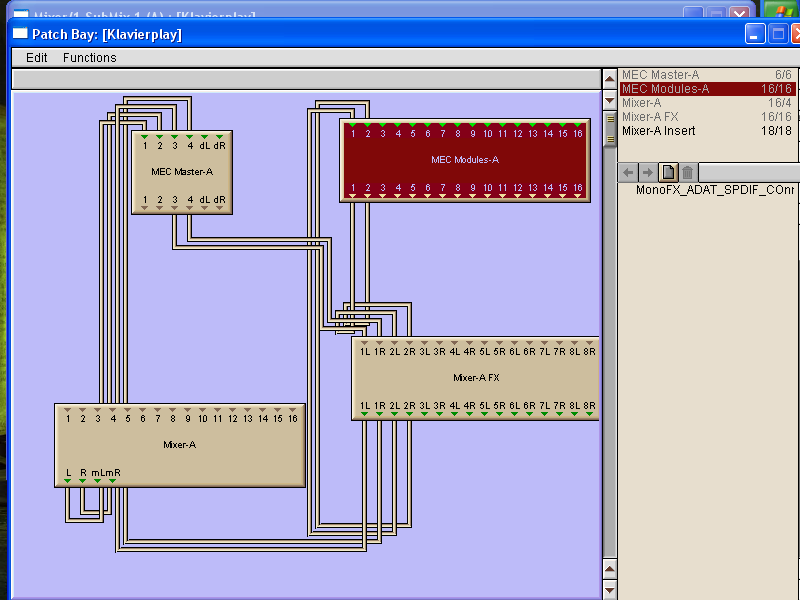 At the next step i have checked the USB Ports by shut down per bios. But the noise stays . At the next step i have checked the USB Ports by shut down per bios. But the noise stays .
Is it possible that the EDS Card is damaged ?
I have disconnected the SCSI Plug( connectionwire between EDS 1000 an MEC) from EDS-Card and the digital Noise stays !  I sometimes see very little noise at the bottom of a channel fader and the master. I can't hear it, but I can see it. For me it usually comes from a reverb in the aux. That's all I've ever seen.Might be a ground thing. If you are going between balanced and unbalanced connection you might want to check you shield ground wire. Any connection could add noise. Next would be to check AC ground. I sometimes see very little noise at the bottom of a channel fader and the master. I can't hear it, but I can see it. For me it usually comes from a reverb in the aux. That's all I've ever seen.Might be a ground thing. If you are going between balanced and unbalanced connection you might want to check you shield ground wire. Any connection could add noise. Next would be to check AC ground.
I tried to use a digital cable from my Panasonic DAT to the Mec but also had noise...so I opted to feed the signal to my Mic-Pre. THX, for answear ! I would buy it if i cannot eleminate noise on both board wich i use now.All connection are balanced at my setup. I discover another secret of the Digital world.
Let me explain :
I have got to motherboard of Asus. One wit triple core and the other with Quad core CPUs.
The newest board ( quadcore) god a software wich calibrate the cores of CPU ( AMD Phenom IIx4). After the core was calibrated, the most of digital Noise disapears. By Second Step i shut down the USB Ports, make a big thing of noise.
At least i have to change the Power supply, because there is a noise of AC, thx for first odler Noise Threat where i read that.
I will tell you if i know if it is works.
Now the new Problem is :
The paris Software 2.1, 2.2, an 3.0 don't run on my computer.
Software Paris 2.1, 2.2 Says : Error initializing Paris Engine code 1/1.
Software Paris 3.0 : I klick it, but do not start.
Hi Gang, Long time. Is it just me, or have the current tools (DAWS) are just catching up to Paris's sonics?
I say this because,these days I primarily mix in Pro Tools (HD/HD native) and Nuendo. Pro Tools today is the best sounding Pro Tools ever. And, I find it very funny that they finally dropped TDM and fix-point processing ,and after 15 years!!, adapting to 32 bit floating point and the like (ala Native).
Let me get to the Points:
With plugins like Steven Slates VCC (Vitual Console) and VTM (Virtual Tape), now I can make Pro Tools, Nuendo, Logic sound like ...dae I say Paris?
How much grief did we take for Paris's "dark sound". We Paris users knew all to well how easy it is to mix on.
I'm glad the industry has such new tools for the current DAWs, like I stated, I can now make Pro Tools 9 (HD) sound like Paris.
What are you thoughts. Me, I stil have 4 (EDS-1000) cards and wnt 1 more.If anyone is selling one, let me know.
Take care..
Digital noise makes me angry now.
Try to use 3 different boards.
Asus M3N78-VM
Asus p5....
Gigabyte Z68x-UD3h-b3 , Win 7 32 bit, CPU i5 2320
At gigabyte only used 1 Core of CPU. USB 3.0 is Disabled.
But this terrible noise is following me at start of Computer.
So at last step to check Paris Hardware, i went under roof and use it in an very old PC. Dust and death spiders comes out of case when i opend it .
I pluged in the EDS Card and when it run i can't hear any noise.
I believe the fast multicore CPUs send out this digital noise.
My point of view is, Paris will die by highspeedmachines and for professional recording is it unusable.
I dont like to give up, but i dont know what i can do against digital noise !
No one there to keep my system alive ?I built a triple core atx system with an asus mobo a couple years ago and everything still works perfect. I used to run paris on a win me system years ago and now it works much faster and just as clean on the newer win xp system.
Hope you can get your system working get your projects out.
Last step and it works. Try a third powersupply. EDS cards makes stable digital noise.
But AC noise disapears in this configuration.
Configuration of Hardware:
- EDS 1000 Card on PCI Slot 2
- Paris 3.0
- scherzodriver for dual core
- gigabyte mobo used type of this thread.
- i5 2320 quad core
- 4 gb kingston value ram
- powersupply : be quiet 450W
- mobo Gigabyte Z68x-UD3h-b3
Bios Configurations :
- Multicore off, runs only as one kernel cpu
- usb 3.0 off
- usb harddrivesupport off
- Ram lowest speed
- onboard sound off
It looks great Paris 3.0. But the DSP FXs don't run. I will look into this whole great forum for help, this threat would be only "digital Noise" Threat !
Hi,
You might want also try to check your recording room for unwanted noise..stuff like cpu fans, mec fan, AC...this may help to keep a good perspective...sometimes system noise is much less than your environment.
Did someone knows the link, Email to authorize Paris 3.0 by challenge / response ?
I cannot find it in this whole forum .email suppo
|
|
|
|
| Re: Scherzo beta (alpha?) [message #101298 is a reply to message #101295] |
Thu, 27 November 2008 16:46  |
Kerry Galloway

Messages: 56
Registered: December 2008
|
Member |
|
|
tly appreciated.
Can't wait to get my hands on the ASIO driver and put Paris hardware and Reaper software through their paces and as I will be using it only for mixing, latency should be pretty well a non issue
I have not tried..But, I really don't think Paris needs VTM or VCC. Paris's mixer and recording alogs already adds that (3D)effect. I have checked this things, but the digital noise won*t disappears.
I have to root in patchbay some different way to have no d-noise.
I cannot use the 8 analog inputs with a root on the mixer.Amazing what you are doing!
My new win 7 box is waiting and ready!
I did some reading through the buffer scheduling part of the PSCL yesterday, and I think I found a mistake in it that once fixed, will allow for much lower latency. The code assumes that there has been no processing delay, and I'm going to change that. Basically, a buffer gets linked after the previous buffer, but there is no check to see if the previous buffer is already done playing. If it has, the hardware never sees the new buffer.
This becomes a problem when the PARIS hardware is still initializing. Reaper sends the Play message before the MEC is done getting started, so there are delays very early on in the process - before any real audio is playing - that mess things up. I'm hoping to try a fix out tomorrow on my daughter's nap.
As for using PARIS on a laptop, magma has a solution, and so does virtua via. I've had mixed results with the virtua via, but others report good results with Intel chipsets. <
|
|
|
|
|
|
| Re: Scherzo beta (alpha?) [message #101308 is a reply to message #101299] |
Fri, 28 November 2008 04:42 |
Mike Audet
Messages: 294
Registered: December 2008
|
Senior Member |
|
|
that on my mind for the rebuild of the PARIS effects subsystem. That's the next stop after I get the ASIO done.
All the best!
Mike
Not to get ahead of the game but did I just hear VSTi's in PARIS for the first time?????
Mike....you are above and beyond!Well, this could take some time, but yes, I'd like to see that. I have to decompile the ensoniq written effects subsystem to assembly language and figure out how it works. Once I've got that done, I'll be in a position to write a new one in c++, and that's where things can get interesting.
Now, this is going to take some time. It's a big, big, ambitious project. Some might call it crazy. But, I really love PARIS, and I want to see it happen. I've already read a huge book on assembly language and tested some decompilers. It's started.
I always think
|
|
|
|
|
|
| Re: Scherzo beta (alpha?) [message #101314 is a reply to message #101312] |
Fri, 28 November 2008 10:06 |
Mike Audet
Messages: 294
Registered: December 2008
|
Senior Member |
|
|
t mix buss saturation thing going on. He explained to me the 64 bit word length of his system and the much added headroom with that. Though not exactly the same as what Paris does but combined application would be amazing.
Can't wait for the ASIO Driver that sees all the I/O of Paris Configuration
That is huge!
ESP2 Processor PDF File for geeks out there!
http://watchmykidspc.com/ESP2.pdfAgree. Mike is keeping us up to date. 1st with multi-core driver and now with his 64 bit work. Also his reverbs are sweet. He has earned compensation in my view.THX !! It runs. But there is only one Problem left.
One CS16 is only runnig.
I tried the 2 RJ45 of the 2 EDS at both Cs16 one runs every time, but the other don't runs. My both systmes are Ensoniq Paris and the other is Emu Paris Pro.
At the Ensoniq Paris CS16 is blinking the Dim LED. The other one PAris Pro CS16 not when i connected every RJ45 Cable.
I believe one of the CS16 is damaged.
Got someone have this Problem too ???
If one of the CS16 damaged ?
Hi, a question and excuse me if it is off topic . Will it ever be possible to use the c16 (at least some basic functions: faders, mute and solo, master volume, play, record, etc) with Reaper after the driver is ready and finished? I think that is a fantastic idea! I'm not sure what ability reaper has to access a MIDI controller, but I'm going to see if I can send the C16 commands to a MIDI driver.
Apparently Doug Wellington (I think) has a box designed and built for this.The nice thing about doing this in the ASIO driver is that the PSCL is already loaded. I just have to do some digging to find out exactly how the PARIS app gets notified of the changes and hook in the same way. I think adding this is a great idea.If working CS16 led blinks when connect to card a or b but the CS16 Pro dosen't when connected to a or b then Id say it IS the Pro CS16 that has the issue.Wow, supercool!! Looks like Paris is ready for a new life ! Reborn ! Have you checked and/or unchecked the C16Pro "blue" or C16 "black" in the Project window settings for the appropriate C16? This makes a big difference.I'll host the drivers - AFAIK it was always Chris' intention they be given away for free. They went offline when Doug changed servers, breaking his download links. We've been awaiting his announced re-linking of files.<
|
|
|
|
| Re: Scherzo beta (alpha?) [message #101315 is a reply to message #101314] |
Fri, 28 November 2008 09:05 |
Rich Lamanna

Messages: 316
Registered: February 2006
|
Senior Member |
|
|
br />
Mike's even recommended them as being slightly more efficient on single processor systems, in a theoretical sense, than his own. He's being modest, of course. Mike's drivers are better for two reasons (neither one a negative reflection on Chris' work). First, Mike supports them, even spending hours on the phone getting people's systems up and running when necessary. Outside us, there's no support for Chris' drivers. And second, Mike's drivers killed a lot of bugs, any one of which could have caused enough problems that you could kiss the time saved by that theoretical efficiency advantage goodbye.
Let's dispel some fantasies here. Mike's not a card-carrying member of "The Power". Mike's a guitarist, teacher and PARIS fan in Canada who taught himself to write code from the ground up to see if he could tackle some problems in our aging PARIS rigs. He's got a wife and a kid, this isn't his job but his hobby, and $50 from every PARIS fan in the world wouldn't pay him McDonalds wages for the hours he's put in. He's a hero here and I look forward to even cooler achievements in the future.
As far as "staff" here, the staff is me, Kerry Galloway, a bassist and PARIS fan in Vancouver Canada. I don't do advertising, I don't sell data, and I don't solicit donations; I built this site (and the Wiki) for free and I host it at my own expense. Because I think PARIS is pretty cool.
It's really time to let go of that antiquated "PARIS user screwed by the power" hooey. It's not like it ever did anyone any favors. If you want to do some good for PARIS, think fresh - put that energy into something more constructive like filling in some of the myriad blanks on the Wiki.Matt, good on ya! I'll host, whatcha got?Hey Matt! Yes I removed them, because I needed the space on dropbox.
The thing is I don´t have an internet connection at home at themoment but I try to find an opportunity to drop you the files as soon as I can. Greetings from germany
I'd be happy to pay for the shipping for a physical copy of the DVD if you're willing to send it. (I'd prefer to have it full quality in any case.)
That is, unless someone knows where I can buy an original copy of the DVD...Sadly, it seems there hasn't been much activity here from Doug Wellington in a year or so; I'm guessing he's got too much going on to continue his PARIS hardware hacking for the moment.
But I was thinking about the motorized faders he had been working on. It seems to me that if we've successfully reverse-engineered the RS-422/faux MIDI protocols the C16 uses, why couldn't we wrap them in software and create a virtual C16 interface for a touchscreen like an iPad or Android tablet? Imagine having all your faders, buttons, etc. available virtually... you could zoom, there would be no need for motorization - the faders would always reflect the current state of the mix. (And imagine all that room you'd save on your mixing desk...!)
There are so many possibilities... Imagine you have 12 tracks of drums, but you only have 2 EDS cards, so you have four non-drum tracks on your second submix. You could
|
|
|
|
Goto Forum:
Current Time: Tue Jun 02 08:37:41 PDT 2026
Total time taken to generate the page: 0.09276 seconds
|
 The PARIS Forums
 Search
 Help
Help Members
 Register
 Login
Login Home
Home



